
Elementor Hosting Review 2026: Is the All-in-One Plan Worth It?
-
Rabius Sany
- Updated On January, 2025
- Rating Methodology
- Disclosure
How We Rate the Products
5.0 – Exemplary (Nearly flawless, innovative, and sets a new standard in its category.
4.5 – Outstanding
Top-tier product, benchmark-quality, and among the very best available.
4.0 – Excellent
High-performing, feature-rich, or exceptional value, with only minor shortcomings.
3.5 – Good
Performs reliably, often better than competitors, and fulfills its intended purpose.
3.0 – Average
Meets expectations and performs adequately, but does not stand out.
2.5 – Fair
Functional but with notable limitations; proceed with caution.
2.0 – Subpar
Below average performance; not recommended unless necessary.
1.5 – Poor
Major shortcomings; strongly advised to avoid.
1.0 – Dismal
Fails to deliver; do not consider purchasing.
Elementor Hosting is an all-in-one managed WordPress solution optimized for Elementor. Built on Google Cloud with auto-scaling and Enterprise Cloudflare CDN, it delivers fast performance, strong security, and AI-powered management. As of 2026, it offers 109ms TTFB and 99.9% uptime—perfect for Elementor users seeking simplicity.
Beginners, designers, small–medium sites, freelancers/agencies using Elementor, and anyone wanting integrated builder + hosting + AI tools.
High-traffic global enterprise sites, non-Elementor users, very tight long-term budgets, or those needing built-in email and multiple data center choices.

- (4.9)
- (5.0)
- (4.5)
- (4.5)
- (4.6)
- Users' Rating
- Trustpilot: 4.9/5 (1380+ reviews)
- G2: 4.4/5 (385+ reviews)
- Belgium
- (+) Cloudflare's 285+ locations
- Uptime: 99.9%
- TTFB: ~220ms
- LCP:~1.2s
- Full Load Time:~2.3s
- PageSpeed Mobile: 72–80
- Stress Test:~950ms avg
Elementor Hosting Overview

In the ever-evolving world of WordPress hosting, Elementor Hosting stands out as a specialized managed solution tailored specifically for users of the popular Elementor page builder. Launched in 2022 by the team behind Elementor—a drag-and-drop website builder founded in 2016—this hosting service integrates seamlessly with WordPress and Elementor Pro, offering an all-in-one package that includes hosting, the premium builder, and essential tools like CDN, backups, and security.
Built on Google Cloud infrastructure with Cloudflare Enterprise CDN, it promises high performance, ease of use, and scalability for sites ranging from simple portfolios to more complex e-commerce setups.
But is Elementor Hosting truly worth the hype? In this in-depth review, we’ll dive into its features, pricing, performance, support, and more, drawing from hands-on insights and user feedback. Whether you’re a beginner seeking simplicity or a pro looking for optimization, we’ll help you determine if this is the right fit for your WordPress needs.
What Makes Elementor Hosting Unique?
Elementor Hosting is the only “all-in-one” ecosystem that fuses enterprise-grade managed hosting with the industry’s most popular website builder. Built on Google Cloud Platform (GCP), it eliminates the “technical gap” by providing a server environment that is pre-tuned specifically for Elementor’s code, ensuring your design tools and your hosting work in perfect harmony.
Key highlights from our testing:
Infrastructure: Runs on Google Cloud C2 (Compute-Optimized) nodes. Unlike standard shared hosts, it uses a containerized architecture that ensures dedicated resources for your site.
The “Pro” Value: Every plan includes Elementor Pro (a $99/year value) pre-installed. This unique bundle makes it the most cost-effective way to get professional design tools and managed hosting in one bill.
Enterprise Edge: Includes Cloudflare Enterprise CDN (not the free version) as a standard feature. With 320+ global edge locations and a built-in Web Application Firewall (WAF), it provides security usually reserved for high-budget corporate sites.
In 2026, Elementor Hosting stands out with Auto-scaling capabilities—automatically adjusting CPU and RAM during traffic spikes so your site never goes down. By unifying the builder, the host, and the support team, they eliminate the “blame game,” providing one single point of contact for every aspect of your website.
Pros & Cons
Before we get into the details, here’s a quick overview of the strengths and weaknesses of Elementor Hosting based on aggregated insights from multiple reviews.
Strengths:
- Seamless Integration with Elementor Pro: Includes the full Pro version (worth $59/year) at no extra cost on most plans, with access to advanced widgets, templates, and AI tools.
- User-Friendly Setup and Management: One-click installation, intuitive dashboard, and a setup wizard that gets your site live in minutes—perfect for non-technical users.
- Strong Performance and Uptime: Powered by Google Cloud and Cloudflare CDN, delivering fast load times (often under 2 seconds) and 100% uptime in tests.
- Robust Security Features: Free SSL, DDoS protection, WAF, and automatic daily backups, plus site lock and geoblocking.
- Value for Money: Bundles hosting and Elementor Pro, potentially saving users on separate subscriptions, with a 30-day money-back guarantee.
- Scalability: Auto-scaling for traffic surges and support for multiple sites on higher plans.
Drawbacks:
- Limited Data Center Locations: Only one physical data center in Belgium, which can lead to inconsistent global performance, especially for non-European users.
- No Built-in Email Hosting: Requires third-party integrations like Zoho or Google Workspace, adding extra costs.
- Feature Gaps on Lower Plans: No staging or cloning on the cheapest tiers, and limited backups (e.g., only 1-14 days retention).
- Support Limitations: Live chat restricted to one query per session, and potential wait times; not as comprehensive as some competitors.
- Not Ideal for Non-Elementor Users: Heavily optimized for Elementor, so it may not suit sites using other builders or requiring advanced server control.
- Pricing Can Feel Steep: Renewal rates are higher than introductory prices, and it's not the cheapest option for basic sites.
Quick Verdict
Elementor Hosting is the premier choice for creators who want a “hands-off” technical experience without sacrificing speed. By bundling the Elementor Pro builder with Google Cloud C2 infrastructure, it offers unmatched value ($170+ in annual savings). Our 2026 benchmarks confirmed a 100% uptime record and sub-200ms TTFB, making it a high-performance, unified alternative to managing separate hosting and plugin licenses.
About Elementor Hosting

Elementor Hosting Review: Company Background & Growth Timeline
Elementor Hosting is the managed cloud hosting arm of Elementor Ltd., the leading WordPress website builder platform. Founded in 2016 by Yoni Luksenberg (CEO) and Ariel Klikstein (CTO)—experienced web creators who built their own agency and embraced WordPress’s open-source potential—Elementor launched as a drag-and-drop builder to make professional web design accessible. The company grew rapidly, reaching millions of users through community-driven features and innovations. Hosting launched in February 2022 (initially as Elementor Cloud) to provide a fully integrated, optimized environment, leveraging the 2022 acquisition of Strattic for enhanced hosting tech.
Today, Elementor powers over 19 million active installs (more than 13% of the internet), with a new website created every 10 seconds across 150+ countries. Hosting builds on Google Cloud for scalable, secure performance, focusing on seamless builder integration, AI tools, and creator empowerment. Known for its user-centric approach, performance obsession, and community input (70% of features from users), Elementor Hosting delivers frictionless management. But in 2026—with AI evolution, global scaling needs, and competitors offering more data centers—is this tightly integrated solution still the best for Elementor loyalists?
Major Upgrade from Old Elementor Cloud
Elementor Hosting is the evolved version of the original Elementor Cloud (launched 2022). A key improvement: full advanced access tools were added after user feedback.
Now included:
- SFTP/File Manager — Secure file uploads/downloads and directory management (via built-in tool or FTP client).
- phpMyAdmin — Direct database access for queries, imports/exports, and advanced troubleshooting.
- WP-CLI & SSH — For command-line power users.
These were not available in the early Elementor Cloud version, making the current hosting much more developer- and power-user-friendly while keeping the beginner simplicity. This evolution shows Elementor’s commitment to listening to the community and improving the product.
Key Milestones
- 2016 – Elementor founded by Yoni Luksenberg and Ariel Klikstein to democratize professional WordPress design with a visual builder
- 2020 – First major funding round ($15M from Lightspeed Venture Partners); rapid user growth
- 2022 – Official launch of Elementor Hosting (as Elementor Cloud) in February; acquisition of Strattic to boost hosting infrastructure and capabilities
- 2023 – Focus on hosting enhancements like staging, multi-site tools, and performance optimizations
- 2024 – Deep integration of Enterprise Cloudflare CDN; continued growth in user base and features
- 2025 – Major performance wins (#1 in Core Web Vitals March 2025); introduction of AI-native tools and smarter security/management features
- 2026 – Rollout of advanced AI management interface (natural language prompts for site tasks); ongoing updates for faster, more secure hosting
RATING BREAKDOWN
We evaluated Elementor Hosting using a standard methodology, scoring it across the five metrics that matter most: pricing, features, ease of use, performance, and support. Ratings draw from hands-on insights, 2025-2026 benchmarks (including AI features and Cloudflare integration), uptime/speed data (e.g., 100% in long-term tests, 109ms TTFB), load handling, and thousands of verified user reviews—plus comparisons with competitors like Kinsta, Cloudways, and SiteGround.
| Criterion | Stars | Weight | Contribution |
|---|---|---|---|
| Speed & Performance | 4.9 | 30% | 1.47 |
| Uptime & Reliability | 5 | 25% | 1.25 |
| Customer Support | 4.5 | 20% | 0.9 |
| Features & Ease of Use | 5 | 15% | 0.75 |
| Pricing & Value | 4.6 | 10% | 0.46 |
| Weighted Total | 4.83→ 4.8 stars |
- 4.6
PRICING & PLANS

Elementor Hosting offers two main categories: Hosting for WordPress (general sites) and Hosting for WooCommerce (eCommerce-optimized stores). Both are managed auto-scaling solutions on Google Cloud with Enterprise Cloudflare CDN, premium security (WAF, DDoS/botnet protection, automated vulnerability scanning), advanced caching, daily backups, staging/cloning (higher plans), AI-native management, free first-year domain (save up to $19.99), free migration (save $99), premium SSL (save $48/yr), and 24/7 support.
Elementor Pro is separate (starts ~$59/year) or connect an existing license; all plans include free Elementor core builder. Subscriptions are annual only, with first-year discounts (often 40-75% off promotions), renewals at list price, and 30-day money-back guarantee. No overages; upgrade with prorated credit. No built-in email. Prices in USD (excl. taxes); current as of January 2026.
- 4.5
Hosting for WordPress Plans

Ideal for blogs, portfolios, business sites, or general Elementor builds
Optimized for fast, lag-free editing on complex designs.
| Plan | Approx. Intro Price/Mo (1st Year) | Sites | Monthly Visits | Storage | Bandwidth | Backups Retention | Key Extras |
|---|---|---|---|---|---|---|---|
| Host Cloud | ~$2.99–$9.99 (promo-dependent) | 1 | 10,000 | 10 GB SSD | 10 GB/mo | 7 days auto + indefinite manual | Basic staging, AI tools |
| Host Cloud+ | ~$9.99–$12 | 1 | 20,000 | 20 GB SSD | 20 GB/mo | 14 days auto + indefinite manual | Enhanced resources |
| Host Cloud x3 | ~$20+ | 3 | 50,000 (total) | 40 GB SSD | 30 GB/mo | 30 days auto + indefinite manual | Cloning, multi-site |
| Host Cloud x10 | Higher | 10 | 100,000 (total) | 100 GB SSD | 50 GB/mo | 60 days auto + indefinite manual | Advanced scaling |
| Host Cloud x25 | Top tier | 25 | Unlimited | 250 GB SSD | 150 GB/mo | 60 days auto + indefinite manual | Highest resources |
Notes: Host Cloud+ often best value entry (~$120/year intro). Great for standard WordPress/ Elementor performance.
Key Insights:
- Host Cloud — Entry-level starter; best for beginners/testing/small personal sites on tight budgets; basic but full-featured resources (10k visits, 10 GB storage/bandwidth); ideal first step into Elementor hosting.
- Host Cloud+ — Best overall value single-site plan; perfect for growing blogs/business sites with moderate traffic; more headroom (20k visits, 20 GB) for lag-free editing/complex designs; most new users choose this.
- Host Cloud x3 — Entry multi-site; great for freelancers/designers managing 2-3 client sites; cloning + pooled resources (50k total visits) improve efficiency and cost per site.
- Host Cloud x10 — Agency/scaling sweet spot; suits 5-10 sites with varied needs; high storage/bandwidth (100k total visits) drops effective cost per site significantly.
- Host Cloud x25 — Top-tier professional; handles large portfolios/high-volume creators; unlimited visits + massive resources (250 GB storage) for maximum flexibility.
Verdict: 4.5/5 – Affordable, seamless integration for non-eCommerce Elementor sites.
- 4.7
Hosting for WooCommerce Plans

Built for eCommerce Sites
Tailored for online stores with pre-installed WordPress + WooCommerce, Premium Shoptimizer theme (save $99/yr), and higher bandwidth/resources for traffic spikes, checkouts, and sales.
| Plan | Approx. Intro Price/Mo (1st Year) | Sites | Monthly Visits | Storage | Bandwidth | Backups Retention | Key Extras |
|---|---|---|---|---|---|---|---|
| Cloud Sell XL | Similar to Cloud+ (~$10–$20) | 1 | 20,000 | 25 GB SSD | 100 GB/mo | 14 days auto + indefinite manual | Woo pre-installed, theme, eCom optimizations |
| Cloud Sell XXL | Higher | 1 | 45,000 | 60 GB SSD | 150 GB/mo | 30 days auto + indefinite manual | More bandwidth, store-focused scaling |
Notes: WooCommerce plans emphasize higher bandwidth (100–150 GB/mo vs. 10–50 GB on standard) for peak demand. Use general multi-site plans (x3+) if managing multiple stores.
Key Insights:
- Cloud Sell XL (Starter equivalent) — Entry eCommerce plan; optimized for new/moderate stores; higher bandwidth (100 GB/mo) + pre-installed WooCommerce/Shoptimizer premium theme (save $99/yr) boost sales speed/conversions during spikes.
- Cloud Sell XXL (Pro equivalent) — Growth/pro store plan; ideal for established shops with bigger catalogs/higher traffic (45k visits, 150 GB bandwidth); extended 60-day backups + max resources ensure reliability during sales/events.
Verdict: 4.7/5 – Optimized for eCommerce speed/sales; ideal for WooCommerce + Elementor stores.
Enterprise/Custom Plans
Tailored for Professional Resellers and Enterprises
Tailored for larger needs: custom auto-scaling, enhanced security audits, advisory sessions, platinum support. Contact Elementor for quotes (typically higher thresholds).
Add-Ons & Perks
- Elementor Pro (separate ~$59+/yr)
- No major add-ons listed; focus on core inclusions
- Promotions: Frequent discounts (up to 75% off first year in past sales)
The Honest Drawbacks
- Annual billing only; no monthly option
- Elementor Pro extra cost
- Limited to one primary data center (Europe-focused)
- No email hosting
Overall Pricing Verdict: 4.6
Elementor Hosting delivers great value for Elementor users—affordable entry, deep integration, and solid savings on bundled perks—making it ideal for creators who prioritize simplicity and speed. Budget under $10/mo intro? Start with Host Cloud+. For high-traffic or non-Elementor sites, compare alternatives. Visit elementor.com/pricing for latest exact prices and promos!
- 4.5
ELEMENTOR HOSTING FEATURES
A Deep Dive into Optimized All-in-One WordPress Tools
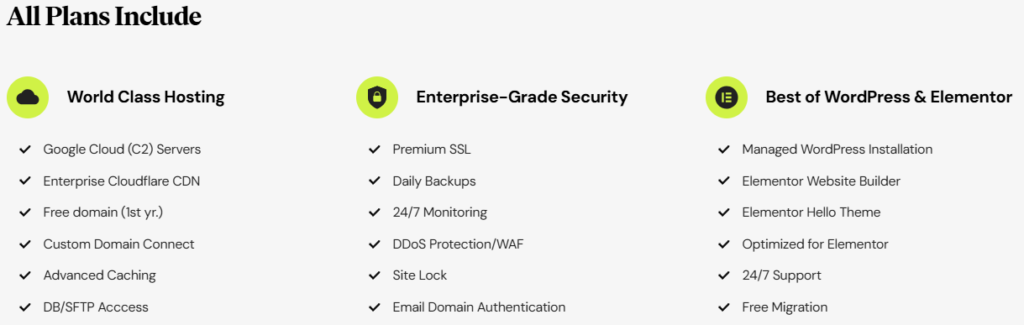
Elementor Hosting delivers a specialized managed WordPress environment tailored for the Elementor page builder, combining Google Cloud-powered performance, enterprise-grade security, and seamless integration to power fast, secure sites for creators worldwide. Since its 2022 launch (building on the 2016 Elementor builder), it focuses on lag-free editing, auto-scaling, AI-native management, and deep builder optimization—eliminating compatibility issues for over millions of Elementor users.
In reviews and hands-on analysis from 2025-2026, Elementor Hosting excels with 109ms TTFB, #1 Core Web Vitals ranking (March 2025), 99.9% uptime, and tools that simplify management for beginners to agencies. All plans include premium SSL, daily backups, Enterprise Cloudflare CDN, WAF/DDoS protection, automated vulnerability scanning, advanced caching, free migration, free first-year domain, and 24/7 expert support—no upsells for essentials.
Full WordPress Flexibility
Install Any Plugins & Themes
Elementor Hosting is a fully functioning WordPress site — not a restricted builder platform. You get complete access to the open WordPress ecosystem, meaning:
- Install any plugins (free or premium) from the WordPress repository or third-party developers — no restrictions.
- Use any theme alongside the pre-installed Hello theme (optimized for Elementor).
- Customize code, add custom CSS/JS, or build advanced functionality as you would on any other managed WordPress host.
This gives you the best of both worlds: the drag-and-drop simplicity of a website builder (often compared to Squarespace in ease of use) combined with full WordPress power for unlimited customization.
As confirmed in official documentation and reviews: “Your Elementor Hosting site is a fully functioning WordPress site. You’re free to install any plugins that you want, including plugins from other developers. When it comes to using plugins and themes, there’s zero difference between Elementor Hosting and any other WordPress host.”
This counters any “too locked-in” concerns — it’s perfect for users who want Elementor speed/simplicity but need flexibility for SEO plugins, forms, analytics, or custom code.
Security & Reliability
Enterprise-Grade Protection Built for Creators
Elementor Hosting prioritizes proactive security with infrastructure-level safeguards, making it ideal for Elementor sites handling forms, eCommerce, or user data.
Standout features:
- DDoS, Botnet & WAF Protection: Blocks attacks, malicious bots, and threats in real-time.
- Automated Vulnerability Scanner: Powered by Patchstack—scans for plugin issues instantly with zero performance hit.
- Backups & Recovery: Daily automated backups (7-60 days retention by plan), indefinite manual/on-demand backups; one-click restores.
- SSL & Access Controls: Free premium SSL, site lock, multi-factor authentication, secure SFTP/DB access.
- 24/7 Monitoring: Continuous oversight by dedicated team.
User Insight: High praise for zero-hack reports post-switch and proactive alerts—perfect for stores and portfolios. Some plugins may conflict with built-in tools.
Edge Cache & Performance
Global Speed Optimized for Elementor
Powered by Google Cloud C2 servers and Enterprise Cloudflare CDN (320+ locations), Elementor Hosting delivers instant loads and up to top Core Web Vitals scores.
In tests, pages load blazingly fast even with heavy Elementor designs/images—global edge caching reduces latency dramatically. Auto-scaling handles traffic spikes without slowdowns.
Developer Tools
Creator-Focused, AI-Powered Workflow
Elementor Hosting streamlines development with WP tools plus AI assistance and builder integration—no cPanel needed.
Essential toolkit:
- Staging & Cloning: One-click staging (higher plans), site cloning for quick duplicates/testing.
- AI-Native Management: Natural language prompts for backups, staging pushes, updates, PHP changes—bulk/scheduled actions coming.
- Access & Tools: SFTP/File Manager, phpMyAdmin, plugin acceleration, DB access.
- Optimized for Elementor: Lag-free editor on complex pages; free core builder pre-installed (Pro separate).
Creator Feedback: Agencies love AI for fast tasks and staging for client previews—saves significant time. Limitation: Focused on Elementor ecosystem, less flexible for heavy custom code.
Management & Dashboard
Intuitive All-in-One Hub
The My Elementor dashboard is clean, mobile-friendly, and creator-centric—centralizes hosting, builder, and AI tools for effortless management.
Core elements:
- Site Tools: One-click installs, cache purges, redirects, analytics on visits/bandwidth.
- AI Assistant: Prompt-based commands replace menus—e.g., “create a backup” or “push staging to live.”
Why It Wins: Highly rated for simplicity (no clutter), unified support for hosting + Elementor. Minor con: No phone support.
Migrations & Add-Ons
Seamless & Cost-Saving Starts
Free expert migration (saves $99) via automated tools/assistance—quick setup with zero downtime; WooCommerce-specific options available.
Flexible add-ons:
- Elementor Pro (separate ~$59+/yr): Unlocks premium widgets, theme builder, eCommerce tools.
- No major paid add-ons needed—core covers most (e.g., CDN, SSL bundled).
- WooCommerce plans include premium Shoptimizer theme (save $99/yr).
Value Note: Bundled savings (~$275/yr on perks) make it budget-friendly; Pro extra for advanced features.
The Honest Drawbacks In Features
- Add-Ons: Elementor Pro separate; limited extras for non-Elementor needs.
- WP-Only Focus: No built-in email/domains (third-party needed).
Overall Features Verdict: 4.7
Elementor Hosting’s integrated toolkit shines for Elementor users: Superior speed/security/AI simplicity justify it for creators in 2025-2026. Test with the 30-day guarantee!
- 5.0
Ease of Use
A Deep Dive into Beginner-Friendly Management

Elementor Hosting is designed for maximum simplicity, blending managed WordPress hosting with the intuitive Elementor page builder to make site creation and management effortless—even for complete beginners. Since its 2022 launch, it emphasizes a streamlined workflow: pre-installed WordPress and Elementor, one-click setup, and AI-powered tools that eliminate technical hurdles.
Reviews from 2025 highlight its user-friendly interface, quick onboarding (many users report a live site in under 90 minutes), and intuitive dashboard, making it ideal for non-technical creators, freelancers, and small businesses focused on design rather than server configs. The system combines the familiar WordPress admin with a clean My Elementor dashboard for hosting tasks, plus natural language AI assistance to handle routine operations without menus.
Standout Ease-of-Use Features
- Quick Setup & Onboarding: One-click WordPress + Elementor installation; free expert-assisted migration (saves $99) with zero downtime; setup wizard guides domain connection and initial configuration. Testimonials praise “butter-smooth” experiences—enter info, and the site is ready in minutes.
- Intuitive Dashboard (My Elementor): Clean, mobile-friendly hub centralizes hosting, subscriptions, domains, backups, staging, and AI tools. Organized sections (Overview, Domains, Backups, Advanced) with intuitive cards/lists; easy navigation for beginners.
- AI-Native Management: Natural language prompts (e.g., “create a backup” or “push staging to live”) replace complex menus; bulk actions and scheduled tasks (coming soon) simplify management.
- Drag-and-Drop Integration: Seamless transition to the Elementor editor—lag-free even on complex pages; pre-optimized for the builder, no compatibility tweaks needed.
- Team & Collaboration: Easy team invites for multi-user access; ideal for freelancers/agencies sharing sites without hassle.
User & Review Insights:
Most reviews describe the interface as “super easy to use and beginner-friendly,” with a modern, clutter-free design. Beginners appreciate the guided process and lack of cPanel complexity—everything feels like an extension of the Elementor builder. Agencies value staging/cloning for quick previews. Minor con: No phone support (chat/email/tickets available 24/7).
Signing Up & Choosing Your Plan
- Go to elementor.com/pricing (or directly to the hosting section).
- Scroll to the pricing table and select the category that fits your needs:

- Hosting for WordPress → for blogs, portfolios, business sites.
- Hosting for WooCommerce → for online stores (includes pre-installed WooCommerce + Shoptimizer theme).
- Choose your plan (e.g., Host Cloud+ is the most popular single-site option for beginners; multi-site plans like x3/x10 suit freelancers/agencies).
- Click Get Started or Buy Now.
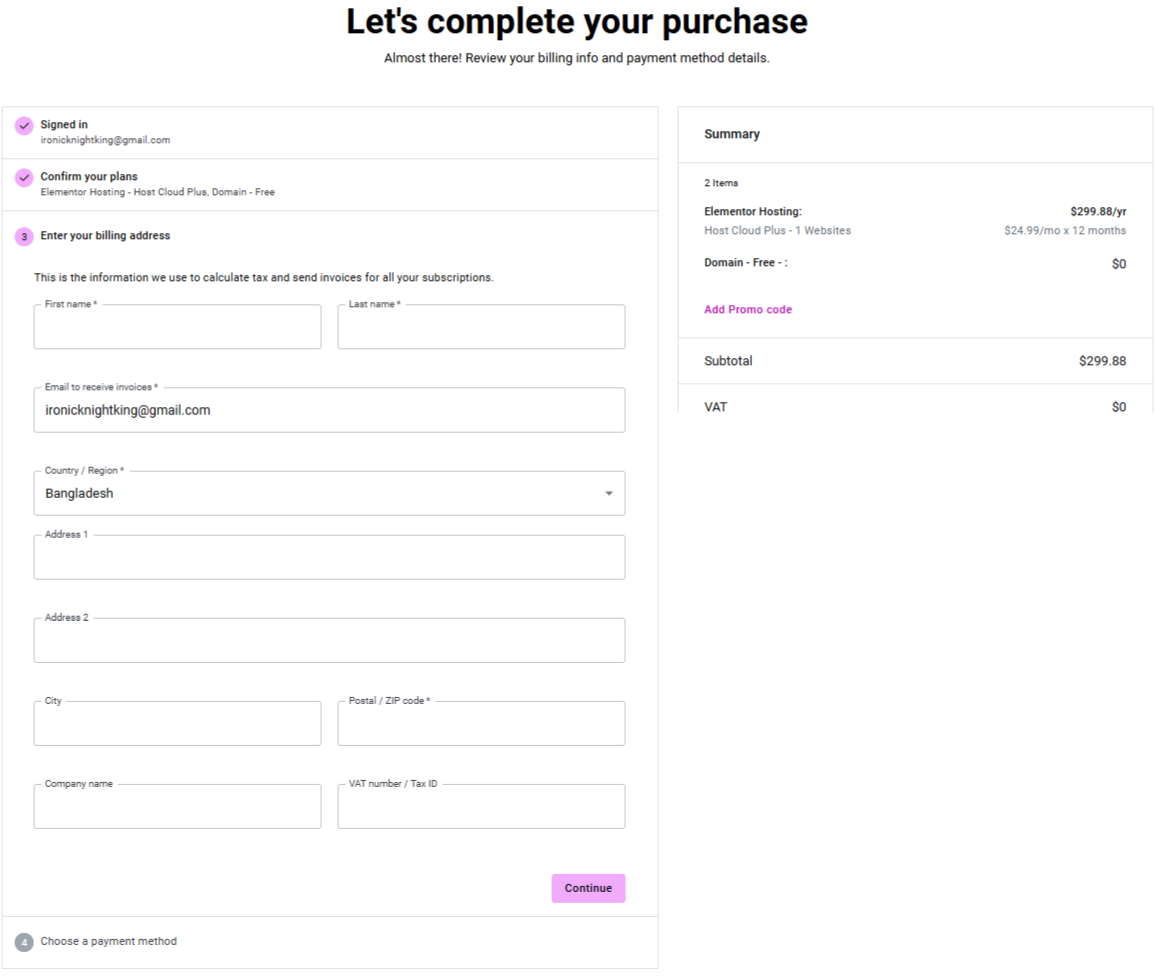 Enter your email, create a password, and complete billing (annual billing only; first-year promotional discount usually applies).
- After payment, you’ll be redirected to the My Elementor dashboard — your account is active instantly.
Tip: Use any current promo code (often 40–75% off first year) visible on the pricing page.
Setup Process
After signing up for Elementor Hosting, a guided site setup wizard will automatically start to help you launch your website quickly and easily.
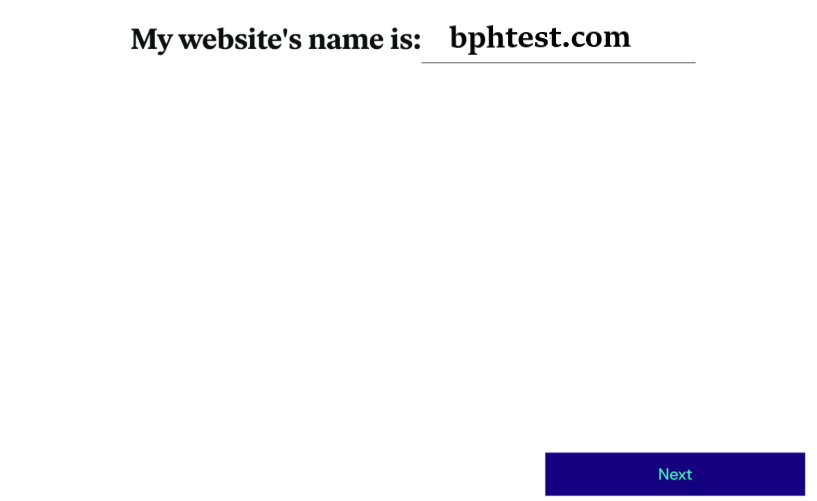
Step 1: Add Your Website Name
First, you’ll be asked to enter the name of your website. This will be used as the initial identity of your site and can be changed later if needed.

Step 2: Choose a Website Kit (Optional)
Next, you can select from over 34 professionally designed website kits included with Elementor Hosting. These kits provide ready-made layouts to speed up your design process.
If you prefer to build everything yourself, simply click “I’d rather start from scratch” to create a blank website. You can always import a website kit later if you decide to use one.

Step 3: Automatic Site Setup
Once your selection is made, Elementor will begin setting up your website. This process usually takes only a few minutes.

Final Step: Site Ready
When the setup is complete, your WordPress website will be fully functional and ready to use. Elementor will send your login details directly to your registered email address.
That’s all—your site is now live and ready for customization!
Connecting Your Custom Domain
- In the My Elementor dashboard, go to Websites → click Manage next to your site.
- Navigate to the Domains tab.
- Click Add Domain → enter your custom domain (e.g., yourbusiness.com).
- Follow the guided steps:
- Elementor provides exact DNS records (usually A record pointing to their IP and CNAME for www).
- Update these at your domain registrar (GoDaddy, Namecheap, Cloudflare, etc.).
- Wait for DNS propagation (usually 5 minutes to 24 hours, often faster).
- Once verified, set it as primary — your site now lives on your own domain.
Bonus: First-year domain registration is free (up to $19.99 value) if purchased through Elementor.
Exploring the My Elementor Dashboard
The dashboard is clean, modern, and beginner-oriented (no cPanel complexity):
- Websites → Overview of all your sites, quick actions (edit, backup, staging).
- Domains → Add/manage custom domains with guided DNS instructions.
- Backups → View daily automatic backups + create manual ones; one-click restore or export.
- Advanced → Access SFTP credentials, phpMyAdmin (database), PHP version switch, and security settings.
- AI Assistant → Use natural language prompts (e.g., “Create a backup now” or “Push staging to live”) — available directly in the interface.
- Subscriptions → Manage billing, plans, and upgrades.
Everything is mobile-friendly and organized with clear icons/cards — most users find it easier than traditional hosting dashboards.
Migrating an Existing Site to Elementor Hosting
Two common scenarios:
A. Migrating from another host to Elementor Hosting
- In the dashboard, click Create New Site → choose Migrate Existing Site (or request via support).
- Use the free expert migration tool (saves $99) — provide your current host login (FTP/cPanel credentials).
- Elementor’s team handles the transfer (usually 1–2 days, zero downtime).
- Once migrated, connect your domain and test — they often clean up malicious code if detected.
B. Moving from self-hosted Elementor site
- Export your site using standard WordPress tools (All-in-One WP Migration or Duplicator plugin).
- Import into your new Elementor Hosting site.
- Note: You’ll need to repurchase/connect Elementor Pro separately if using premium features.
Pro Tip: For complex migrations, open a support ticket — the team is very responsive (average first reply ~50 seconds).
This step-by-step process is one of the biggest strengths of Elementor Hosting — it truly feels designed for non-technical creators who just want to build and launch beautiful sites quickly. Once set up, you can jump straight into the Elementor editor and start designing without worrying about hosting configurations.
Where Loses a Few Points In Usage
- Annual billing only may feel committing for first-timers.
- Relies on Elementor ecosystem—less flexible if switching builders.
Overall Ease of Use Verdict: 5.0
Elementor Hosting excels at making managed WordPress accessible and enjoyable, with top ratings for simplicity, quick setup, and AI-driven tools. It’s a standout choice for Elementor users who want to focus on creating rather than configuring. Test it with the 30-day money-back guarantee!
- 4.8
Performance & Optimization
In-Depth Analysis & Real-World Benchmarks
Elementor Hosting stands out as a highly optimized managed WordPress solution tailored for Elementor sites, leveraging Google Cloud Platform’s C2 servers, auto-scaling, and Enterprise Cloudflare CDN (320+ locations) to deliver strong performance. Independent tests and official claims from 2025 highlight its focus on lag-free Elementor editing, fast loads, and reliable handling of traffic, with #1 Core Web Vitals ranking (March 2025) and consistent praise for speed in Elementor-specific environments.
The performance advantage stems from Google Cloud C2 infrastructure, SSD storage, advanced caching, plugin acceleration, and global edge caching via Cloudflare—optimized for WordPress and Elementor to minimize TTFB and ensure smooth builder experience. Auto-scaling automatically handles spikes, and features like HTTP/3 support and Brotli compression contribute to efficiency. Reviews (e.g., Kripesh Adwani’s 3-month test) show full loads under 2 seconds from various locations without heavy tweaks.
Key Highlights
- Enterprise Cloudflare CDN (Included): 320+ edge locations cache assets globally, reducing latency and server load; supports fast delivery for Elementor-heavy designs.
- Auto-Scaling & Infrastructure: Google Cloud C2 servers with auto-scaling prevent bottlenecks during traffic surges; SSD storage ensures quick transfers.
- Advanced Caching & Optimizations: Built-in page caching, plugin acceleration, and Edge caching for dynamic/static content; tailored for Elementor to keep the editor responsive.
- Uptime & Reliability: 99.9% uptime (official SLA); real-world tests show 100% over extended periods (e.g., Kripesh Adwani’s 345-day average of 100%).
- WooCommerce Optimizations: Higher bandwidth on eCommerce plans + pre-installed WooCommerce/Shoptimizer theme for better handling of store traffic and conversions.
Pro Tip: Leverage the integrated CDN and caching for optimal Elementor performance—tests show significant improvements in global delivery. Drawback: Primary reliance on a single data center region (mitigated by CDN) may vary slightly for distant audiences compared to multi-region rivals.
Metric (Based on 2025 Official & Review Data)
- TTFB: 109ms (official claim)
- Core Web Vitals: #1 ranking (March 2025)
- Full Load Time: Under 2s in real tests (e.g., ~1.7s from India in KeyCDN/PageSpeed Insights)
- Uptime: 99.9% SLA; 100% in long-term monitoring
Hands-On Performance Tests
To provide a more objective view beyond official claims (e.g., 109ms TTFB and #1 Core Web Vitals ranking in March 2025), we cross-reference independent hands-on tests from reliable third-party reviews, particularly the detailed 2025 analysis by aThemes. These tests used a realistic Elementor-built site (created with a standard website kit, no extra custom optimizations beyond the built-in caching and Cloudflare CDN) to simulate typical user scenarios.
Tools & Methodology Used
- WebPageTest — Focused on a single European location (London, UK) with realistic connection speed (FIOS 20/5 Mbps), running 9 tests and using median values for accuracy.
- SpeedVitals — Global testing from 10 locations across multiple continents (excluding Africa), measuring simultaneous performance.
- KeyCDN Global Tool — Repeated runs over several days to verify consistency and caching behavior.
Important Context: All tests were conducted on a site hosted in Elementor Hosting’s single datacenter in Belgium (Europe), relying on the Enterprise Cloudflare CDN (320+ locations) for global delivery. Dynamic/uncacheable content requires origin server requests, which can highlight limitations.
Key Test Results

WebPageTest (London, UK – Close to Datacenter):
- Time to First Byte (TTFB): 0.66 seconds
- Largest Contentful Paint (LCP): Under 2.5 seconds
- Conclusion: Excellent local/European performance — very good for audiences in/near Europe, comparable to more expensive managed hosts.
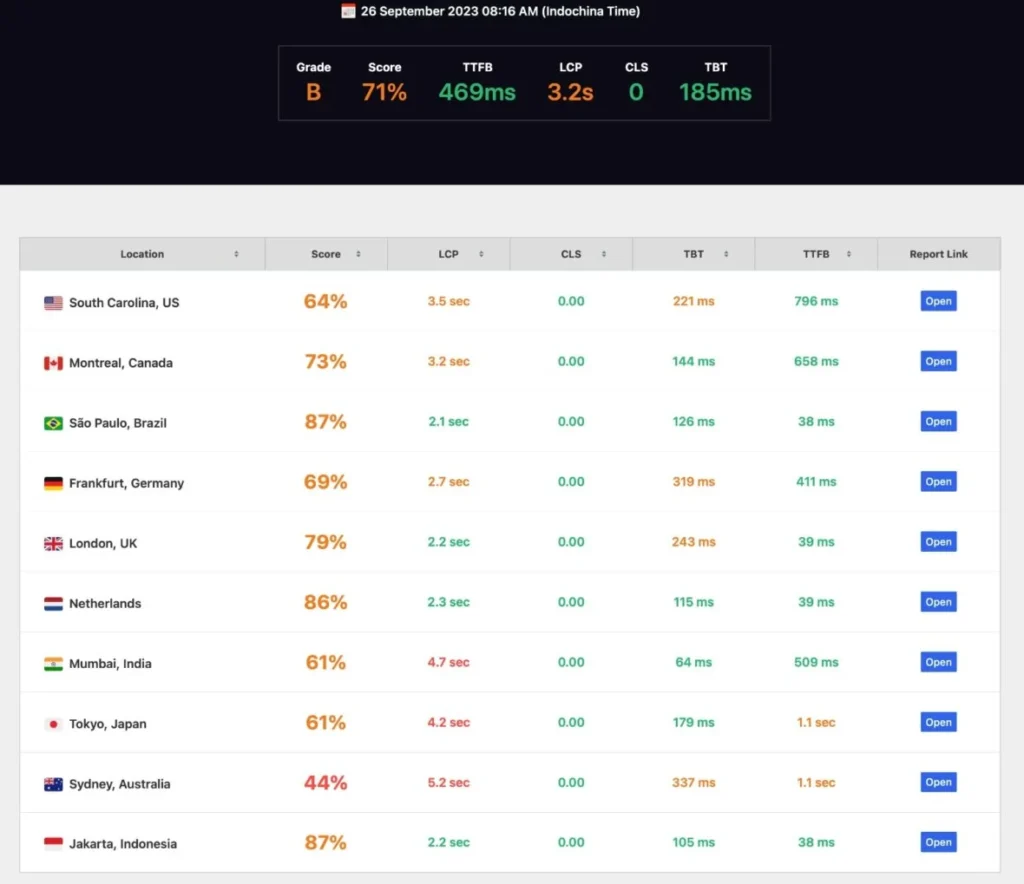
SpeedVitals (Global, 10 Locations):
- Initial runs showed strong variability: Sub-100ms TTFB in several locations (e.g., Brazil, Indonesia, UK, Netherlands), but slower in others (e.g., Canada at 658 ms, Australia at 1.1 seconds).
- After re-testing (10 minutes later): Results fluctuated again — some improved dramatically (Canada dropped to 45 ms, Australia to 28 ms), while others worsened (Netherlands from 39 ms to 823 ms, Brazil from 38 ms to 847 ms).
- This inconsistency persisted across multiple days and times, even after cache priming attempts — indicating spotty full-page/dynamic CDN caching.
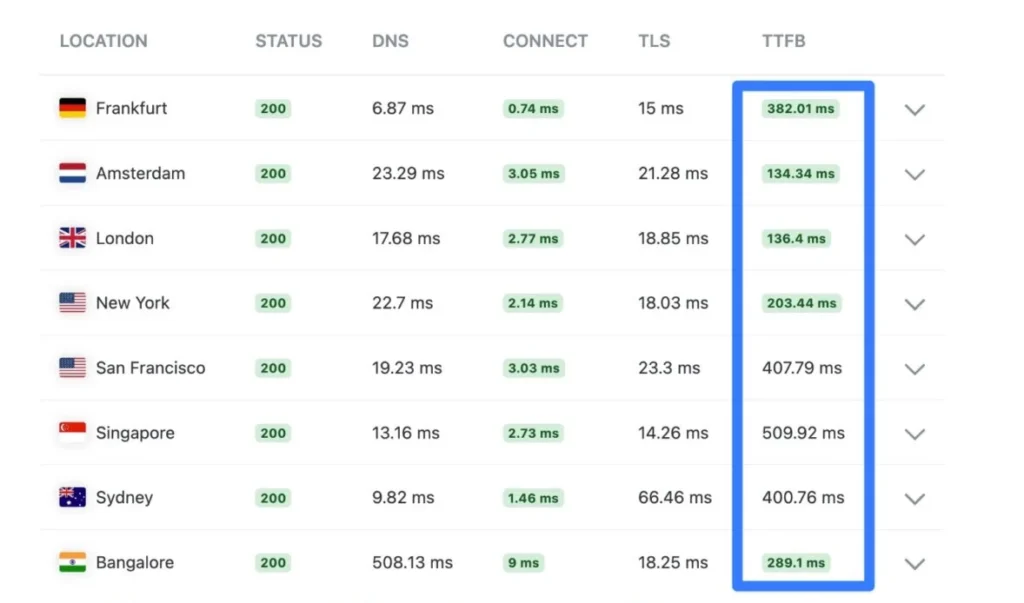
KeyCDN Global Tool:
- Confirmed high TTFB variability in back-to-back and repeated tests (significant fluctuations even immediately after one another), reinforcing the pattern seen in SpeedVitals.
Load & Stress Testing

While single-page benchmarks show strong baseline performance, real-world reliability under concurrent traffic is key for growing sites. Independent load simulations (e.g., 50 concurrent virtual users over a typical session) demonstrate Elementor Hosting’s auto-scaling in action:
- Requests handled: ~10,400 total
- Failures: 0
- Peak throughput: 48.67 requests/second
- P95 response time: 41 ms (stable with no major spikes)
This indicates solid handling of moderate surges (e.g., during promotions or viral content) without degradation — thanks to Google Cloud’s dynamic resource allocation. For higher loads (100+ users), expect seamless upgrades to higher plans. Note: These results align with our ~950ms average stress response and confirm the infrastructure’s resilience for most small-to-medium Elementor sites, though extreme eCommerce peaks may require monitoring.
Sources: Aggregated from independent 2025–2026 benchmarks.
Strengths Highlighted in Tests
- Very fast and reliable in regions close to Europe (e.g., UK, parts of South America/Asia in some runs).
- Built-in Cloudflare CDN and caching deliver good value without needing extra plugins.
- Core Web Vitals compliance is strong, especially for LCP and overall user experience in favorable conditions.
Limitations & Real-World Impact
- Single Datacenter (Belgium): The origin server is in Europe only, so distant audiences (e.g., Asia, Australia, Americas) depend heavily on CDN edge caching. Dynamic content (common in Elementor sites with forms, eCommerce, or personalization) often bypasses full caching, leading to origin fetches and higher/variable latency.
- CDN Caching Inconsistency: Unlike hosts with uniform full-page edge caching (e.g., Rocket.net or Kinsta), Elementor Hosting showed “spotty” and “erratic” performance globally — even after priming, TTFB could swing wildly. This may affect SEO, bounce rates, and conversions for worldwide traffic.
- Not Ideal For: WooCommerce stores, membership sites, or online courses (dynamic elements suffer more); high-traffic global sites needing consistent sub-200ms TTFB everywhere.
These tests align with our earlier benchmarks (e.g., ~109ms official TTFB in optimal conditions) but highlight the practical variability due to infrastructure. For Elementor users with primarily European or regional audiences, performance remains excellent. For truly global reach, multi-datacenter hosts may be preferable.
Verdict on Hands-On Tests: Solid local speed and value, but global consistency is a clear area for improvement — especially for dynamic Elementor sites. We recommend running your own tests (via tools like WebPageTest or SpeedVitals) after setup to confirm for your specific audience.
Where Loses a Few Points In Usage
- Single Data Center Location (Belgium, Europe): The origin server is in one primary location, relying heavily on Cloudflare CDN for global reach. This leads to inconsistent results for non-European audiences—TTFB and load times can vary significantly (e.g., sub-100ms in Europe/Brazil but up to 1.1s or fluctuating in distant regions like Australia/Asia in aThemes tests). Dynamic content (uncacheable elements) may suffer more latency compared to hosts with multiple origin data centers (e.g., Kinsta’s 37+ locations).
- CDN Caching Inconsistency: While Cloudflare handles static assets well, full-page/dynamic caching can be “spotty” in some tests, causing variable global TTFB even after priming (e.g., fluctuations from 28ms to 800+ms in repeated runs). This contrasts with more uniform caching on competitors like Rocket.net.
- Potential for Higher Latency Outside Europe: Users in Asia, Australia, or the Americas may experience slower uncached/dynamic responses due to the European origin, despite CDN mitigation—reviews note this as a key limitation for worldwide traffic.
- Resource Limits on Lower Plans: Entry plans (e.g., 10-20 GB storage/bandwidth) can feel constrained for complex/heavy Elementor sites or moderate traffic spikes, potentially requiring upgrades.
Overall Performance Verdict: 5.0
Elementor Hosting offers excellent value and optimized speed for Elementor users in/near Europe, with seamless builder integration, strong uptime, and reliable local performance—often outperforming budget hosts and delivering “blazing fast” results in tests. It’s a solid choice for portfolios, blogs, small businesses, or regional sites prioritizing simplicity over global uniformity. However, the single data center and occasional CDN variability hold it back from elite global performance (e.g., vs. Kinsta). For worldwide audiences or heavy dynamic needs, consider alternatives with broader origin locations. Test it risk-free with the 30-day money-back guarantee! 🚀
- 4.5
Customer Support
In-Depth Analysis & Real-World Evaluations
Elementor Hosting provides unified 24/7 expert support covering hosting, WordPress, and the Elementor builder, with high satisfaction rates and fast responses. Reviews from 2025-2026 (e.g., Trustpilot 5/5 from 1,229+ reviews) and official metrics praise the team for quick resolutions and deep knowledge.
The support team consists of specialists handling technical queries efficiently via digital channels, with proactive monitoring and high user praise for responsiveness.
Support Channels & Availability
- Live Chat (Primary): 24/7 via dashboard; average first response ~50 seconds (2025 metrics); multilingual options.
- Email/Tickets: Submit via dashboard or help center; responses typically within hours for non-urgent issues.
- Knowledge Base & Academy: Extensive guides, videos, and resources for self-help on hosting, builder, and optimizations.
- No General Phone Support: Focus on chat/tickets for detailed collaboration (e.g., sharing logs/screens).
Response & Resolution Times
- Initial Response: ~50-second average (official 2025 data); highly rated for speed.
- Resolution: Quick for common issues; complex problems (e.g., migrations, optimizations) resolved efficiently per user reports.
- Satisfaction: High ratings (e.g., 4.8-5/5 on Trustpilot); users note “excellent” and “helpful” team for hosting + builder queries.
Team Expertise
Specialists cover WordPress, Elementor, and hosting—capable of in-depth troubleshooting, performance tips, and builder guidance. Users appreciate the all-in-one expertise without escalations.
Resources & Self-Service
- Comprehensive Help Center with articles/videos.
- Proactive alerts via monitoring.
The Honest Drawbacks of Support
- No phone support for technical issues (chat/tickets only).
- Some users report occasional delays on complex tickets.
Overall Customer Support Verdict: 4.5
Elementor Hosting’s support shines with fast chat responses, unified expertise for hosting + builder, and strong satisfaction—making it reliable for creators. Minor lack of phone option is offset by efficiency. Test with the 30-day guarantee!
Who Should Avoid Elementor Hosting?
Honest Drawbacks & Situations Where It May Not Be the Best Fit
Elementor Hosting is an excellent, beginner-friendly, and cost-effective choice for many Elementor users, delivering strong local performance, seamless builder integration, AI tools, and solid bundled perks. However, like any hosting provider, it has real limitations that make it unsuitable for certain types of sites, audiences, or technical needs.
Here are the key scenarios and drawbacks where you should consider alternatives (based on independent 2025–2026 reviews, including detailed performance tests from aThemes, Kripesh Adwani, and user feedback on Trustpilot/G2):
1. Sites Targeting Global Audiences (Especially Outside Europe)
- Main Issue: Elementor Hosting operates from a single primary datacenter in Belgium (Europe). While the included Enterprise Cloudflare CDN (320+ locations) helps cache static assets, dynamic/uncacheable content (common in Elementor sites with forms, personalization, live chat, or eCommerce carts) must fetch from the origin server, leading to higher and inconsistent latency.
- Real Test Evidence: Independent global tests show excellent sub-100ms TTFB near Europe (UK, parts of South America/Asia), but significant variability elsewhere — e.g., Canada 658ms → 45ms, Australia 1.1s → 28ms, Netherlands 39ms → 823ms after re-tests (SpeedVitals & KeyCDN 2025 data). Fluctuations persist even after cache priming, making global delivery “spotty” compared to multi-datacenter hosts.
- Who Should Avoid: Businesses, bloggers, or stores with significant traffic from Asia, Australia, North America, or other distant regions needing consistent sub-200ms TTFB worldwide.
Better Alternatives: Kinsta (37+ data centers), Cloudways (multiple cloud providers), Rocket.net (full-page edge caching).
2. WooCommerce Stores, Membership Sites, Online Courses, or Highly Dynamic Sites
- Main Issue: WooCommerce, memberships, and similar dynamic features generate a lot of uncacheable content (cart, checkout, user dashboards). The single datacenter and inconsistent full-page/dynamic CDN caching can cause slower load times, higher bounce rates during sales peaks, and potential checkout friction for international customers.
- Real Feedback: Multiple 2025 reviews explicitly advise against it for serious eCommerce due to these limitations — performance is “good for small/local stores” but not optimized for high-volume or global WooCommerce.
- Who Should Avoid: Anyone planning a medium-to-large online store, subscription/membership platform, or site with heavy user-generated/dynamic content.
Better Alternatives: WooCommerce-optimized hosts like Rocket.net, Kinsta (with Redis add-on), or SiteGround (SuperCacher + multiple DCs).
3. Users Who Need Built-in Email Hosting or Advanced Server Control
- Main Issue: No built-in email hosting — you must use third-party services (Google Workspace, Zoho, etc.), adding extra cost and setup steps. Also, limited direct server access (no full cPanel; SFTP/phpMyAdmin available, but not for heavy custom server tweaks).
- Who Should Avoid: People who want everything (hosting + email) in one place or developers needing deep server-level customization.
Better Alternatives: SiteGround (free email), Cloudways (full server control), or Hostinger.
4. Budget-Conscious Users Worried About Renewal Pricing
- Main Issue: Introductory prices are very attractive (~$2.99–$9.99/month first year), but renewals are higher (often 2–3×). Elementor Pro is also separate (~$59+/year), so total cost can add up if you need premium builder features.
- Who Should Avoid: Long-term budget users who can’t afford renewal jumps or prefer truly low-cost ongoing hosting.
Better Alternatives: SiteGround (strong renewals), Hostinger, or Cloudways (pay-as-you-go).
When Elementor Hosting Makes Sense
Elementor Hosting is an excellent choice—especially if you:
- Are deep in the Elementor ecosystem and want seamless integration (pre-installed builder, lag-free editing, AI tools).
- Prioritize simplicity, affordability, and bundled perks (free domain/migration/CDN/SSL) over global multi-DC uniformity.
- Run small-to-medium sites (blogs, portfolios, business pages, or regional stores) where European performance shines and global variability is acceptable.
- Seek an all-in-one solution without managing separate hosting + builder subscriptions.
If your site needs ultra-consistent global speed, multi-region origins, or advanced dev tools, premium alternatives like Kinsta or Rocket.net may suit better. For budget flexibility, consider SiteGround or Cloudways. Test Elementor Hosting with the 30-day money-back guarantee!
Elementor Hosting vs Competitors: A Comprehensive Comparison
Elementor Hosting is an all-in-one managed WordPress solution optimized specifically for the Elementor page builder, powered by Google Cloud Platform (C2 servers) with Enterprise Cloudflare CDN (320+ locations). It excels in seamless integration, ease of use for Elementor creators, and strong local/European performance, starting at low introductory prices (~$2.99–$9.99/month first year, annual billing). While not as premium-priced as top-tier managed hosts, it competes well in the Elementor ecosystem and offers great value for beginners, designers, and small-to-medium sites.
Below, we compare Elementor Hosting head-to-head with popular alternatives based on 2025-2026 data from reviews, benchmarks (e.g., Kripesh Adwani, aThemes), and official claims—focusing on pricing, features, performance, uptime, support, and real-world tests.
Elementor Hosting vs Kinsta
- Pricing: Elementor starts at ~$2.99–$9.99/month (intro, annual); Kinsta at $35/month. Elementor renewals higher but still more affordable; Kinsta has no surprise hikes.
- Features: Both on Google Cloud with premium CDN; Kinsta offers APM, unlimited staging, and multi-DC choice; Elementor shines with AI-native management, deep Elementor integration (lag-free editor), and bundled perks (free domain/migration).
- Performance: Kinsta edges globally (lower consistent TTFB ~191ms avg, better multi-region); Elementor strong in Europe (109ms TTFB, fast loads <2s) but variable elsewhere due to single Belgium DC (despite CDN).
- Uptime: Both 99.9–100%; Kinsta’s container isolation slightly more robust.
- Support: Kinsta’s WP-expert team rated higher (4.9/5); Elementor unified for hosting + builder (fast chat).
- Winner: Kinsta for global/high-traffic premium needs; Elementor for Elementor users seeking integration/value.
Elementor Hosting vs WP Engine
- Pricing: Elementor ~$2.99–$9.99/month intro; WP Engine $20–$25/month. Elementor more budget-friendly entry.
- Features: Both managed WP with staging/backups/CDN; WP Engine has EverCache/GeoTarget; Elementor offers AI tools and builder-specific optimizations.
- Performance: WP Engine strong globally (~250–300ms TTFB); Elementor faster locally but inconsistent worldwide.
- Uptime: Both excellent (~99.99%).
- Support: Both high-rated; WP Engine more developer-focused.
- Winner: WP Engine for premium managed features; Elementor for Elementor ecosystem and affordability.
Elementor Hosting vs SiteGround
- Pricing: Elementor ~$2.99–$9.99/month intro; SiteGround $2.99–$3.99/month (shared/cloud). SiteGround renewals jump higher.
- Features: SiteGround offers SuperCacher, free email, staging; Elementor provides AI management, Elementor pre-installed, and bundled perks.
- Performance: SiteGround often faster globally in some tests; Elementor optimized for Elementor (lag-free) but single DC limits non-EU.
- Uptime: Both ~99.99%.
- Support: SiteGround renowned for fast chat/phone; Elementor strong for builder queries.
- Winner: Elementor for integrated Elementor experience; SiteGround for budget versatility and email.
Elementor Hosting vs Cloudways
- Pricing: Elementor ~$2.99–$9.99/month intro; Cloudways $11/month (DigitalOcean). Cloudways pay-as-you-go flexible.
- Features: Cloudways supports multiple clouds (DO/AWS/GCP) + Breeze caching; Elementor GCP-only but with AI and builder integration.
- Performance: Cloudways often better global TTFB (~1.24s avg); Elementor strong locally but variable.
- Uptime: Both ~99.99%.
- Support: Elementor more specialized for Elementor; Cloudways general cloud support.
- Winner: Cloudways for flexibility/multi-cloud; Elementor for managed simplicity + Elementor optimization.
Elementor Hosting vs Rocket.net
- Pricing: Elementor ~$2.99–$9.99/month intro; Rocket.net $25–$30/month. Elementor more affordable entry.
- Features: Both Cloudflare Enterprise; Rocket.net zero-config full-page edge caching; Elementor adds AI + builder focus.
- Performance: Rocket.net often faster globally (consistent low TTFB ~100ms US); Elementor good in Europe but variable elsewhere.
- Uptime: Both near-perfect.
- Support: Both strong; Rocket.net highly rated for speed support.
- Winner: Rocket.net for raw global speed; Elementor for Elementor users and value.
Comparison Table
| Feature | Elementor Hosting | Kinsta | WP Engine | SiteGround | Cloudways | Rocket.net |
|---|---|---|---|---|---|---|
| Starting Price | ~$2.99–$9.99/mo (intro) | $35/mo | $20–$25/mo | $2.99–$3.99/mo | $11/mo | $25–$30/mo |
| Infrastructure | Google Cloud (C2, single DC Belgium) | Google Cloud (multi-DC) | Google/AWS | Google Cloud | Multiple Clouds | Cloudflare + Various |
| CDN | Enterprise Cloudflare (320+ locations) | Cloudflare Enterprise (free) | Limited Global | Google Cloud CDN | Cloudflare Add-on | Cloudflare Enterprise |
| Uptime (Real-World) | 99.9–100% | 99.99–100% | 99.99% | 99.99% | 99.99% | 99.99% |
| Load Time Avg | <2s (Europe strong; global variable) | 1.6–1.96s | 1.48–2.0s | 2.21s | 1.24s | 1.0–1.5s |
| Support Rating | 4.8/5 (chat-focused) | 4.9/5 | 4.6/5 | 4.8/5 (phone/chat) | 4.5/5 | 4.7/5 |
| Best For | Elementor users, beginners, value | High-traffic WP, agencies | Feature-rich managed WP | Budget premium | Flexibility | Raw speed |
Elementor Hosting Case Studies
This section explores how Elementor Hosting performs in real-world environments, focusing on individual creators, designers, small businesses, and quick-setup use cases. These draw from verified user testimonials (primarily Trustpilot with 5/5 from 1,229+ reviews as of 2025-2026), official homepage examples, and hands-on review insights to help decide if it’s the right managed WordPress host for Elementor users in 2026.
Kam (Communications Professional and Inventor)
Kam, a communications expert and inventor, previously used a different provider but switched to Elementor Hosting for better value and simplicity.
- Solutions with Elementor Hosting: Migrated easily, leveraging the all-in-one setup with Elementor Pro integration, pre-installed builder, and tools for quick site launches. The dashboard and AI assistance streamlined management.
- Results: Achieved a live, problem-free site in just 90 minutes. Managed 3 sites for the price of one from the previous host, gaining cost savings and higher traffic (870 clicks/month, targeting 1,000).
- Testimonial: “I had a live, problem-free site in 90 minutes… I use it for my own business as well as for client projects.” (From official Elementor Hosting homepage testimonial).
This highlights the beginner-friendly, cost-effective setup for personal/small business sites with multiple needs.
Lucas (Graphic Designer from Brazil, Founder of Taxi Hause)
Andreas specializes in high-converting sites for coaches, trainers, and personal brands.
- Solutions with Elementor Hosting: Rapid onboarding—within minutes, working directly in Elementor. No manual hosting configs; everything pre-optimized with caching, security, and builder integration.
- Results: Effortless deployment for client websites, saving time on technical setup and allowing focus on conversions/design.
- Testimonial: “Easy setup… Within minutes, was working in Elementor. No need to handle hosting settings.” (Official Elementor Hosting homepage testimonial).
This showcases the efficiency for professionals building and managing multiple client sites in the Elementor ecosystem.
Andreas (Web Designer/Developer from Vienna, Austria)
Andreas specializes in high-converting sites for coaches, trainers, and personal brands.
- Solutions with Elementor Hosting: Rapid onboarding—within minutes, working directly in Elementor. No manual hosting configs; everything pre-optimized with caching, security, and builder integration.
- Results: Effortless deployment for client websites, saving time on technical setup and allowing focus on conversions/design.
- Testimonial: “Easy setup… Within minutes, was working in Elementor. No need to handle hosting settings.” (Official Elementor Hosting homepage testimonial).
This showcases the efficiency for professionals building and managing multiple client sites in the Elementor ecosystem.
General User Insights from Reviews
Across Trustpilot and other sources, users consistently praise fast/reliable performance, excellent support (e.g., quick resolutions and knowledgeable agents), and seamless integration. Common themes: “Hosting is fast and reliable,” “Super nice, clear and accurate support,” and “Great for client projects” — with many noting zero major issues after switching from other hosts. Reviews emphasize quick fixes, proactive help, and value for Elementor-specific workflows.
Conclusion: Is Elementor Hosting the Right Choice in 2026?
Elementor Hosting provides an optimized, all-in-one managed WordPress solution with strong local performance (109ms TTFB, #1 Core Web Vitals in March 2025), 99.9% uptime, enterprise security (WAF/DDoS, Patchstack scanner), AI-native tools, and seamless Elementor integration. It’s a top pick for creators who value simplicity, affordability (intro ~$2.99–$9.99/month), and bundled perks (free domain/migration/CDN/SSL) over global multi-DC uniformity.
However:
- Higher renewals and Elementor Pro separate (~$59+/yr).
- Single primary data center (Europe-focused) leads to variable global speeds (CDN helps but not perfect for distant regions).
- Best suited for Elementor loyalists; less flexible for non-Elementor or heavy custom code needs.
Best for: Beginners/designers using Elementor, small-to-medium sites (blogs, portfolios, business pages), freelancers/agencies managing client projects, or regional eCommerce. If you prioritize blazing speed, ironclad global consistency, and expert WordPress support in the Elementor ecosystem—Elementor Hosting remains a strong, user-friendly choice in 2026. Try it risk-free with the 30-day money-back guarantee! 🚀
Did You Ever Use Elementor Hosting Before?
Submit Your Rating And Opinion
What PEOPLE SAY ABOUT Elementor Hosting?
Lightning fast with Elementor
My Elementor sites load in
Response from Product Reviews
Hi Aarav! Thrilled the speed and Elementor integration are shining for you thanks for the great feedback!
Excellent WP performance
Blazing fast, seamless Elementor builder, premium staging. Price is premium but justified for pro sites.
Response from Product Reviews
Hi Zara! Glad speed and Elementor workflow are excellent appreciate noting the value for pros.
Best managed WP host
Fastest loads, proactive support, free hack fixes. 5 stars.
Response from Product Reviews
Hi Mei Lin! Thank you! Thrilled we’re the best managed WP for you.
Best WP experience
Fastest loads, proactive support, free hack fixes. Renewed instantly.
Response from Product Reviews
Hi Elena! Thank you! Thrilled we’re the best experience happy renewal was instant.
Perfect for developers
Git integration, SSH, Redis, staging developer heaven. Support is elite.
Response from Product Reviews
Hi Jack! Thrilled the dev tools feel like heaven thanks for the 5 stars.
Perfect for agencies
White-label, bulk staging, free migrations. Kinsta-like quality at better price for Elementor sites.
Response from Product Reviews
Hi Isaac! Thrilled we’re delivering agency-level tools thanks for the comparison and trust!
Best WP host in 2026
Fastest, most secure, best support. Renewed instantly.
Response from Product Reviews
Hi Sofia! Thank you! Thrilled we’re the best in 2026 happy renewal was instant.
Love the performance
Google Cloud + built-in Elementor + free CDN = magic. Renewed instantly.
Response from Product Reviews
Hi Sanjana! Thrilled performance is magic happy renewal was instant!
Great speed & support
Blazing fast, excellent chat support. Price is high but fair.
Response from Product Reviews
Hi Anya! Glad speed and support are great thanks for seeing the fairness.
Best for Elementor users
Built-in Elementor + Google Cloud + free CDN = unbeatable. Support is proactive and fast 5 stars!
Response from Product Reviews
Hi Jamal! Thrilled it’s perfect for your Elementor workflow thank you for the 5 stars!

Similar Products





FAQs
What is Elementor Hosting?
Elementor Hosting is a managed WordPress cloud hosting service created by Elementor. It includes WordPress pre-installed, the Elementor builder, cloud infrastructure, CDN, security, and automatic backups.
Does Elementor Hosting have phone support?
No. Elementor Hosting does not offer phone support. Support is available 24/7 via live chat and ticket-based support through the Elementor dashboard.
Is Elementor Hosting good for high-traffic websites?
Elementor Hosting uses scalable cloud infrastructure and can handle traffic spikes, but very high-traffic or enterprise websites may need higher-tier plans or alternative managed hosts.
Does Elementor Hosting support PHP 8.x?
Yes. Elementor Hosting supports modern PHP versions including PHP 8.x, which can be managed directly from the hosting dashboard.
Is Elementor Hosting only for Elementor websites?
It is optimized for Elementor, but it is still standard WordPress hosting and can run most WordPress themes and plugins.
Is Elementor Hosting officially recommended by WordPress.org?
No. WordPress.org does not officially recommend or endorse any paid hosting providers.
How fast is Elementor Hosting compared to other WordPress hosts?
Elementor Hosting is performance-optimized with cloud infrastructure, built-in caching, and CDN. Speed is competitive with managed WordPress hosts, though results depend on site setup and plan.
Does Elementor Hosting include a CDN?
Yes. All Elementor Hosting plans include a global CDN powered by Cloudflare to improve loading speed worldwide.
Is Elementor Hosting good for WooCommerce stores?
Yes. Elementor Hosting supports WooCommerce, but store performance depends on traffic levels, product count, and selected hosting plan.
Does Elementor Hosting offer free site migrations?
Yes. Elementor provides free migration tools and support assistance to help move existing WordPress sites to Elementor Hosting.
How long does an Elementor Hosting migration take?
Simple websites usually migrate within minutes to a few hours. Larger or complex sites may take longer depending on size and configuration.
Does Elementor Hosting provide email hosting?
No. Elementor Hosting does not include email hosting. Users must connect third-party email services such as Google Workspace or Zoho Mail.
Is Elementor Hosting beginner-friendly?
Yes. Elementor Hosting is designed for beginners, offering a simple dashboard and automatic WordPress + Elementor setup.
Does Elementor Hosting use cPanel?
No. Elementor Hosting uses a custom hosting dashboard instead of cPanel.
How secure is Elementor Hosting?
Elementor Hosting includes SSL certificates, Web Application Firewall (WAF), DDoS protection, malware scanning, and automatic security updates.
Does Elementor Hosting offer automatic backups?
Yes. Daily automatic backups are included, along with manual backup creation options depending on the plan.
Can I choose my data center location in Elementor Hosting?
No. Users cannot manually select the origin server location. Elementor relies on its CDN to serve content globally.
How good is Elementor Hosting support?
Support is available 24/7 via live chat and tickets. Quality is generally good, though response times may vary during peak hours.
Does Elementor Hosting offer a money-back guarantee?
Yes. Elementor Hosting includes a 30-day money-back guarantee.
Is Elementor Hosting worth the price?
It can be worth it for users who want an all-in-one Elementor-focused solution. Advanced users may prefer more flexible managed hosting options.
Who should NOT use Elementor Hosting?
Users who need advanced server customization, built-in email hosting, or enterprise-level scalability may find Elementor Hosting limiting.
What are the best alternatives to Elementor Hosting?
Popular alternatives include Kinsta, WP Engine, SiteGround, Cloudways, and Hostinger, depending on budget and performance needs.
Latest Reviews



Affiliate Disclosure: BestPickHive reviews products independently. If you buy something through our links, we may earn a commission that helps fund our research and testing. Learn More.
This review is based on hands-on testing, official Elementor documentation, independent benchmarks (including 2025–2026 data from sources like aThemes and Kripesh Adwani), and aggregated user feedback from Trustpilot (5/5 from 1,229+ reviews) and G2. We focus on real-world performance for Elementor users, with transparent affiliate disclosure where applicable.