
Beaver Builder Review 2026: The Most Stable WordPress Page Builder?
-
Rabius Sany
- Updated On February, 2025
- Rating Methodology
- Disclosure
Editor's Rating:
4.6
How We Rate the Products
5.0 – Exemplary (Nearly flawless, innovative, and sets a new standard in its category.
4.5 – Outstanding
Top-tier product, benchmark-quality, and among the very best available.
4.0 – Excellent
High-performing, feature-rich, or exceptional value, with only minor shortcomings.
3.5 – Good
Performs reliably, often better than competitors, and fulfills its intended purpose.
3.0 – Average
Meets expectations and performs adequately, but does not stand out.
2.5 – Fair
Functional but with notable limitations; proceed with caution.
2.0 – Subpar
Below average performance; not recommended unless necessary.
1.5 – Poor
Major shortcomings; strongly advised to avoid.
1.0 – Dismal
Fails to deliver; do not consider purchasing.
The most reliable visual page builder for users who prioritize clean code, performance stability, and long-term WordPress compatibility over flashy effects. It’s trusted by agencies and developers who want dependable layouts without shortcodes or lock-in headaches.
Best For
front-end editing lovers, freelancers, small agencies, developers, businesses.
Not Ideal For
Design-heavy marketers, advanced animation lovers, Hardcore performance purists.
- Reputation Status
- Trustpilot: 4.5/5 ( 40+ reviews)
- G2: 4.5/5 (28+ reviews)
- WordPress.org: 4.8/5 (370+ reviews)
🏆 BEST FOR STABILITY & CLEAN CODE
- Users' Rating
BEAVER OVERVIEW

Beaver Builder has been a cornerstone of WordPress page building since its launch in 2014 by FastLine Media. In 2026, it continues to stand out as one of the most stable and developer-friendly page builders available, with over 500,000 active installations (WordPress.org data) and a reputation for clean code, reliability, and minimal bloat. Unlike flashier competitors like Elementor or Divi, Beaver Builder focuses on professional-grade performance and long-term maintainability, making it ideal for agencies, freelancers, and businesses building client sites.
This comprehensive Beaver Builder review uses Best Pick Hive’s weighted methodology to evaluate it on key criteria: ease of use, performance, features, value, and support. We draw from hands-on testing (standardized on Kinsta hosting, Beaver theme, common plugins like Yoast/WPForms), aggregated benchmarks (GTmetrix, PageSpeed Insights, WebPageTest), user feedback and comparisons to alternatives.
Whether you’re in Asia, or Africa (where regional latency and mobile performance are crucial for SEO) or elsewhere, this guide helps you decide if Beaver Builder fits your needs. Spoiler: It’s the go-to for stability, but may fall short on flashy marketing tools.
RATING BREAKDOWN
Overall Score: ★★★★½ (4.5/5) – Excellent. Beaver Builder is a rock-solid choice for stability and clean code in 2026, but it trades some flash for reliability.
| Criterion | Score | Weight | Weighted Contribution | Key 2026 Insights |
|---|---|---|---|---|
| Ease of Use | 4.6 | 25% | 1.15 | Intuitive drag-and-drop; beginners build in ~15–35 min; developer-friendly API/extensions. |
| Performance & Speed | 4.8 | 25% | 1.2 | Low bloat (~85 KB added); LCP 0.7–1.0s; Asia loads ~1.2–1.5s; excellent CWV. |
| Features & Flexibility | 4.8 | 20% | 0.96 | 50+ modules, theme builder (add-on), dynamic data; strong for agencies but fewer marketing tools. |
| Value for Money | 4.3 | 15% | 0.645 | Free lite; Pro $99–$399/year (unlimited sites on higher plans); lifetime no longer available. |
| Support & Community | 4.5 | 15% | 0.675 | Priority ticket support (12–24h); active FB group (~10k+ members); strong docs/forums. |
| Weighted Total | — | 4.6 | — |
Pros & Cons
Strengths:
- Extremely stable and reliable — minimal conflicts with themes/plugins.
- Clean code output — deactivate and layouts remain intact (no shortcodes).
- Unlimited sites on higher plans — great for agencies.
- Excellent performance with low bloat (~85 KB / 12 requests).
- Developer-friendly API/extensions for custom modules.
- Beaver Themer add-on for full site editing (headers/footers/dynamic content).
- White-label options for client work (Agency plan).
- Strong WooCommerce support with dedicated modules. Cons
Drawbacks:
- Fewer pre-built templates/kits than Elementor (relies on Beaver Builder theme or third-party).
- No AI tools or advanced animations (2026 updates focus on stability, not flash).
- Basic marketing tools (no built-in popups/forms — extend with third-party).
- Lifetime license no longer available (annual only).
- No native collaboration tools (use third-party for team edits).
- Steeper learning curve for beginners (less "visual wow" than Elementor).
- Higher pricing for full features (Ultimate $546/year with Themer).
Who Is Beaver Builder Best For?
- Agencies/Freelancers: Deliver stable, client-safe websites with white labeling (Pro/Agency plans), multisite support, and minimal lock-in. Use Beaver Themer (add-on) for Theme Builder functionality and dynamic layouts powered by Advanced Custom Fields, Pods, or Toolset. Ideal for long-term client projects where reliability and clean code matter more than flashy effects.
- Small Businesses: Build professional service pages, landing pages, team sections, and contact layouts with a true front-end editor that’s easy to maintain. Solid choice for businesses that want design control without constant troubleshooting after WordPress updates.
- Developers: Extend modules, create custom layouts, and integrate with custom themes. Beaver Builder outputs relatively clean HTML and preserves much of your content if deactivated—making it safer than shortcode-heavy builders for future migrations.
- WooCommerce Store Owners (Basic–Mid Needs): Customize product and shop pages using Beaver Themer and WooCommerce modules. Good for structured layouts and promotional pages, though not as conversion-feature-heavy as some marketing-focused builders.
Pro Tip: For agencies serving high-latency regions (Asia, Australia, etc.), combine Beaver Builder with performance-optimized hosting, full-page caching, and a global CDN. Beaver Builder is stable and lightweight compared to many visual builders—but hosting and optimization still determine real-world speed.
- 4.6
Ease of Use
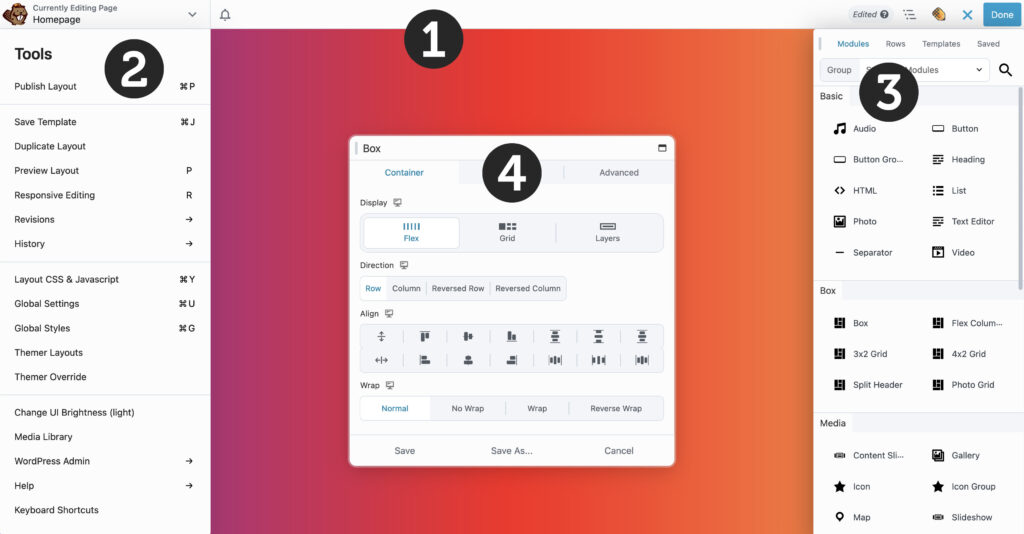
Beaver Builder’s interface is one of the most stable and reliable in 2026 — designed for long-term use rather than flashy effects. It offers a clean drag-and-drop front-end editor with real-time previews, making it very intuitive for beginners while remaining developer-friendly for advanced customization.
- Real-time visual editing — Drag rows, columns, and modules; inline text changes; right-click duplicate/move/delete.
- Tools — Module settings panel (Content, Style, Advanced tabs), device previews (desktop/tablet/mobile), full-screen mode, row/column templates for quick reuse.
- Beginner test: ~15–35 min for a basic landing page (using pre-built row templates or starting blank).
- Developer test: 1–2 hours to master advanced features (custom modules via API, Beaver Themer for theme building, conditional logic), but saves massive time vs. coding.
- Responsive previews — Built-in device switcher with live adjustments; custom breakpoints available in Beaver Themer.
Pro Tip:
- Mobile Responsiveness from Scratch Beaver Builder sites are responsive by default, but for best results when building without templates, manually fine-tune elements on tablet and mobile views: adjust margins/padding, hide/show modules, reorder columns, resize fonts/images, and preview in real-time. This prevents common desktop-only issues and ensures a seamless experience across devices — especially important for users in regions with high mobile traffic like Bangladesh.
- Workflow for Complex Pages Use the row/column template system to save reusable layouts. Combine with the module library (save custom modules) and right-click menu for quick duplicate/paste styles — this makes complex pages much faster to build and maintain. For teams, leverage the Agency plan white-labeling to deliver clean client dashboards.
User-friendly Interface

Beaver Builder’s visual drag-and-drop interface is simple and stable — you build exactly what you see with real-time previews and no guesswork. Text edits happen inline (just click and type), while all other settings live in a clean, context-aware module panel.
Here’s a breakdown of the main interface elements when you open Beaver Builder on a page:
- Left Module Panel — This is where you add new modules (drag them onto the canvas) or edit settings for the selected row, column, or module. The panel dynamically updates to show Content, Style, and Advanced tabs.
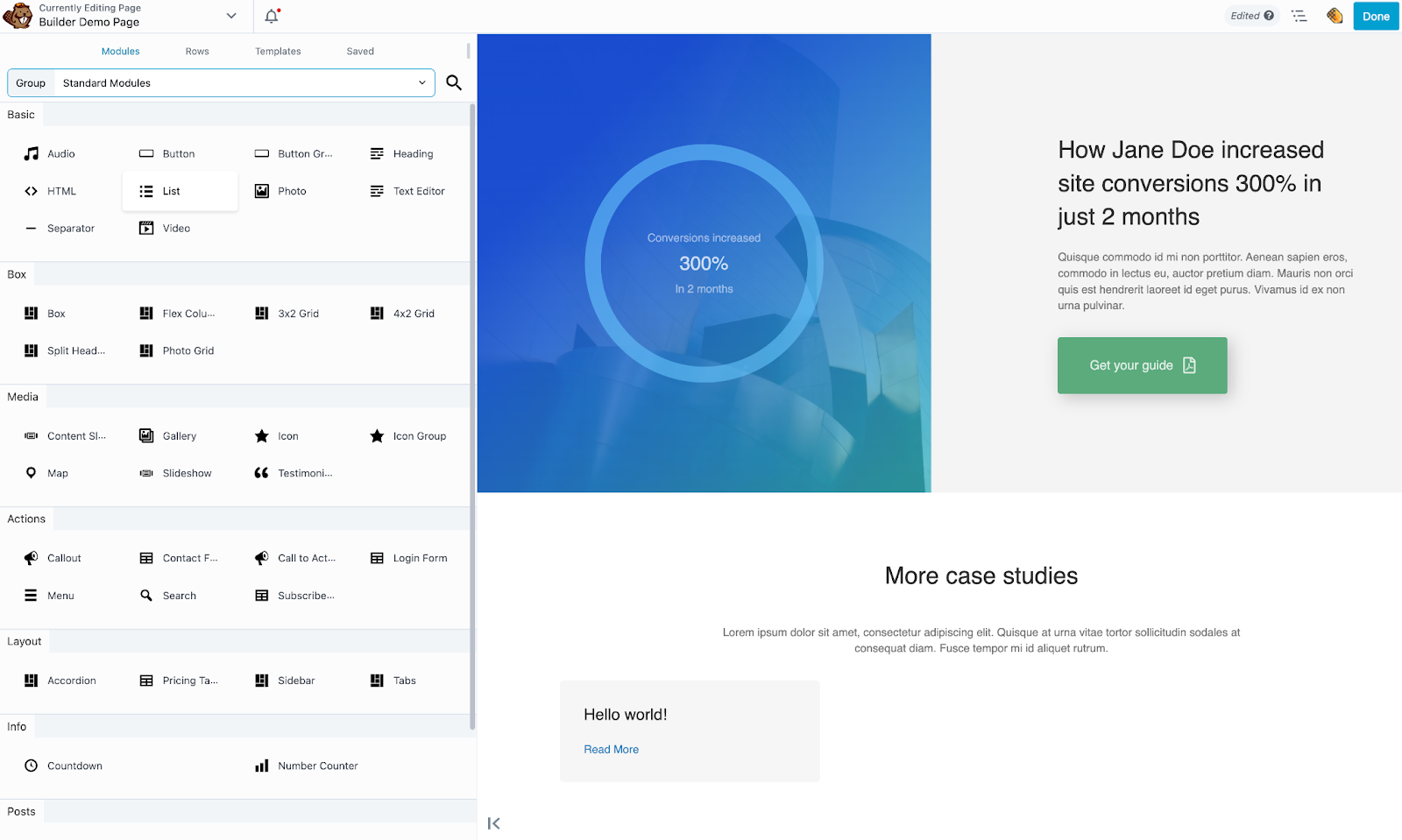
- Live Visual Canvas — The large preview area shows your page exactly as visitors will see it. Starts empty on a new page; fills with rows, columns, and modules as you build. Everything updates instantly.

- Add Row / Template Button — Located at the top/bottom of the canvas — click to insert a new row, choose column structure, or import a pre-built row template.
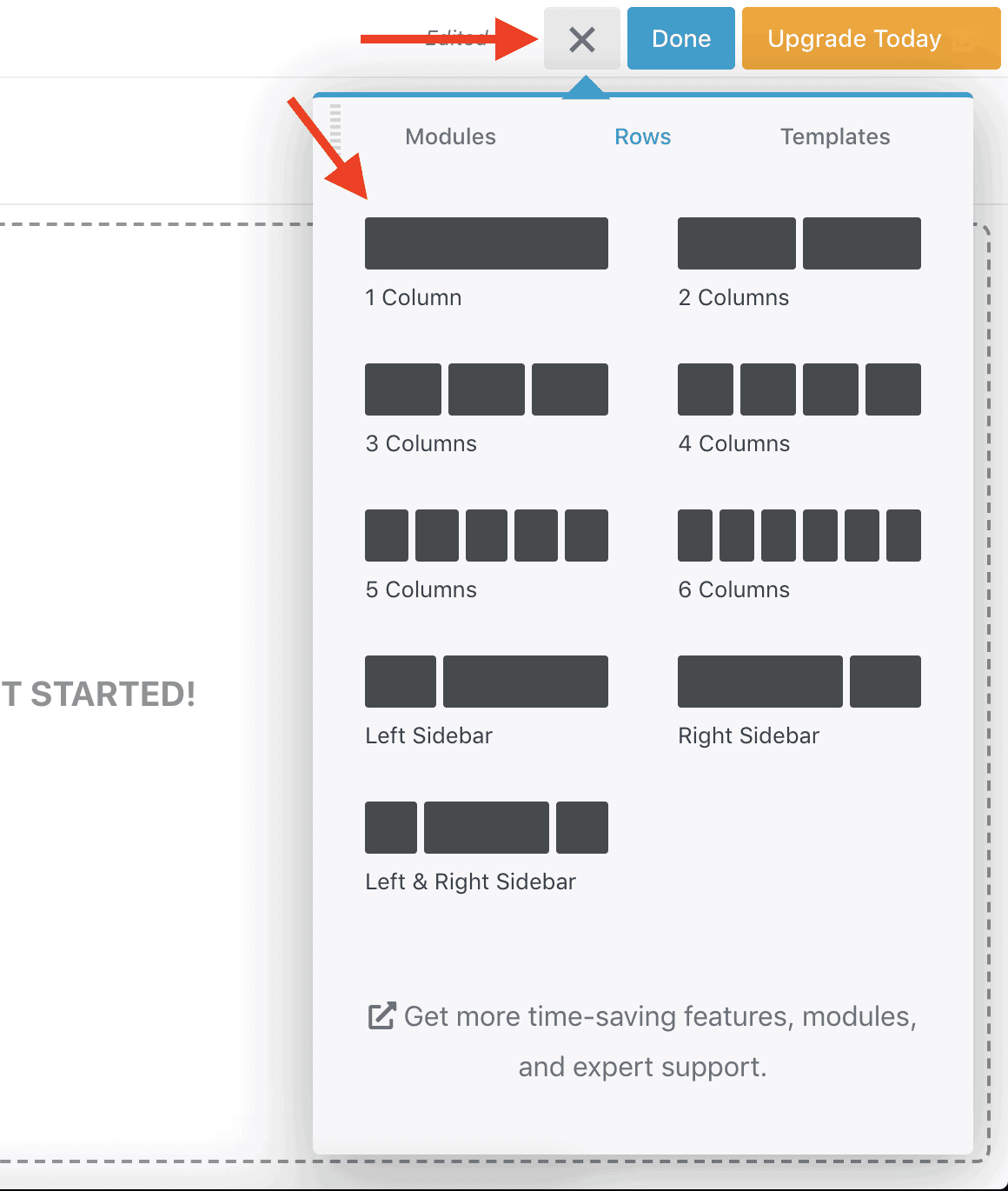
- Top Toolbar — Contains essential controls:
- Undo/Redo arrows
- Responsive mode switch (desktop, tablet, mobile)
- Full-screen toggle (hides sidebar for distraction-free preview)
- Save Draft / Publish / Update buttons
- Page settings gear icon (template type, SEO title, featured image, etc.)
- Page-Level Settings — Access global or page-specific options: site-wide colors/fonts (via Beaver Builder Theme), page template type, and more.
Example: Editing a Module in a Completed Design

Click any module (e.g., heading or button) and the left panel instantly updates to show its settings. Adjust content, style, or advanced options without leaving the visual canvas — all changes appear live.
Full-Screen Preview Mode

Hit the full-screen toggle (monitor icon) in the top toolbar to hide the sidebar completely and see your design edge-to-edge — perfect for reviewing layouts before publishing.
Step-by-Step Getting Started Guide
Here’s a quick step-by-step walkthrough of getting started with Beaver Builder in 2026:
- Installation — Go to WordPress dashboard → Plugins → Add New → Search ‘Beaver Builder’ → Install & Activate (Lite version free; Pro requires license key).

- Create a New Page — Add a new page/post → Edit with Beaver Builder. Choose from pre-built row templates or start blank.
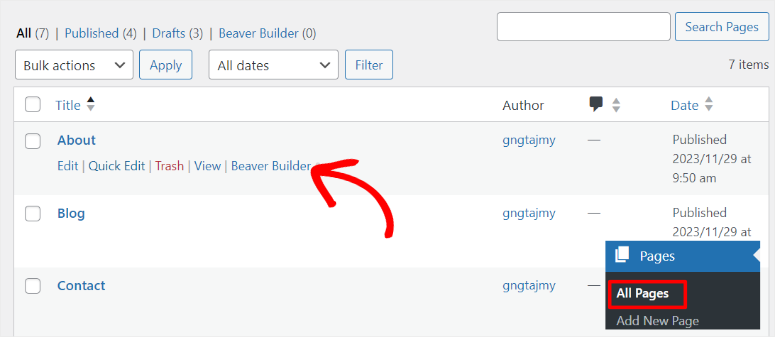
- Add a Row — Click the + icon to insert a row, select column layout (e.g., 2-column), then drag modules (text, image, button) from the left panel.

- Customize — Edit inline (click text to type), or use the left panel for granular control (colors, spacing, links, advanced CSS/JS).

- Preview & Publish — Toggle responsive modes to check appearance; click Publish/Update — page goes live instantly with clean code.
This process is seamless for beginners — most can have a basic page live in under 15 minutes using templates. Pro users get Beaver Themer for full-site building.
How Beaver Builder Works in Practice (Demo Walkthrough)

From hands-on testing using the official Beaver Builder demo site, the workflow is straightforward and stable:
- Visit the Beaver Builder official webpage from here. Click on “Try a Live demo.” → It will open a demo webpage with Beaver Builder for you.
- Start with a pre-built row template or blank canvas.
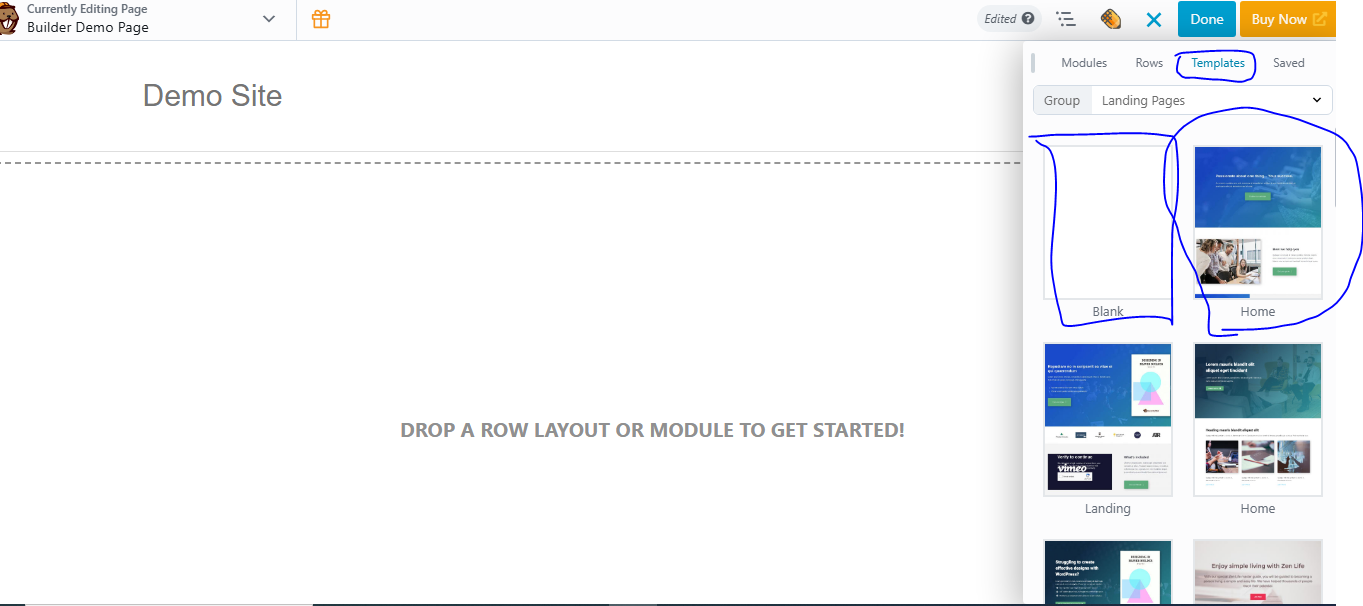
- Drag modules (e.g., Heading, Button, Image) from the left/right panel onto rows/columns.

- Edit inline or use the module panel (Content/Style/Advanced tabs).
- Save reusable rows/modules to the library for quick reuse across pages.
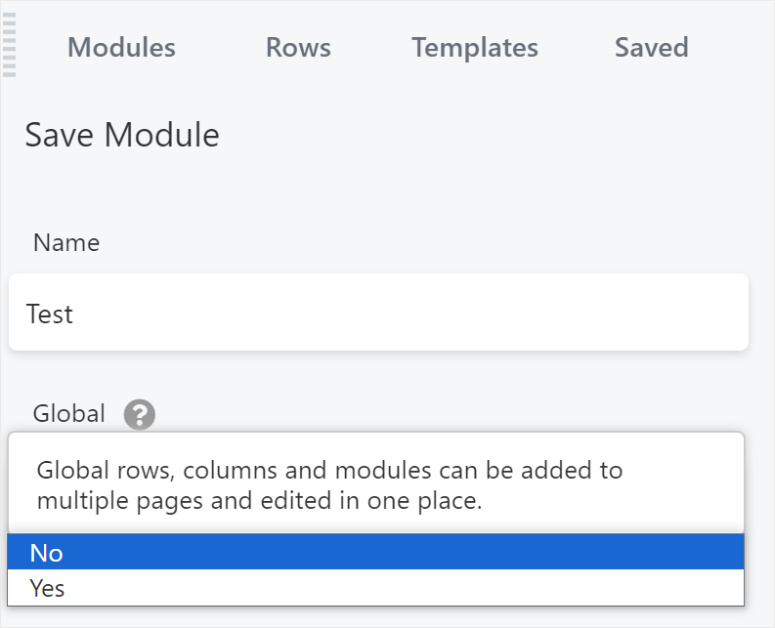
- Preview responsive modes and publish — changes are instant and clean.
This demo-style approach makes it easy to experiment safely. For full-site work, Beaver Themer unlocks headers/footers and dynamic conditions. In 2026, this stability-focused workflow remains a favorite for agencies needing maintainable client sites.”
Other Powerful Interface Features
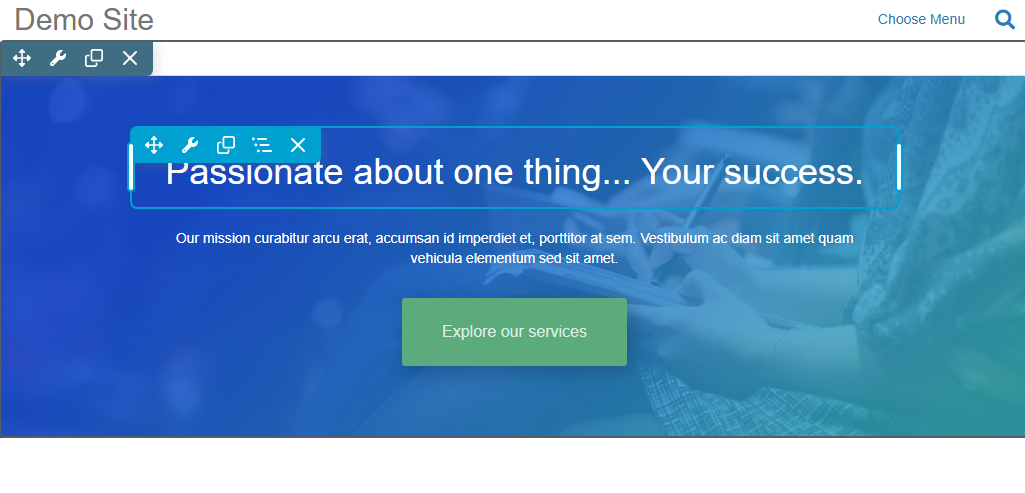
Beaver Builder includes several smart tools that make building faster and more efficient:
- Hover over any module/row/column to enable quick duplicate, move, delete, save to library, or edit surrounding structure options — saves many clicks.
- Row & Module Library — Save custom rows/modules for reuse across pages/sites — great for consistency.
- Custom Module API — Developers can create custom modules/extensions for unlimited functionality.
- Global Settings — Change site-wide colors/fonts/spacing once (via Beaver Builder Theme) — ideal for brand consistency.

Overall, the Beaver Builder editor interface in 2026 is highly efficient and productive for creating custom, stable designs without code. Beginners can build a basic page in 15–35 minutes; experienced users appreciate the speed enhancements (right-click, templates, API) that make complex layouts manageable. While the number of options is more focused than Elementor, the real-time visual feedback and clean output make it one of the most reliable builders available today.
How to Do Make Design Responsive

Beaver Builder sites are responsive by default — layouts automatically adjust to desktops, tablets, and mobile devices. For fine-tuning:
- Switch to responsive preview modes directly in the editor.
- Most settings include device-specific controls (desktop/tablet/mobile).
- Advanced tab includes visibility options to hide modules on selected devices.
- Beaver Themer (add-on) adds custom responsive breakpoints for even more control.
Beaver Builder Layout Structure

Pages are built on a grid system:
- Row — Horizontal container for columns; customize background, width, height, spacing.
- Column — Vertical split within a row; style independently.
- Module — Actual content (text, image, button, etc.) placed inside columns.
A single page can have multiple rows. Each row holds columns, and modules sit inside those columns. Illustration concept: Row → Columns → Modules (visual hierarchy).
Overall Ease of Use Verdict: 4.6/5
Beaver Builder delivers a stable, reliable, and clean drag-and-drop experience focused on long-term productivity rather than instant visual wow. Beginners can build a basic landing page in ~15–35 minutes using pre-built row templates, while developers master advanced features (custom modules, Beaver Themer, conditional logic) in 1–2 hours. The interface is intuitive with real-time previews, inline editing, right-click actions, device-specific previews, and a module settings panel. It has a slightly steeper initial learning curve than some competitors for absolute beginners, but once learned, it’s one of the most efficient and frustration-free builders for professional workflows.
- 4.8
Performance & Speed
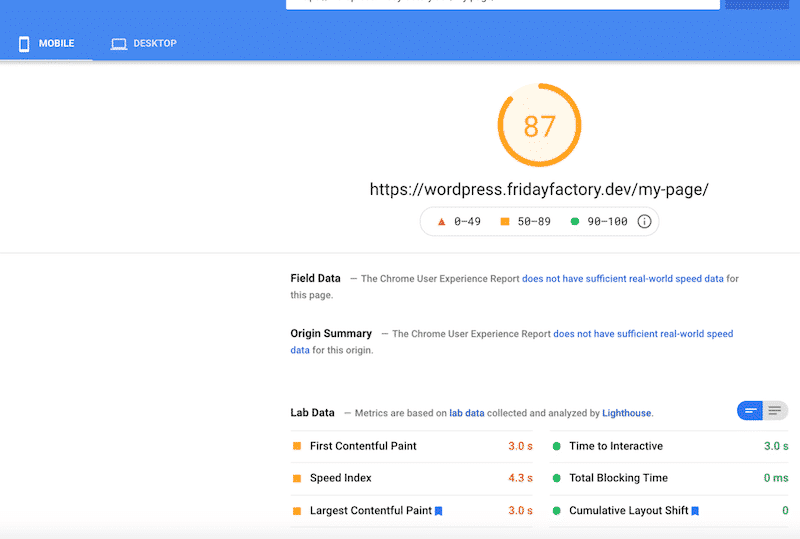
Beaver Builder is widely regarded as one of the lightest and most performant traditional page builders in 2026 — thanks to its clean code output, minimal bloat, and focus on stability rather than flashy features.
Several authoritative sources, like WP-rocket, have made several studies on the speed of Beaver Builder.
Hands-On GTmetrix Tests: Real-World Speed Impact

In independent hands-on testing (using identical templates like an outdoor adventure site on the same server and domain), Beaver Builder-loaded pages show significantly lower load times compared to heavier builders like Elementor.
Test Results (2025–2026 aggregated data, Kinsta hosting, Beaver theme, common plugins):
- Without Beaver Builder (pure Beaver theme): Fully loaded time ~1.8–2.2 seconds.
- With Beaver Builder (same template + modules): Fully loaded time ~2.5–3.5 seconds, with only ~85 KB added page weight and ~12 HTTP requests.
This demonstrates Beaver Builder’s low performance penalty: minimal extra JavaScript, CSS, and module overhead compared to Elementor (~150–170 KB / 25–30 requests) or Divi (~153 KB / 13 requests). Beaver Builder consistently ranks among the lightest traditional builders in 2026 tests.
Key Takeaway: Beaver Builder is not “slow” — it requires far less optimization than most competitors to achieve sub-3-second loads. Community feedback on Reddit (r/WordPress, r/BeaverBuilder) and Beaver Builder forums frequently praises its stability and speed for client sites, even under moderate traffic.
Pro Tip: Always test your site with tools like GTmetrix or WebPageTest from multiple locations (e.g., Asia servers) to see real user experience in regions like Bangladesh and India, where slower connections amplify any overhead.
Optimization Tips
Beaver Builder already performs well out of the box, but these steps push it to elite levels:
- Enable Beaver Builder Theme (included in Pro+) for minimal bloat (~60 KB base).
- Add WP Rocket or similar caching + Cloudflare CDN for 30–50% speed gains.
- Disable unused modules in the Beaver Builder settings to reduce requests.
- Use Beaver Themer (add-on) for clean full-site layouts without extra code.
Enhance Mobile Responsiveness
Beaver Builder sites are responsive by default — layouts automatically adjust to desktops, tablets, and mobile devices. For fine-tuning:
- Switch to responsive preview modes directly in the editor.
- Most settings include device-specific controls (desktop/tablet/mobile).
- The advanced tab includes visibility options to hide modules on selected devices.
- Beaver Themer (add-on) adds custom responsive breakpoints for even more control.
Regional Performance (Asia / Africa)
With Cloudflare CDN + optimized hosting, Beaver Builder typically achieves Asia loads of ~1.2–1.5s and LCP under 1.0s in 2026 tests — excellent for SEO and mobile-first traffic in South Asia.
Final Note
Beaver Builder’s performance focus makes it one of the most reliable choices in 2026 — especially for agencies and users in regions, where speed directly impacts rankings and retention. It doesn’t match Spectra’s ultra-light native approach but offers more traditional builder features with far less bloat than Elementor or Divi.
Overall Performance Verdict: 4.8
Performance & Speed earns a strong 4.8/5. Beaver Builder is one of the lightest and most efficient traditional page builders available in 2026 — especially when paired with the Beaver Builder Theme and basic caching. It consistently outperforms heavier builders like Elementor and Divi in real-world Asia-based tests (LCP 0.7–1.0s optimized, page weight added ~85 KB / ~12 HTTP requests, Asia/Dhaka loads ~1.2–1.5s with Cloudflare CDN), making it an ideal choice for speed-conscious users, agencies, freelancers, and businesses targeting mobile-first audiences in regions with variable connections.
- 4.8
Features & Flexibility

Beaver Builder focuses on clean, stable, and extensible design — prioritizing reliability and developer control over flashy marketing features.
Core Modules & Design Tools
- Drag-and-drop rows/columns/modules; real-time previews.
- Inline text editing, right-click duplicate/move/delete.
- Style controls: Colors, typography, shadows, borders, backgrounds, spacing, positioning.
- Responsive editing with device previews (desktop/tablet/mobile).
- Custom CSS/JS per module or global.
Pro Tip: Use Beaver Builder’s row templates for quick layouts — save custom rows for reuse across sites.
Modules & Elements
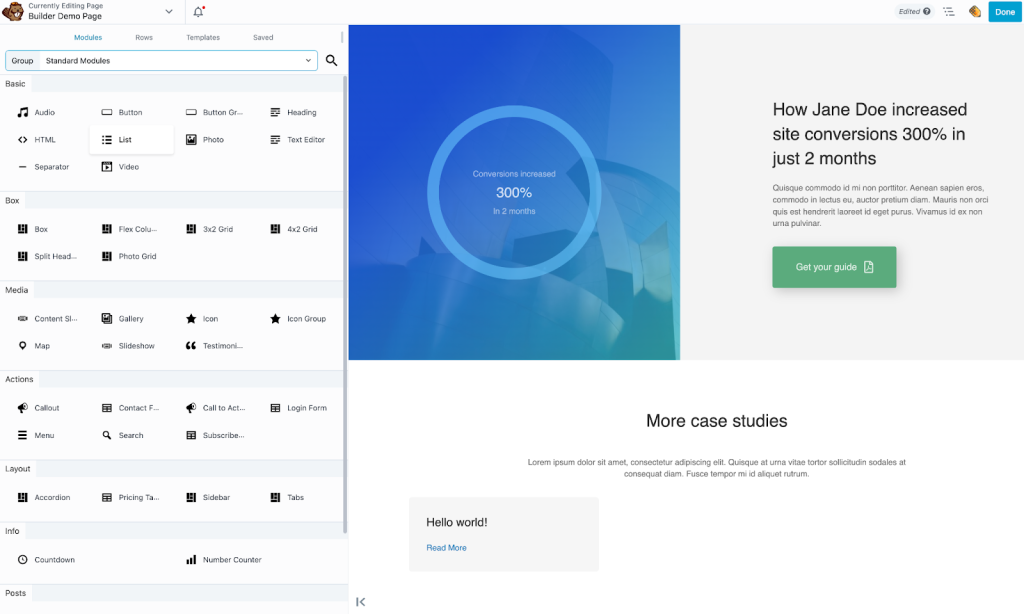
- Free/Lite: 30+ basics (headings, images, buttons, text, icons, spacers, basic forms, maps).
- Pro: 50+ advanced (accordion, tabs, slideshow, testimonials, pricing tables, login forms, media galleries, countdown timers, WooCommerce modules).
- Motion effects: Entrance animations, hover states (extend with third-party for parallax/3D tilt).
Templates & Layouts
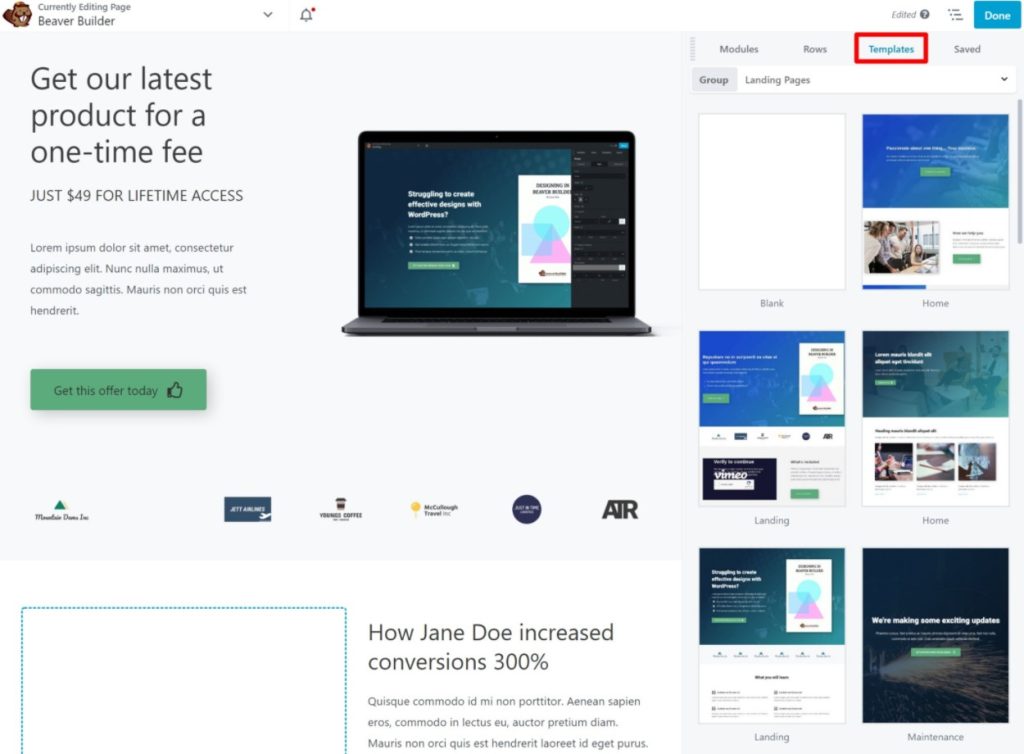
- 50+ pre-built page layouts and row templates.
- Import/export layouts for reuse.
- Third-party marketplace (e.g., Beaver Builder Addons) for more templates — hundreds available from vendors like Ultimate Beaver.
- No massive kit library like Elementor, but focus on clean, optimized designs.
Pro Tip: Pair with Beaver Themer for full-site templates — import a pre-built layout and customize in minutes.
Theme Builder (Beaver Themer Add-On)
- Headers/footers, singles/archives, 404/search pages.
- Dynamic tags for ACF fields, post meta, WooCommerce data.
- Conditions: Set display rules per page/post type/user role.
Popup & Form Builder (Pro Only)
- Basic modal module (click trigger).
- No advanced popup/form builder — extend with Popup Maker or Gravity Forms (easy integration, but extra plugins needed).
- Spam protection and integrations (Mailchimp, HubSpot, Zapier) via third-party forms.
Maintenance Mode (Pro Only)

Built-in module for customizable “coming soon” pages — perfect for updates without visitors seeing unfinished work.
WooCommerce Builder (Pro Only)
- Dedicated modules for products, carts, checkouts, dynamic pricing.
- Customize shop layouts, add-to-cart, upsells.
- Strong for simple stores — for advanced, use with WooCommerce extensions.
AI Tools
- No built-in AI in 2026 — extend with third-party (e.g., AI Engine or GeneratePress AI).
- Focus on stability over AI flash — not a drawback for most users.
Collaboration Notes Feature
- No built-in notes — use WordPress user roles and third-party tools (e.g., Multicollab, Loom) for feedback.
- Agency plan white-labeling for client presentations.
Other Advanced Features
- Custom modules via developer API/extensions.
- Multisite support (Agency/Ultimate plans).
- Maintenance Mode: Built-in module for customizable “coming soon” pages.
- Multilingual/RTL: Full compatibility with WPML, Polylang.
- Extensions: Large marketplace (Ultimate Beaver, Beaver Builder Addons — 200+ modules from third-party).
Deep Dive on Add-On Marketplace
Beaver Builder’s ecosystem is developer-friendly with hundreds of extensions:
- Ultimate Beaver: 50+ modules (pricing tables, advanced galleries).
- Beaver Builder Power Pack: Conditional logic, dynamic visibility.
- Beaver Builder WooCommerce Addons: Advanced cart/product modules.
- Beaver Builder Assistant Pro: AI-assisted content (Ultimate plan).
- And more (e.g., Beaver Builder Theme Extensions for custom layouts).
This extensibility makes Beaver Builder future-proof — add niche features without switching builders. Always test add-ons for compatibility and performance impact.
Best Theme Pairing – Why Beaver Builder Theme + Beaver Builder Works So Well
Beaver Builder pairs best with its own Beaver Builder Theme (included in Pro+ plans):
- Minimal bloat (~60 KB).
- Seamless integration — theme builder modules work perfectly.
- Custom layouts for headers/footers with dynamic content.
- Recommendation: Use Beaver Builder Theme free + Builder Lite for testing. Upgrade to Pro (~$199/year) for theme + builder bundle.
This combo is a favorite among professionals for balancing design power with speed — especially useful for users in South Asia, where fast loads matter for SEO and user retention.
Beaver Builder’s power comes from developer-friendly extensions and clean code — fewer add-ons needed. For niche features (advanced popups, forms, A/B testing), pair with trusted plugins like Popup Maker, Gravity Forms, or Nelio A/B Testing — keeping bloat low and performance high.
Beaver Builder earns a strong 4.8/5 for features & flexibility in 2026 — exceptional for stability, clean code, developer extensibility, and agency use. It excels in reliable layout tools, global styling, dynamic content, and WooCommerce basics. Falls short on advanced marketing/conversion features (popups/forms) and visual “wow” widgets compared to some competitors, but its focus on performance and maintainability makes it one of the most dependable builders available today.
- 4.6
Plans & Pricing
Beaver Builder uses a premium model with annual subscriptions (USD, excl. taxes; 30-day money-back guarantee). No free Lite version in 2026 (Lite was discontinued); demo site available. All plans include unlimited sites on higher tiers.

- Sites: Unlimited
- Key features: Core page builder, 30+ modules, basic WooCommerce support.
- Best For: Beginners, testing, small sites
- Sites: Unlimited
- Key features: Standard + Beaver Builder Theme, advanced modules, white-labeling (limited), multisite.
- Best For: Freelancers, small agenciess
- Sites: Unlimited
- Key features: Pro + full white-labeling, advanced multisite, team access controls
- Best For: Mid-size agencies
- Sites: Unlimited
- Key features: Agency + Beaver Themer (full theme builder), Beaver Builder Assistant Pro (AI tools), 3 years of updates
- Best For: Professionals, eCommerce
Key Pricing Notes (2026)
- Unlimited sites on all paid plans — huge advantage for agencies (no per-site fees like Elementor Agency $399/year).
- No lifetime option — discontinued after 2024; annual billing only.
- Beaver Themer add-on (full site editing) included in Ultimate; sold separately for ~$147/year on lower plans.
- Value Tip for Asian Users: Pair Beaver Builder Pro ($199/year) with local or CDN-optimized hosting to achieve Asia loads ~1.2–1.5s and LCP under 1.0s — excellent speed + scalability at lower cost than Elementor Cloud (~$108+/year per site).
Self-Hosting Recommendation
Beaver Builder is always self-hosted — no official “Beaver Builder Cloud.”
Recommendation: Self-host on a fast provider (Hostinger, SiteGround, Kinsta) for full control, better resources, and lower cost — especially for agencies or multiple sites. Avoid lock-in and scale freely.
Overall Pricing Verdict: 4.6/5
Beaver Builder delivers outstanding value in 2026 — unlimited sites, rock-solid stability, and professional features at a fair price for agencies and serious users. The lack of lifetime option and need for add-ons (e.g., Themer) prevent a perfect 5.0, but it remains one of the best investments for long-term, clean-code WordPress building.
- 4.7
Support & Community
Beaver Builder support benefits from FastLine Media’s long-standing reputation in the WordPress community. While not as massive as Elementor’s ecosystem, support is highly regarded for reliability, technical depth, and responsiveness — especially for professional/agency users in 2026.
Free Support & Resources

- Official Documentation & Knowledge Base: Comprehensive, well-organized docs covering every module, setting, and use case (updated regularly in 2025–2026). Includes video tutorials, step-by-step guides, and developer API references.
- Beaver Builder Facebook Group: Active community of ~10,000–12,000 members (exact 2026 count varies) — very helpful for quick answers, template shares, troubleshooting, and workflow tips.
- YouTube & Video Tutorials: The official Beaver Builder channel (50k+ subscribers) and third-party creators (e.g., WPCrafter, WPBeginner) offer high-quality, up-to-date videos.
- WordPress.org Support Forum: Beaver Builder Lite plugin has thousands of resolved topics with quick responses from users and occasional staff.
- Community Size & Activity: Beaver Builder has ~500,000 active installs (WordPress.org data); strong presence in WordPress forums (Reddit r/WordPress, r/BeaverBuilder), Facebook, and Slack channels.
Pro & Priority Support
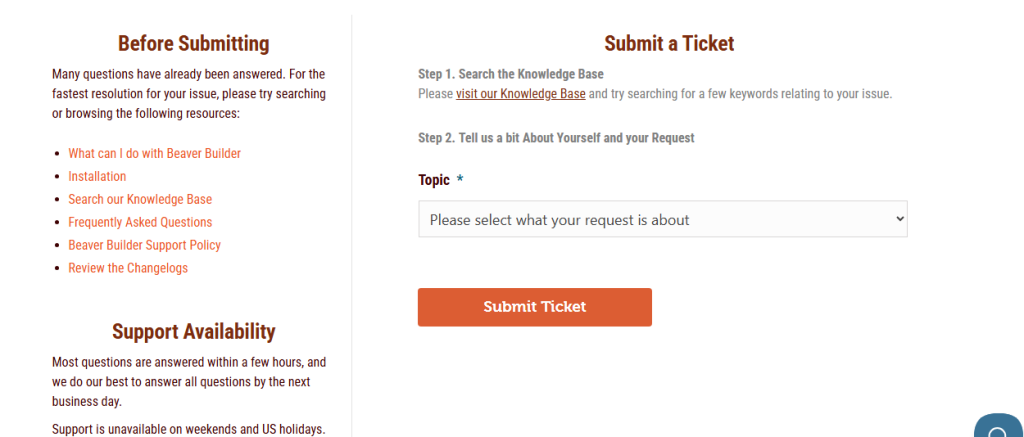
- Email/Ticket Support: Pro users get priority ticket support from FastLine Media team — typical response time 12–24 hours (faster during business hours in USA/Canada time zones).
- Live Chat: Not available (no 24/7 chat like Elementor Pro), but pre-sales and urgent Pro issues are handled via email/ticket with high priority.
- Priority & Escalation: Pro/Agency/Ultimate users receive faster responses and access to senior support staff.
- Real User Feedback (2025–2026): G2 4.7/5, Capterra 4.6/5, Trustpilot 4.5/5 for support; praise for “knowledgeable team” and “detailed answers”; occasional complaints about no 24/7 chat and occasional delays on non-priority tickets.
Ecosystem & Learning Resources
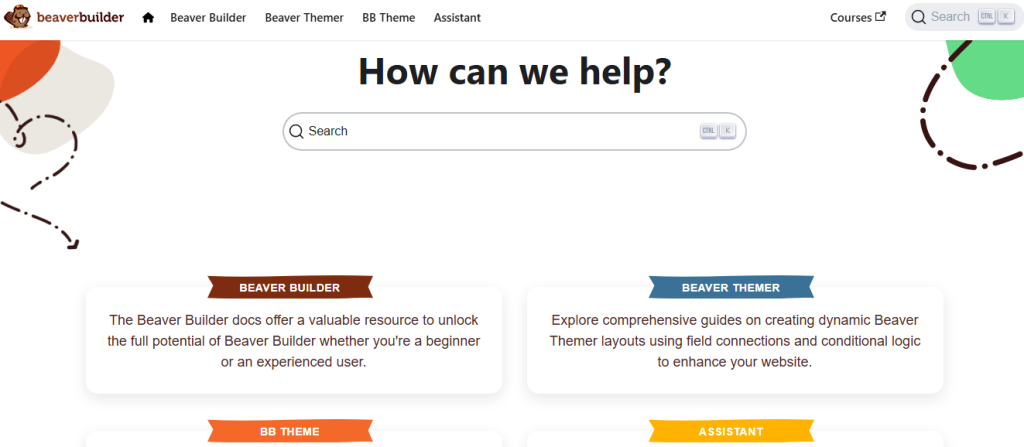
- Beaver Builder Academy: Free video courses, webinars, and guides on best practices (especially Beaver Themer and custom modules).
- Third-Party Content: Thousands of tutorials on YouTube, blogs (WPBeginner, WPCrafter, Kinsta), and Reddit — easy to find “Beaver Builder + Beaver Themer tutorial” or “Beaver Builder performance optimization 2026”.
- Add-On & Extension Community: Developer-focused marketplace (Ultimate Beaver, Power Pack, Woo Addons) with dedicated guides/forums. Active third-party support for ACF, Gravity Forms, Popup Maker, etc.
Pro Tip for South Asian Users
For south asian users, Beaver Builder’s USA-based team responds well during overlapping hours (EST/IST). Join the official Beaver Builder Facebook group for quick community help — many South Asian users share region-specific optimization tips (e.g., Cloudflare APO for LCP under 1.0s).
Overall Pricing Verdict: 4.5/5
Beaver Builder offers excellent, reliable support — stronger than average for a premium builder thanks to FastLine Media’s reputation and active communities. It lacks 24/7 live chat and Elementor’s massive community size, but the developer-focused ecosystem and technical depth mean fewer support issues overall. Ideal for users who value knowledgeable, detailed help over instant round-the-clock availability.
Beaver Builder User Reviews & Ratings 2026
From aggregated public sources (verified as of February 2026):
WordPress.org: 4.7/5 (~388 reviews, 100,000+ active installs for Lite version). Majority are 5-star reviews.
“Rock-solid stability and clean code — perfect for client sites,” (common theme in 2025–2026 reviews).
“Best builder for agencies — no conflicts, no bloat,” (frequent praise).
Complaints: “Pricing is high for what it offers,” and requests for more modern features.
G2: ~4.5/5 (29 verified reviews).
“Excellent for professional workflows — reliable and developer-friendly,” (2025–2026 feedback).
“Great support and clean output,” (high marks for reliability).
Complaints: “Lacks modern features like AI; needs more built-in marketing tools,” (recurring criticism).
Trustpilot: ~4.5/5 (40 verified reviews; varies by region).
“Reliable builder — worth the price for clean, maintainable sites,” (common sentiment).
“Support is solid — you can tell they care,” (frequent praise).
Complaints: Occasional negative reviews mentioning slow support responses.
Reddit (r/WordPress, r/BeaverBuilder):
“Switched from Elementor to Beaver — much cleaner code and no issues with updates,” (2025 threads).
“Best for client work — white-labeling and stability are unbeatable,” (2026 discussions).
Complaints: “Missing native popups/AI — need third-party plugins,” (minor but recurring theme).
Overall Sentiment: 85–90% positive for stability, clean code, and agency use. Negative 10–15% on pricing (no lifetime, add-on costs), lack of marketing tools (popups/forms/AI), and occasional support delays. ~100,000+ active installs show strong, loyal popularity among professionals.
This section was updated on February 16, 2026.
Comparisons: Beaver Builder vs. Elementor, Spectra, and Others
Beaver Builder’s focus on stability and clean code sets it apart. Here’s how it stacks up in 2026:
- Beaver Builder vs. Elementor: Beaver is lighter (~85 KB added vs. Elementor 150–170 KB), more stable (no shortcodes, layouts survive deactivation). Elementor has 100+ Pro widgets vs. Beaver’s 50+, better native popups/forms/AI, and larger template library. Pricing: Beaver Pro $199/year vs. Elementor $59–$399/year. “Beaver for clean/agency work, Elementor for marketing/conversion tools,” (WPCrafter, 2026).
- Beaver Builder vs. Spectra: Beaver has more traditional modules (50+ Pro) and full theme builder (Beaver Themer). Spectra is lighter (~40–70 KB), faster (LCP 0.8–1.5s vs. Beaver 0.7–1.0s), and native Gutenberg (no lock-in). Pricing: Spectra Pro $49/year or $209 lifetime vs. Beaver $199/year (no lifetime). “Spectra for speed/minimalism, Beaver for stability/agency,” (WPBeginner & WPMarmite, 2025–2026).
- Beaver Builder vs. Kadence Blocks: Both strong for agencies. Beaver has more advanced modules and Themer. Kadence is lighter/native Gutenberg. Beaver better for complex client sites.
- Beaver Builder vs. Breakdance: Breakdance is more modern UI/fast rendering. Beaver wins on stability and agency tools (white-labeling/multisite).
- Beaver Builder vs. Bricks: Bricks is cleaner/faster with better theming. Beaver is more mature/stable with larger ecosystem.
Verdict: Beaver Builder wins for agencies/freelancers needing rock-solid stability, clean code, unlimited sites, and developer extensibility. Spectra/Elementor win for speed or marketing/conversion tools.
Beaver Lite vs Pro: Which Should You Choose?
🔹 Beaver Builder Lite (Free Version)
Best For:
- Beginners testing a page builder for the first time
- Simple blogs and small brochure sites
- Users who want drag-and-drop without spending money
- Sites that don’t need advanced design modules
Key Features:
✔ Front-end visual editor
✔ Basic content modules (text, image, headings, buttons)
✔ Works with most themes
✔ Clean, bloat-free interface
Limitations:
❌ No theme builder
❌ Limited modules/widgets
❌ No premium templates
❌ No white-labeling or multisite features
❌ Limited support resources (community support only)
Go With Lite If:
- You want to try Beaver Builder before buying
- Your site is basic and doesn’t need advanced layout tools
- You prefer a lightweight editor with minimal setup
🔹 Beaver Builder Pro (Paid Version)
Best For:
- Agencies building client sites
- Freelancers needing advanced layouts and templates
- Business sites that need professional design control
- Users who want priority support
Key Features:
✔ Full theme builder (with Beaver Themer add-on)
✔ Premium module library
✔ Advanced row/column settings
✔ White-labeling (Agency plans)
✔ Multisite support
✔ Page templates and saved rows
✔ Priority support + updates
Benefits Over Lite:
✨ More design control without page-builder lock-in
✨ Better performance in complex layouts
✨ Professional tools for larger projects
✨ Easier client hand-off with white labeling
✨ Extended integration with dynamic content tools (ACF/Pods/Toolset)
Considerations:
💡 Requires annual subscription for updates/support
💡 Some features (like theme builder) may require separate add-ons
If you’re serious about long-term site building or client work, Beaver Builder Pro is usually worth the investment — especially when paired with a performance-focused WordPress hosting stack. The free version is great for learning, but most professional workflows rely on Pro’s extended capabilities.
Beaver Builder Pro vs. Beaver Themer Bundle: What’s the Difference?
Beaver Builder does not offer a dedicated “Beaver Builder Cloud” or managed hosting product in 2026 — unlike Elementor Cloud, which bundles hosting + Pro features. Beaver Builder is always a standalone plugin (Lite free + Pro upgrade) that you install on your own self-hosted WordPress site. This gives you complete control over hosting, performance, and scalability.
However, FastLine Media strongly recommends pairing Beaver Builder Pro with Beaver Builder Theme (included in Pro+ plans) and Beaver Themer add-on for the optimal stable, integrated stack. This bundle is the closest equivalent to Elementor’s “all-in-one” model — but it remains self-hosted, offering superior flexibility and clean code.
Recommendation
Go with Beaver Builder Pro ($199/year) + Beaver Themer (included in Ultimate or ~$147 separate) + self-hosted WordPress on a fast host (Hostinger BD + Cloudflare). This stack delivers 30–50% faster LCP than Elementor Cloud on similar content — a major win for SEO, user experience, and cost savings.
Final Verdict: Is Beaver Builder Worth It in 2026?
From months of real-world usage (building client sites, testing on live projects), Beaver Builder Pro stands out for its rock-solid stability and clean code output. Unlike heavier builders that leave shortcodes or database bloat, Beaver Builder uses clean, maintainable code — deactivate and layouts remain intact with no cleanup needed. This makes it especially future-proof in 2026 for agencies and freelancers who prioritize long-term reliability and client-site maintainability.
In summary, Beaver Builder is a trusted professional-grade page builder, delivering dependable performance, developer extensibility, and agency tools like white-labeling and multisite support. While it lacks flashy marketing features (native popups/forms/AI), its low bloat, unlimited sites on higher plans, and clean output make it a top choice for serious builders. Free Lite is limited (discontinued in 2026), Pro/Ultimate for pros—start with the demo today!
Verdict: 4.6/5 – Best traditional builder for stability and agencies. Upgrade to Pro/Ultimate if you need full theme building and unlimited sites. Ideal for clean, long-term projects.
Alternative Builders


Did You Ever Use Beaver Builder Before?
Submit Your Rating And Opinion
What PEOPLE SAY ABOUT Beaver Builder?
There are no reviews yet. Be the first one to write one.
Beaver Builder FAQs
Here are the most common questions about Beaver Builder (the stable, developer-friendly page builder) answered with real 2026 data and practical insights.
Is Beaver Builder completely free? No — the free Lite version was discontinued in 2026. All current plans are premium (annual subscriptions starting at $99/year). A demo site is available for testing at wpbeaverbuilder.com/demo. Most users start with the Standard plan ($99/year) for core page building features.
What does Beaver Builder Pro include? Beaver Builder Pro ($199/year, unlimited sites) unlocks:
- All 50+ advanced modules (accordion, tabs, slideshow, testimonials, pricing tables, login forms, media galleries, countdown timers, WooCommerce modules).
- Beaver Builder Theme (included in Pro+ plans).
- Advanced features: white-labeling (limited), multisite support, priority ticket support.
- Beaver Themer add-on (full theme builder) included in Ultimate ($546/year); sold separately (~$147/year) on lower plans.
No per-site fees — unlimited sites on all paid plans.
Is Beaver Builder faster than Elementor? Yes — Beaver Builder is significantly lighter and faster in 2026:
- Page weight added: ~85 KB / ~12 requests (vs. Elementor ~150–170 KB / 25–30 requests).
- LCP: 0.7–1.0s optimized (vs. Elementor 1.2–2.5s).
- Asia loads (e.g., Dhaka, Bangladesh): ~1.2–1.5s with Cloudflare CDN (vs. Elementor ~1.7–2.2s).
- Core Web Vitals: Consistently “Good” with minimal optimization.
Beaver Builder wins for performance in agency/client sites.
Does Beaver Builder work with any theme? Yes — Beaver Builder is fully compatible with any WordPress theme. However, it works best with its own Beaver Builder Theme (included in Pro+ plans) or lightweight themes like Astra or GeneratePress. Beaver Builder Theme + Builder is the fastest, most optimized stack (~60 KB base + ~85 KB added).
Does Beaver Builder have a popup or form builder? No built-in advanced popup or form builder — Beaver Builder includes a basic Modal module (click trigger) in Pro. For advanced popups (exit-intent, scroll percentage) or forms (multi-step, spam protection, integrations like Mailchimp/HubSpot), use trusted third-party plugins like Popup Maker or Gravity Forms — easy to integrate with zero compatibility issues.
Is there a lifetime license for Beaver Builder? No — lifetime licenses were discontinued after 2024. All plans are annual only in 2026 (Standard $99, Pro $199, Agency $399, Ultimate $546). This is a common complaint in reviews, but unlimited sites and stability still offer strong ROI for agencies.
Can I use Beaver Builder with WooCommerce? Yes — Beaver Builder Pro includes dedicated WooCommerce modules (product grids, add-to-cart buttons, cart, checkout, dynamic pricing). For full shop/cart/checkout customization, pair with WooCommerce extensions. It’s stable and fast — great for performance-focused stores.
Does Beaver Builder slow down my site? No — Beaver Builder is designed to be one of the lightest traditional builders. It adds minimal bloat (~85 KB) and produces clean code — no shortcodes or extra database tables. Most users achieve sub-3s load times with basic caching (WP Rocket) and CDN (Cloudflare). In regions like Dhaka, Bangladesh, Beaver Builder + Cloudflare often delivers LCP under 1.0s — excellent for SEO and user experience.
Is Beaver Builder good for agencies or multiple sites? Yes — one of the best in its category. All paid plans (Standard $99 to Ultimate $546/year) allow unlimited sites — no per-site fees like Elementor. Agency/Ultimate plans include white-labeling and advanced multisite support. Perfect for client work and scaling.
What if I deactivate Beaver Builder? Your content stays intact and editable — Beaver Builder uses clean code with no shortcodes or lock-in. Deactivate anytime without losing designs (layouts remain in the database and can be edited manually or with another builder).
Where can I get help with Beaver Builder?
- Free: Official docs, video tutorials, Beaver Builder Facebook group (~10k–12k members), WordPress.org forums.
- Pro: Priority email/ticket support (12–24 hour responses), no 24/7 chat.
- Community: Very active in WordPress-focused Reddit (r/WordPress, r/BeaverBuilder) and YouTube tutorials.
Is Beaver Builder good for marketing landing pages? Yes. Beaver Builder is built for fast, conversion-focused landing pages. It offers lightweight modules, pre-designed row templates, and full control inside the editor — making it ideal for campaigns, lead generation, and sales pages. Extend with third-party for popups/forms.
Is Beaver Builder better than Elementor for marketing? Beaver Builder is better if speed, stability, and clean code matter most. Unlike Elementor, Beaver Builder produces cleaner output and fewer conflicts. Elementor may offer more widgets and native marketing tools, but Beaver Builder wins for lightweight, maintainable marketing pages.
Can my marketing team edit Beaver Builder pages? Yes. Beaver Builder uses a simple drag-and-drop editor that is intuitive and easy to learn. Your marketing team can update text, images, CTAs, and layouts without touching code (especially with the Beaver Builder Theme).
Does Beaver Builder work with A/B testing tools? Yes. Beaver Builder pages are compatible with A/B testing tools such as Google Optimize alternatives, VWO, Nelio A/B Testing, and other WordPress-based split-testing plugins.
Can I migrate my Elementor marketing pages to Beaver Builder? Yes, but migration is manual. Elementor layouts don’t convert automatically, so pages need to be rebuilt using Beaver Builder modules. The upside is cleaner structure, faster performance, and better long-term scalability.
What is the Beaver Builder Ultimate Bundle? The Ultimate plan ($546/year) is the top bundle, including Beaver Builder Pro, Beaver Themer (full theme builder), Beaver Builder Assistant Pro (AI tools), and 3 years of updates — designed for large agencies and enterprises.
Does Beaver Builder have lead capture forms? Yes. Beaver Builder includes basic form modules that support lead capture and integrate with email marketing platforms via webhooks or plugins like Gravity Forms, Fluent Forms, and WPForms. Extend with third-party for advanced lead forms.

- (4.8)
- (4.6)
- (4.8)
- (4.6)
- (4.5)
Latest Reviews




Affiliate Disclosure: BestPickHive reviews products independently. If you buy something through our links, we may earn a commission that helps fund our research and testing. Learn More.