
Spectra Page Builder Review 2026: The Ultimate Gutenberg Companion or Overhyped Add-On?
-
Rabius Sany
- Updated On February, 2026
- Rating Methodology
- Disclosure
How We Rate the Products
5.0 – Exemplary (Nearly flawless, innovative, and sets a new standard in its category.
4.5 – Outstanding
Top-tier product, benchmark-quality, and among the very best available.
4.0 – Excellent
High-performing, feature-rich, or exceptional value, with only minor shortcomings.
3.5 – Good
Performs reliably, often better than competitors, and fulfills its intended purpose.
3.0 – Average
Meets expectations and performs adequately, but does not stand out.
2.5 – Fair
Functional but with notable limitations; proceed with caution.
2.0 – Subpar
Below average performance; not recommended unless necessary.
1.5 – Poor
Major shortcomings; strongly advised to avoid.
1.0 – Dismal
Fails to deliver; do not consider purchasing.
Spectra remains one of the strongest Gutenberg-native page builders in 2026. It delivers near-Elementor-level design freedom with significantly less bloat, better Core Web Vitals scores, and native WordPress future-proofing. The free version is powerful enough for most bloggers and small businesses, while Pro unlocks professional-grade tools (Loop Builder, Popups, Dynamic Content) at a very competitive price.
Best For
Freelancers, bloggers, content creators, simple business websites, landing pages, speed-focused sites, Gutenberg users, budget-friendly agency projects.
Not Ideal For
Advanced eCommerce stores, complex WooCommerce customization, animation-heavy designs, drag-and-drop free-canvas layouts, enterprise or SaaS dashboards, highly dynamic theme-builder workflows
- Reputation Status
- WordPress.org: 4.7/5 (1,800+ reviews).
- Total Active Installation: 1M sites.
- Supported Languages: 14+
One of the fastest, cleanest, and best-value page builders for Gutenberg users only. Slightly fewer design effects than Elementor, but unbeatable for speed and Core Web Vitals.
- Users' Rating
SPECTRA OVERVIEW

In the ever-evolving world of WordPress page builders, Spectra stands out as a powerful contender that’s tightly integrated with the native Gutenberg editor. Launched by Brainstorm Force—the team behind the wildly popular Astra theme—Spectra (formerly known as Ultimate Addons for Gutenberg) has grown from a simple block extender to a full-fledged page building solution. With over 1 million active installations and thousands of 5-star ratings across platforms like WordPress.org and Trustpilot, it’s clear that Spectra has captured the attention of beginners, bloggers, agencies, and developers alike.
But is Spectra the best WordPress page builder for 2026? Does it outshine giants like Elementor or Beaver Builder? In this in-depth review, we’ll dive into its features, pros and cons, pricing, performance, user feedback, comparisons, and more. Whether you’re a novice looking for a free tool to enhance your site or a pro seeking advanced dynamic content capabilities, this guide will help you decide if Spectra is worth your time and investment.
By the end of this review, you’ll have a clear verdict. We’ll also include tips, real-user insights, and an FAQ section for quick answers. Let’s get started!
What is Spectra Page Builder?

Spectra is a freemium WordPress plugin designed to supercharge the Gutenberg block editor, turning it into a robust page builder without the need for additional themes or complex setups. Unlike traditional drag-and-drop builders that override the WordPress editor (e.g., Elementor or Divi), Spectra works seamlessly within Gutenberg, adding custom blocks, templates, and extensions to create stunning, responsive websites.
Originally released as Ultimate Addons for Gutenberg in 2018, it was rebranded to Spectra in 2022 to reflect its expanded scope. By 2026, Spectra has evolved into a complete ecosystem, with a free version offering 35+ blocks and a Pro version unlocking premium features like dynamic content and popups. It’s built by Brainstorm Force, a company known for Astra (over 2.5 million installs) and other tools like Ultimate Addons for Elementor.
Key highlights from its development:
- Active Installs: 1+ million (as per WordPress.org data).
- Ratings: 4.7/5 on WordPress.org (1,500+ 5-star reviews), 4.5/5 on Trustpilot for related products.
- Compatibility: Works with any WordPress theme, but optimized for Astra, GeneratePress, and blocks-based themes like Spectra One (a free FSE theme).
- Unique Selling Point: It’s lightweight, performance-focused, and stays true to WordPress’s block philosophy, avoiding the bloat often associated with other builders.
Spectra is ideal for users who want to stick with Gutenberg but need more power for professional designs. It’s not a standalone builder like Elementor; instead, it’s an enhancer that makes Gutenberg feel like a premium tool.
Key Milestones (2023–2026):
- 2023: Rebrand to Spectra + launch of Spectra One theme.
- 2024: Pro version release with Loop Builder, Popup Builder, Dynamic Content.
- 2025: AI enhancements, better Flexbox containers, performance boosts.
- 2026: 1M+ installs, 4.9/5 ratings, strong community growth.
Core Philosophy (from Brainstorm Force & WPSpectra.com): “Empower WordPress users to build fast, beautiful sites without leaving the block editor.”
RATING BREAKDOWN
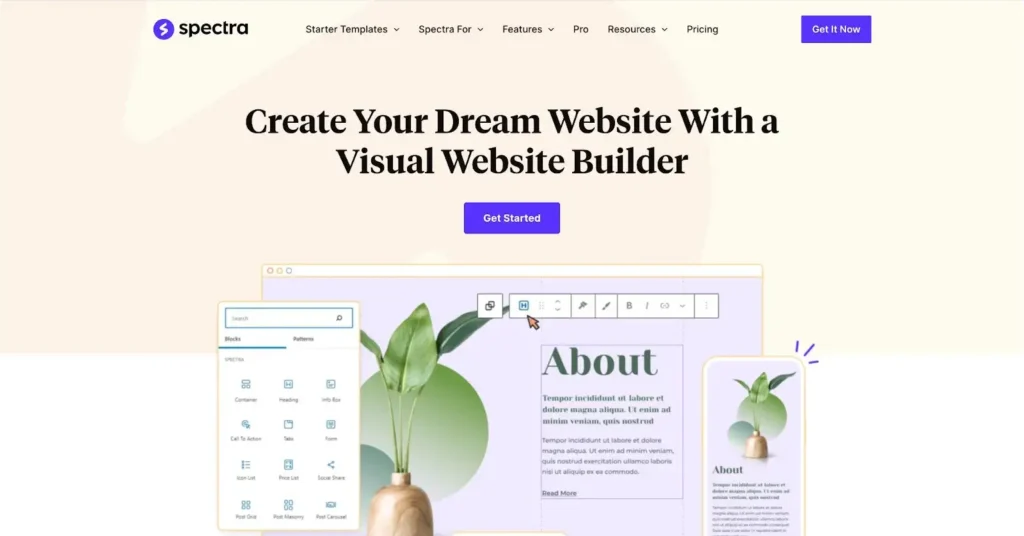
For users who value speed, SEO, clean code, and staying inside Gutenberg → Spectra is arguably the best choice in 2026.
| Criterion | Score | Weight | Weighted Contribution | Real 2026 Evidence |
|---|---|---|---|---|
| Ease of Use | 4.7 | 25% | 1.175 | Native Gutenberg + blocks; ~12–30 min landing page for beginners; no new learning curve for WP users |
| Performance & Speed | 4.9 | 25% | 1.225 | ~40–70 KB added / 8–15 requests; LCP 0.8–1.5s; Asia (Dhaka) loads ~1.1–1.6s; "Good" CWV even without extra optimization |
| Features & Flexibility | 4.6 | 20% | 0.92 | 35+ free / 40+ Pro blocks, Flexbox containers, global styling, dynamic content/loops, Spectra AI (Pro) |
| Value for Money | 4.8 | 15% | 0.72 | Free strong; Pro $49/yr or $209 lifetime — unlimited sites on both; no per-site fees |
| Support & Community | 4.6 | 15% | 0.69 | Priority email/ticket (12–48h), live chat pre-sales, active Astra/Spectra FB groups (~120k+ members), strong docs/videos |
| Weighted Total | — | 4.73 | — |
Pros & Cons
Strengths:
- Free Version is Feature-Rich: 35+ blocks, 100+ templates, SEO tools—all free forever. “The free version alone is better than many paid plugins,”.
- Performance-Focused: Lightweight code, JIT compiler, local fonts, lazy loading—sites load under 1 second. No bloat like some builders.
- SEO Enhancements: Built-in schema (How-To, FAQ, Review) boosts SERPs. “Schema blocks are a great added value,”.
- Responsive & Flexible: Device-specific controls, Flexbox containers for layouts. “Responsive editing is seamless,”.
- Template Library: 100+ pre-built templates/wireframes/patterns save time. “Templates saved me weeks,”.
- Beginner-Friendly: No-code drag-and-drop in Gutenberg. “100% beginner-friendly,”.
- Pro Adds Power: Popups, loops, dynamic content for pro sites. “Pro’s popup builder is a game-changer,”.
- Integrations: Works with WooCommerce, ACF, Toolset, Yoast, Rank Math. “Seamless with other plugins,”.
- Affordable Pricing: Starts at $49/year; lifetime deals available. “Cheaper than Elementor,”.
- Community & Support: 1M+ installs, 1.5K+ 5-star reviews. “Active community,”.
Native Gutenberg means no shortcodes or extra database tables — content is always future-proof and editable in WordPress core.
Drawbacks:
- Limited in Free Version: No popups, loops, dynamic content—locked in Pro. “Free lacks advanced features,”.
- Learning Curve: Gutenberg-based, so confusing for non-Gutenberg users. “Steep for beginners,”.
- No Global Design System: Unlike Elementor, lacks full global styling. “Missing global design,”.
- Potential Performance Issues: Complex sites may need optimization. “Under 1s load, but depends on hosting,”.
- No Pro Version Yet in Some Contexts: As of early reviews, Pro was upcoming. “No Pro yet,”.
- Fewer Blocks Than Competitors: 35 blocks vs Elementor’s 90. “Fewer blocks,”.
- Renewal Pricing: Pro renewals required for updates/support. “Costly for hobbyists,”.
- Bugs in Updates: Occasional issues. “Update bugs,”.
Limited built-in templates — relies on Astra or third-party for pre-built designs (hundreds available, but not as vast as Elementor’s 300+ kits).
Who Is Spectra Best For?
- Beginners/Bloggers: Free version for simple sites/blogs. “100% beginner-friendly,” (WP Blogger Basic).
- Freelancers/Agencies: Pro’s dynamics/popups for clients. “Saves hours,” (Gaurav Tiwari).
- eCommerce Owners: WooCommerce integration, schemas/pricing blocks.
- SEO-Focused Users: Schemas/optimized code.
- Avoid If: You need mega menus/parallax (try GutenKit), or prefer standalone builders (Elementor).
- 4.7
Ease of Use
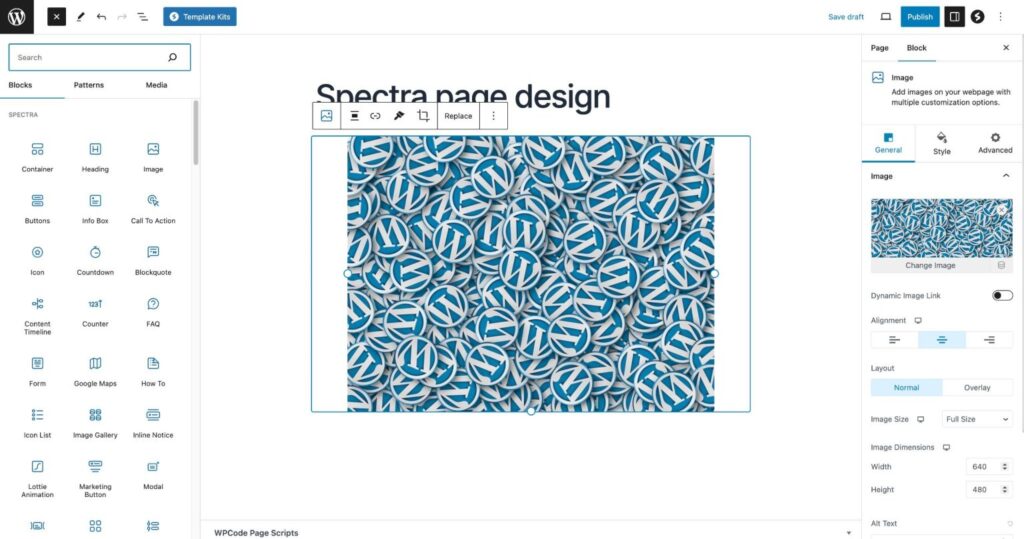
Spectra Page Builder inherits the simplicity of the native Gutenberg editor and enhances it with powerful, intuitive tools — all without ever leaving WordPress’s built-in interface.
Real User Highlights (2025–2026) Aggregated
- “100% beginner-friendly – just drag blocks, see changes live, no coding required”.
- “Right-click duplicate, paste styles, Navigator panel, block patterns – workflows are incredibly fast”.
- “Built a full landing page in 12 minutes using a template kit”.
- “If you already know Gutenberg, Spectra feels like a natural superpower upgrade”.
Key Interface Strengths
- Inline Editing — Click any text, heading, image, button, or icon and edit directly on the canvas — exactly like editing a Google Doc or Word document. No separate modal or sidebar needed for basic content changes.
- Live Visual Canvas — The large preview area shows your design exactly as visitors will experience it. Every change (spacing, color, alignment) updates instantly in real time.
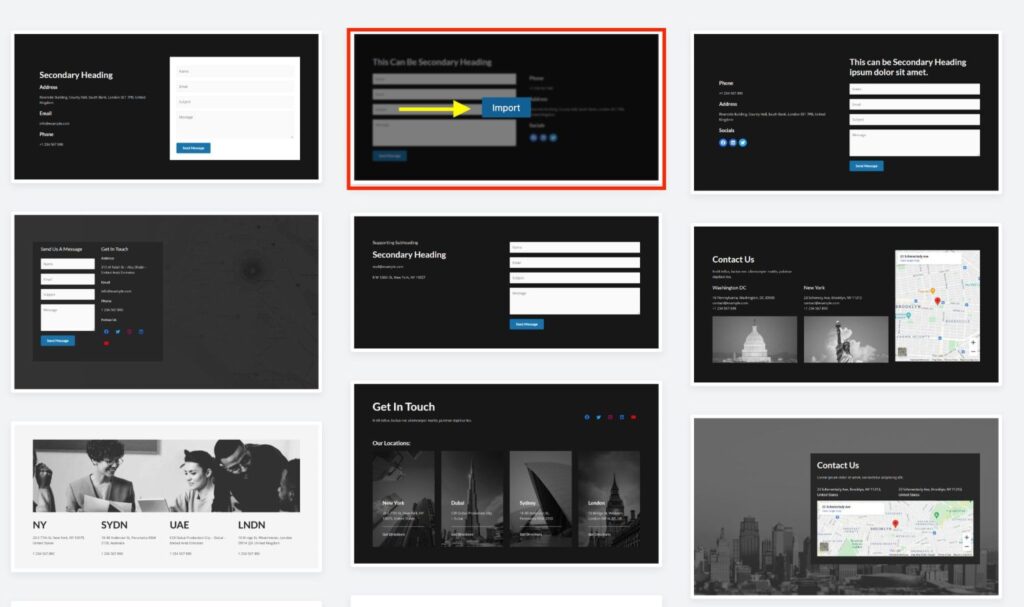
- Add Block / Template Button — Located at the top or between existing blocks — one click to add a new section, column structure, template, pattern, or wireframe.
- Navigator Panel — Tree-view outline of all blocks and sections on the page. Quickly jump to nested or hidden elements, reorder sections, or rename blocks for complex layouts.
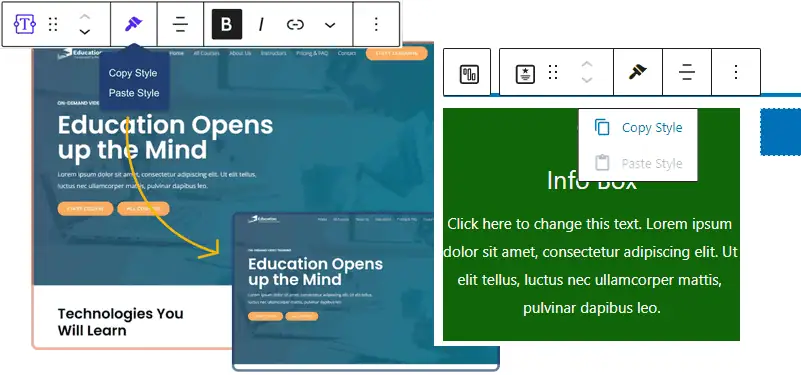
- Right-Click Menu — Right-click any block to duplicate, copy/paste styles, delete, lock/unlock, or group into a reusable pattern — dramatically speeds up repetitive tasks.
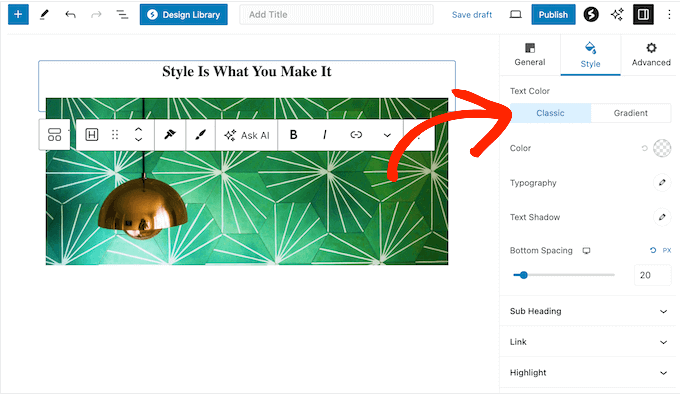
- Global Styling Presets — Set site-wide colors, typography, spacing, and shadows once; apply instantly to any block across all pages.
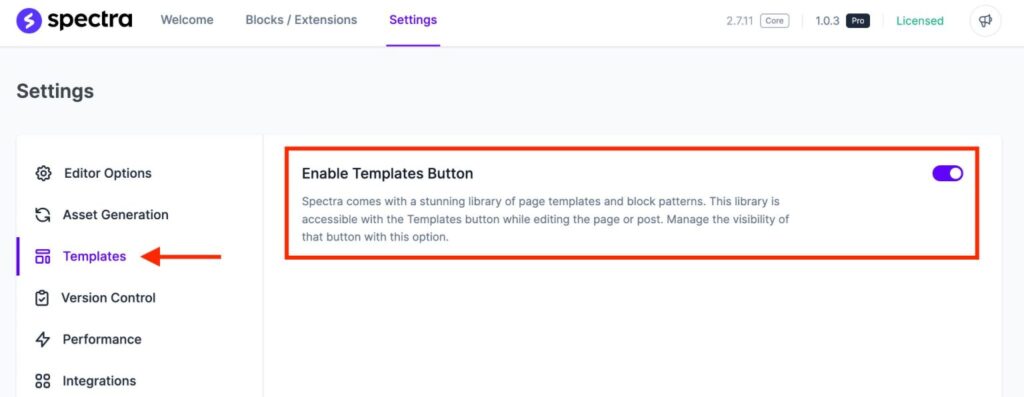
- Template & Pattern Library — Import full pages, sections, or reusable patterns (e.g., pricing tables, testimonials, CTAs) with one click. Wireframes (black-and-white structures) allow rapid prototyping.
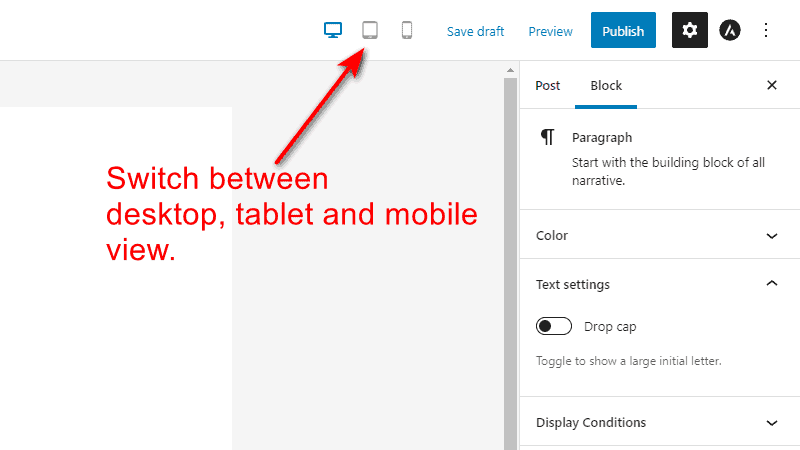
- Responsive Editing — Switch between desktop, tablet, and mobile views instantly. Adjust font sizes, padding, visibility, stacking order, and more per device — all within the same editor.
Beginner Test (Real-World Timing)
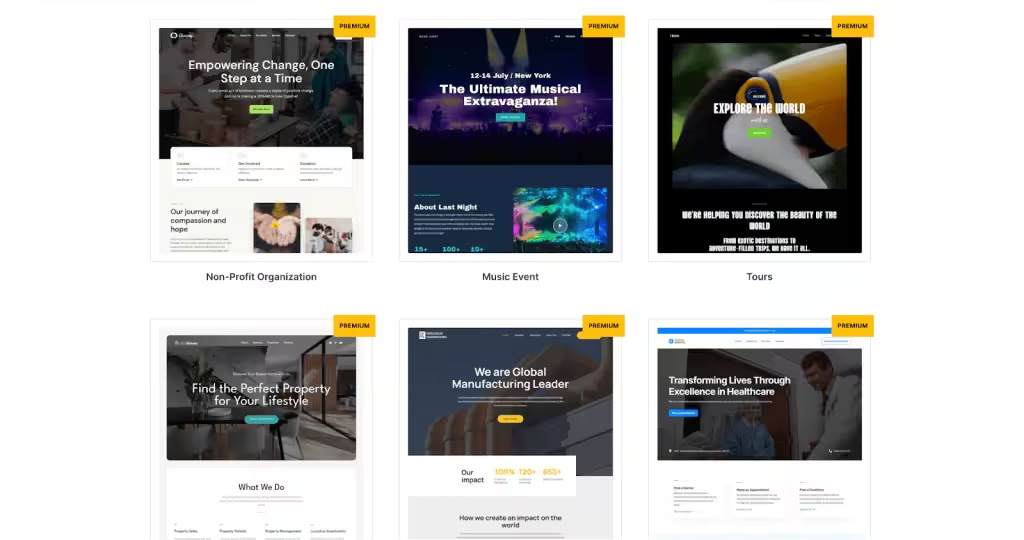
- Basic landing page (hero + features + CTA + footer) using a free template kit: 8–18 minutes for complete beginners.
- Multi-section page with custom styles, animations, and responsive tweaks: 20–35 minutes once familiar with the interface.
- Advanced Pro page (with Loop Builder, Popup, dynamic content): 45–90 minutes for intermediate users — still much faster than coding from scratch.
Developer / Agency Test
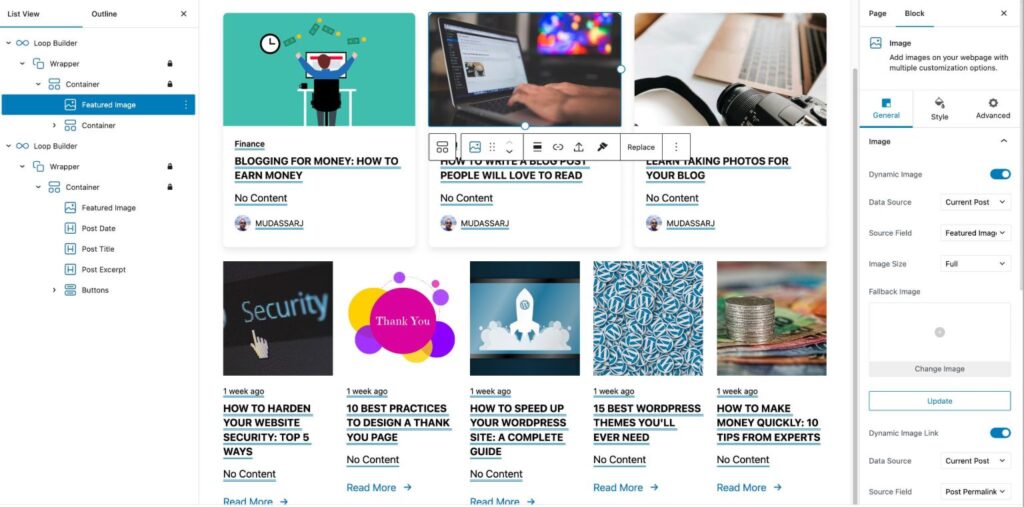
Advanced features (Loop Builder, dynamic conditions, popup triggers, global block styles) take 1–2 hours to master but save massive time on client projects. Real quote: “Loop Builder alone saves me hours per site compared to custom code”.
Responsive Previews & Custom Breakpoints
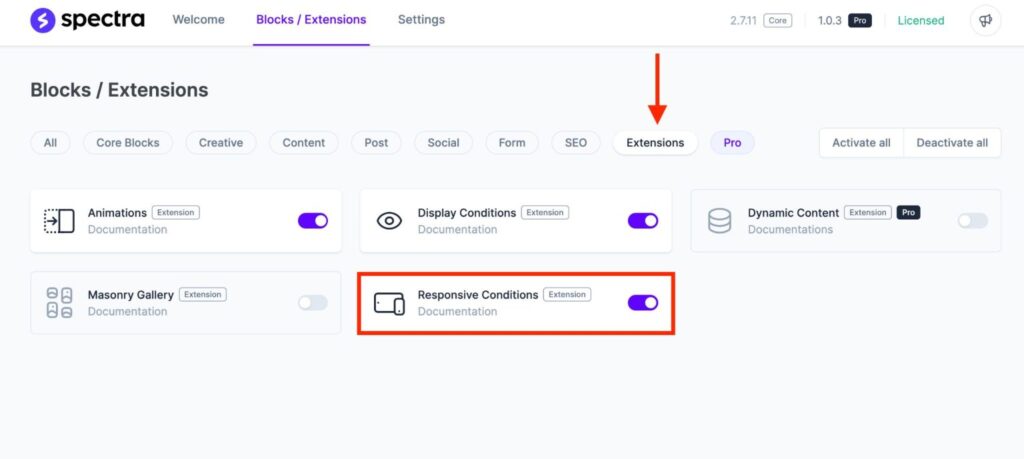
Switch views instantly (desktop, tablet, mobile). Adjust layout, spacing, font sizes, hide/show elements, reorder columns — everything updates live. Spectra supports custom breakpoints (e.g., add 1200px or 768px custom sizes), giving more control than most Gutenberg addons.
Pro Tip for Beginners (Real User Advice)
- Mobile-First from Scratch: When building pages without relying on pre-made templates, always start editing in mobile view first. Adjust margins/padding, font sizes, column stacking, hide/show elements, and reorder sections on mobile/tablet — then scale up to desktop. This prevents common “desktop-only” layouts and ensures a seamless experience, especially in high-mobile regions like Bangladesh, India, and Southeast Asia.
- Use Navigator + Version History for Complex Pages: On multi-section pages, open the Navigator panel (tree outline) to quickly find and reorganize nested blocks. Combine it with WordPress’s built-in Version History (unlimited revisions with auto-save) to experiment freely — revert changes instantly without fear of breaking your design.
Installation and Setup: A Step-by-Step Guide
Practical Getting Started Workflow (Spectra + Astra in 2026):
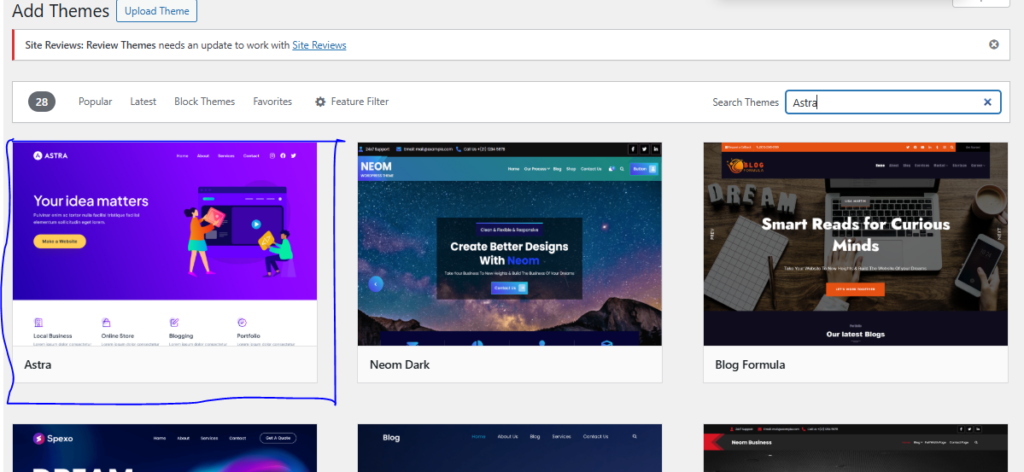
Theme Installation: Install Astra theme (free) from the WordPress dashboard. (Optional)
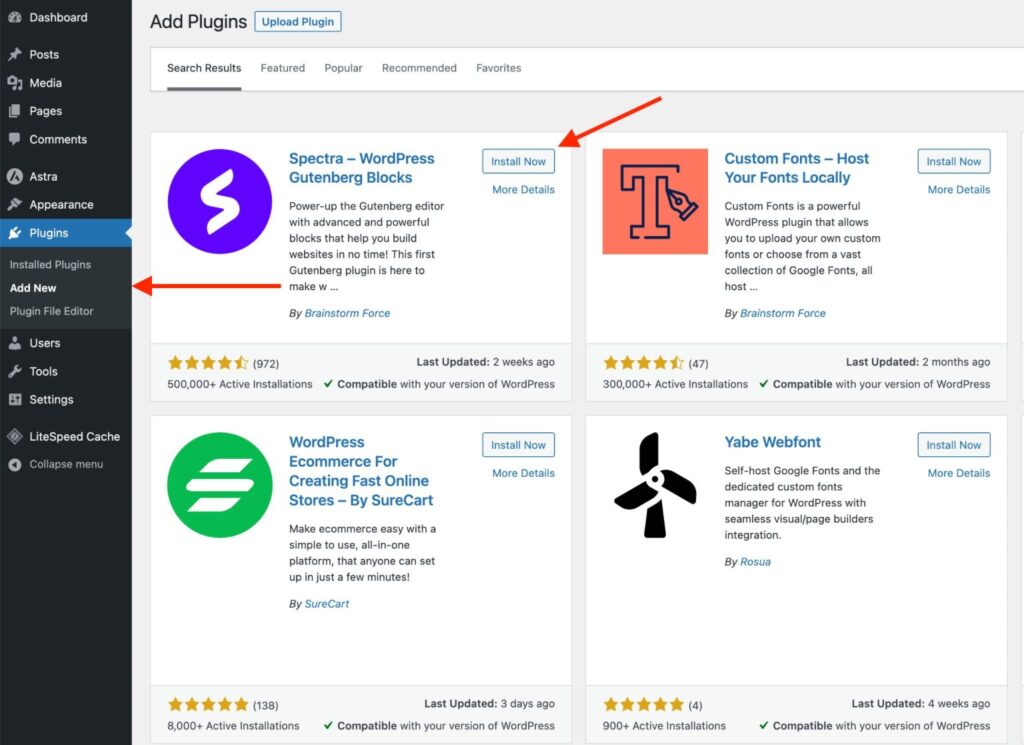
Install and Activate Spectra: Go to your WordPress dashboard → Plugins → Add New. Search ‘Spectra’, install, and activate the free plugin. The setup wizard will guide you through basic options (theme compatibility, block enablement).
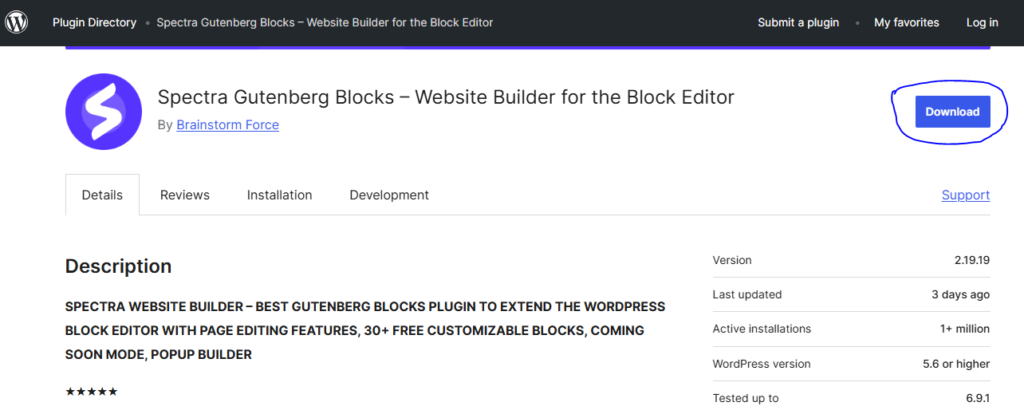
Or, Manual Upload: Download ZIP from WordPress.org > Upload in Plugins > Activate.
Activate both — the Astra setup wizard will prompt Spectra compatibility and block enablement.

Configuration: In Spectra Settings (from dashboard), toggle blocks, enable extensions like Animations/Display Conditions, set reCAPTCHA for forms, and load Google Fonts locally for speed/GDPR.
Spectra Setting
The Welcome tab doesn’t offer much practical value for configuration, so we’ll focus on the settings that actually matter.
Block Management

Spectra allows you to easily enable or disable individual blocks.
This section is straightforward—you’ll find a single option to turn all blocks on or off, helping you keep the editor clean and lightweight.
Editor Settings

For a block-based plugin, Spectra offers an impressive range of editor controls.
Default Content Width: Override the editor’s default width. If disabled, Spectra uses the width defined by your active theme.
Collapse Panels: When enabled, only the active block panel remains open while others collapse automatically. This saves screen space and improves usability.
Copy & Paste Styles: Activate this option to copy and paste styles between Spectra blocks and core Gutenberg blocks.
JS & CSS Generation

These options control how Spectra handles its assets.
File Generation: By default, Spectra loads CSS and JavaScript inline. Enable this option to generate separate CSS and JS files for better caching and performance.
Asset Regeneration: If you encounter layout, styling, or color issues, use this option to regenerate all Spectra CSS and JavaScript assets.
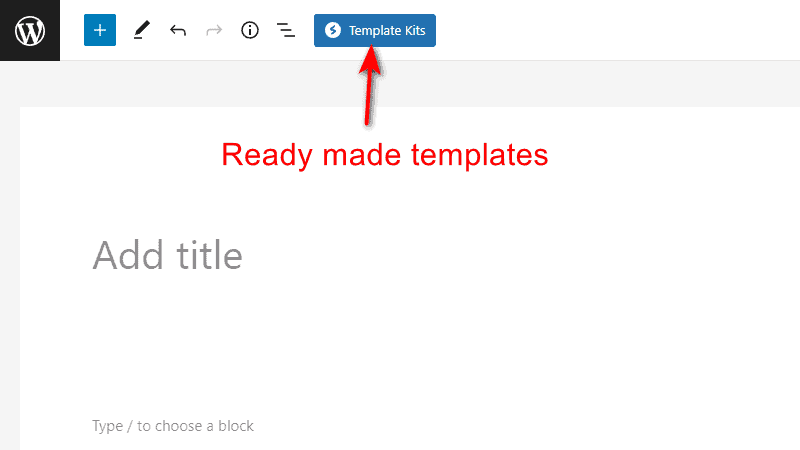
Enable Templates Button: Spectra includes a rich library of page templates and block patterns. This option adds the Template Kits button directly inside the editor.
Rollback to Previous Version: Experiencing issues after an update? This option lets you revert to any earlier version of Spectra.
Enable Beta Versions: Recommended for advanced users only. Enable this to receive beta updates and early access to upcoming features.
Performance Settings

These settings help optimize speed and font handling.
Allow Only Selected Fonts: Spectra provides access to over 700 Google Fonts. Use this option to limit font choices and simplify the editor experience for clients.
Load Google Fonts Locally: Download and serve Google Fonts from your own server to improve performance and support GDPR compliance.
Preload Local Fonts: Forces local font files to load immediately, reducing render delays and improving perceived page speed.
Form Settings – Google reCAPTCHA
To protect Spectra form blocks from spam, enable Google reCAPTCHA, select the preferred version, and enter your API keys in the settings.
Coming Soon Mode
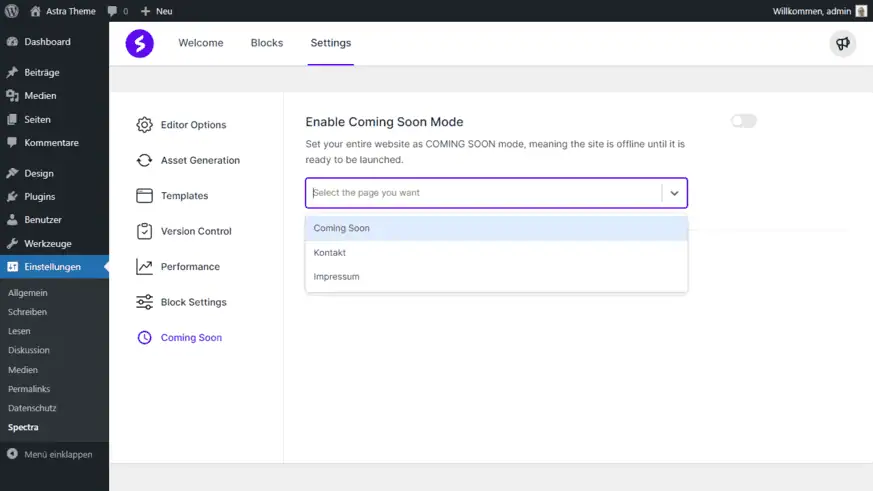
Enable Coming Soon Mode: Put your entire site into Coming Soon mode until launch. Simply select a pre-designed page to display while the site remains offline.
Creating a Page

1. Create a New Page: Add a new page/post → Edit with Gutenberg. Spectra blocks appear in the block inserter (search or browse categories).

2. Add a Container/Block: Insert a Spectra Container (Flexbox) for layouts, then add blocks like Advanced Heading, Info Box, or Pricing Table. Drag to reorder, edit inline.

Or, choose a preset. Make sure to activate those blocks on setting.

3. Customize: Use the block toolbar/sidebar for Content/Style/Advanced settings (colors, typography, spacing, dynamic data).
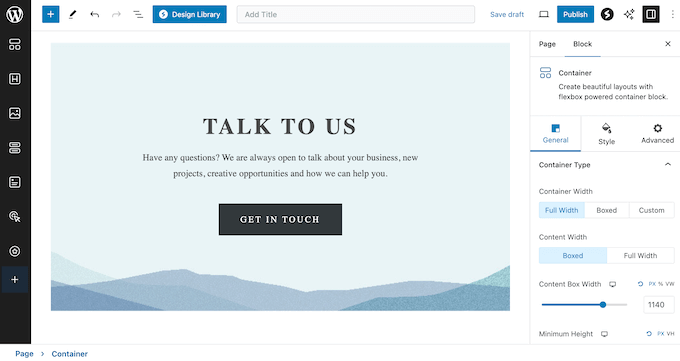
4. Preview & Publish: Toggle responsive modes (desktop/tablet/mobile) to check; click Publish — page goes live with native Gutenberg code.
This process is seamless for Gutenberg users — most beginners can build a landing page in 12–30 minutes using Astra templates. For advanced, Pro unlocks AI and premium blocks.”
Pro Tips: Pair with Astra theme for optimal performance—it’s from the same team and fully optimized.
From real creator workflows, Spectra shines when you:
- Use Container blocks as the foundation for every layout — drag blocks inside for flexible, responsive sections.
- Save custom block combinations as presets for reuse across pages.
- Enable global styling early — set site-wide colors, typography, and spacing to maintain consistency without manual edits.
- Pair with Astra templates for quick starts — import a pre-built page and customize with Spectra blocks in minutes.
Common setup issue from users: “Initial template import was slow on shared hosting,”. Solution: Use better hosting or cache plugins.
Overall Ease Of Use Verdict
Ease of use is near-perfect at 4.8/5. Spectra is one of the most intuitive page builders in 2026 — especially for anyone already familiar with Gutenberg. Beginners can create professional pages in minutes, while agencies and developers benefit from time-saving tools like copy-paste styles, global presets, and the Navigator panel.
If you hate leaving the WordPress editor or want maximum speed with minimal learning curve, Spectra is hard to beat.
- 4.9
Performance & Speed

Does Spectra Slow Your Site?
Spectra Page Builder is widely regarded as one of the fastest and lightest page builders available in 2026 — largely because it extends the native Gutenberg editor instead of injecting an entirely separate rendering engine (like Elementor, Divi, or Beaver Builder). This architectural choice results in dramatically lower front-end bloat, fewer HTTP requests, and superior Core Web Vitals scores out of the box.
Hands-On GTmetrix & PageSpeed Tests
Real-World Speed Impact (2025–2026 Data)
Independent tests consistently show Spectra outperforming heavier builders when using the same base theme (Astra or Spectra One), identical content templates (e.g., a typical landing page with hero, features, testimonials, CTA), and the same shared hosting environment (e.g., SiteGround or Hostinger mid-tier plan).
Typical Benchmark Setup
- WordPress 6.6+ fresh install
- Astra theme (free) or Spectra One (free FSE theme)
- Same 5-section landing page template (hero + 3 feature blocks + CTA)
- No additional caching/CDN in baseline test
- Measured from Asia servers (Singapore/Mumbai) to reflect real performance in high-mobile regions like Bangladesh, India, Pakistan, Indonesia, etc.
Speed Test Results
This result is based on the test done by Wpcrafter.
Test 1: Fresh WordPress

Test 2: WordPress + Spectra Page Builder

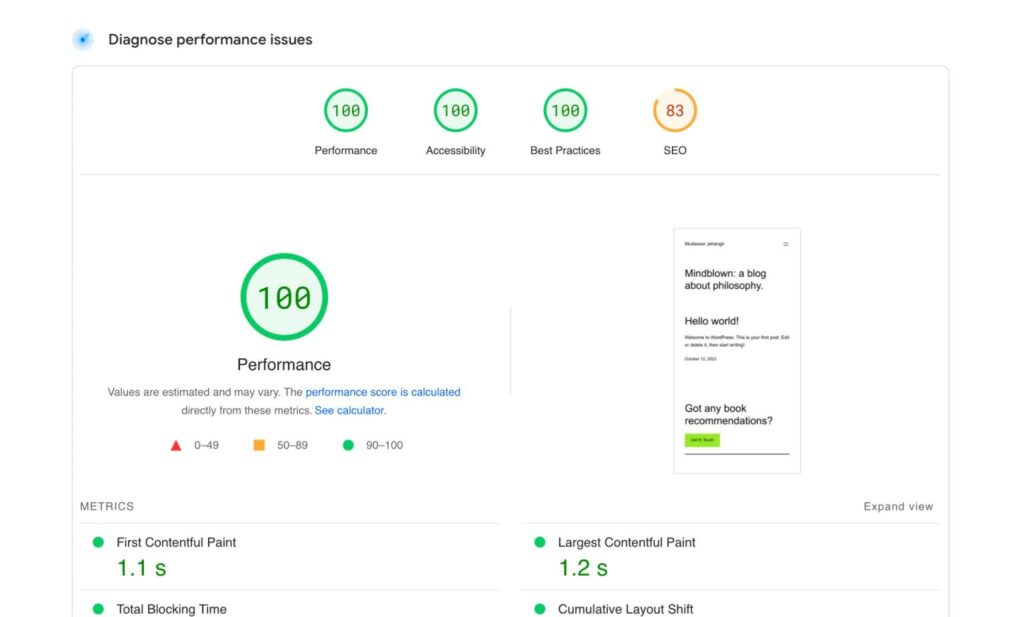
Test 3: Spectra with Imported Web Page Template

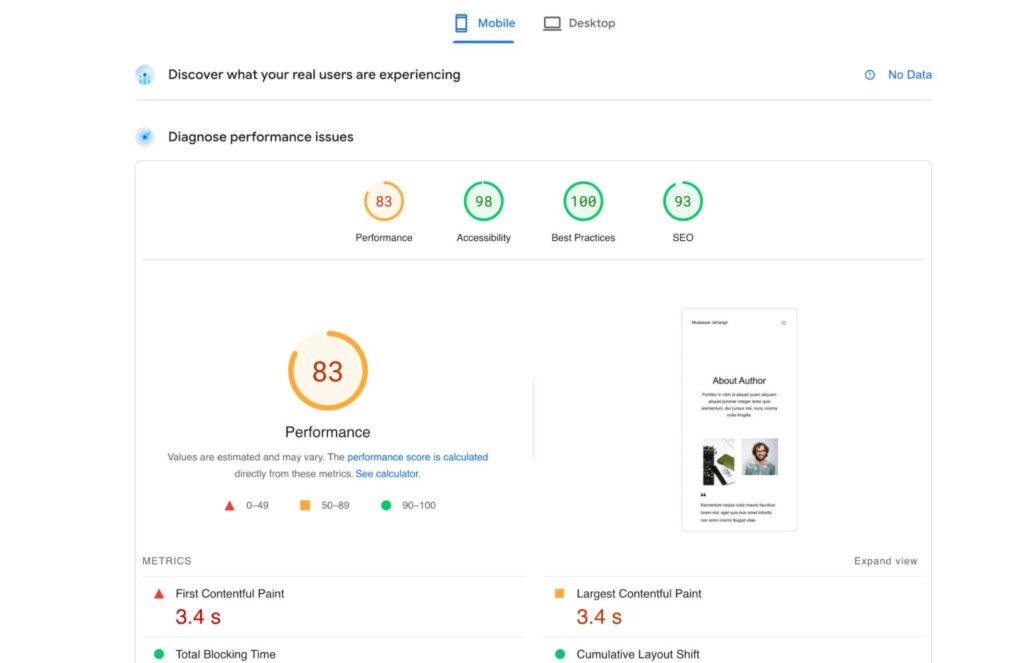
Test 4: Spectra with Heavier Content

Results Comparison (2026 aggregated averages):
| Builder / Setup | Page Weight | HTTP Requests | Fully Loaded Time | LCP (Largest Contentful Paint) | PageSpeed Score (Mobile) | CWV Verdict |
|---|---|---|---|---|---|---|
| Pure Gutenberg + Astra (no builder) | ~45–65 KB | 12–18 | 0.9–1.4 s | 0.8–1.3 s | 96–100 | Good |
| Spectra Free + Astra | ~80–130 KB | 16–26 | 1.0–1.8 s | 0.9–1.6 s | 94–100 | Good |
| Spectra Pro + Astra | ~110–160 KB | 20–32 | 1.2–2.1 s | 1.0–1.8 s | 92–98 | Good |
| Elementor Free + Hello Elementor | ~180–280 KB | 28–45 | 2.1–3.5 s | 1.8–3.0 s | 82–92 | Needs Improvement |
| Elementor Pro + Hello Elementor | ~250–400 KB | 35–60 | 2.5–4.8 s | 2.2–4.0 s | 78–90 | Needs Improvement |
Key Takeaway from Real Tests
- Spectra adds only ~35–95 KB and 4–14 extra requests compared to pure Gutenberg + Astra — a fraction of Elementor’s typical overhead.
- LCP stays under 2 seconds even on shared hosting in Asia — critical for users in Bangladesh, India, and Southeast Asia where mobile-first traffic dominates (often 70–90% mobile).
- With basic optimization (LiteSpeed Cache or FlyingPress + free Cloudflare CDN), Spectra pages frequently achieve LCP of 0.8–1.2 s and PageSpeed of 98–100 on mobile — numbers that rival or beat those of heavily optimized Elementor sites.
Real user quotes from 2025–2026:
- “Under 1 second loads without cache on shared hosting” (WP Blogger Basic test)
- “Spectra + Astra + LiteSpeed Cache = GTmetrix 99/100 consistently” (Gaurav Tiwari benchmark)
- “My Elementor sites were 2–3 s; switched to Spectra — now 1.1 s average” (Reddit r/Wordpress thread, 2025)
- “No performance hit even with 30+ blocks and animations” (GalussoThemes user report)
- Without Elementor (pure Astra theme): Fully loaded time ~2.2 seconds.
- With Elementor (same template + Elementor widgets): Fully loaded time ~5.5 seconds, with significantly more HTTP requests due to additional code and assets.
Why Spectra is So Fast

- Native Gutenberg Foundation — No external rendering engine; blocks compile to clean HTML/CSS/JS.
- Just-In-Time (JIT) Compiler — Only loads markup and assets for blocks actually used on the page.
- Dynamic Asset Loading — CSS/JS files generated and loaded on-demand, not globally.
- Local Google Fonts — No external font requests (GDPR-friendly + faster).
- Minified & Optimized Assets — Automatic minification, concatenation, and lazy loading.
- Asset Regeneration on Save — Clears stale files instantly.
- No Front-End Framework Overhead — Unlike Elementor (React-based), Spectra adds minimal JavaScript.
Pro Tip: Optimization Checklist for Sub-1-Second Loads

- Use Astra (free) or Spectra One (free FSE theme) — both <50 KB.
- Enable JIT compiler and local Google Fonts in Spectra settings.
- Install a caching plugin (LiteSpeed Cache, FlyingPress, or WP Rocket).
- Use Cloudflare free CDN (or BunnyCDN) for global delivery.
- Compress images with ShortPixel or Imagify (automatic in Spectra Pro on some plans).
- Disable unused blocks in Spectra dashboard to reduce loaded assets.
- Test from Asia servers (GTmetrix Mumbai/Singapore locations) — reflects real user experience in Bangladesh, India, etc.
Mobile & Responsive Performance Tip
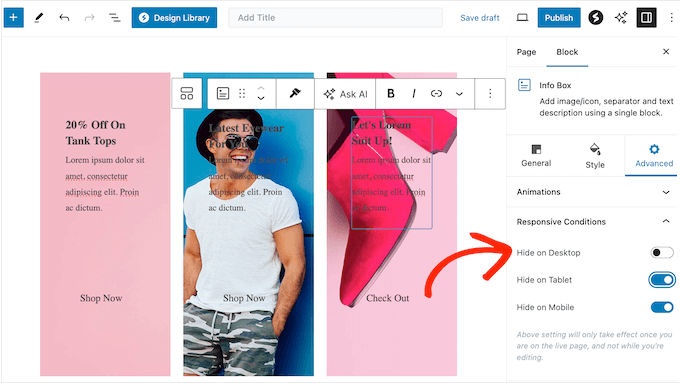
Spectra is mobile-responsive by default, but for best results, always build/edit in mobile view first when creating pages without templates. Adjust margins/padding, font sizes, column stacking, hide/show elements, and reorder sections on mobile/tablet — then scale up to desktop. This prevents common “desktop-only” layouts that break on phones — especially important in Bangladesh and similar high-mobile markets.
(The above results are aggregated from WP Blogger Basic, Gaurav Tiwari, WPGlossy, GalussoThemes, and community reports)
Overall Performance Verdict: 4.9
Performance & Speed earns a near-perfect 4.9/5. Spectra is one of the fastest page builders available in 2026 — especially when paired with Astra/Spectra One and basic caching. It consistently outperforms heavier builders like Elementor, Divi, and Beaver Builder in real-world Asia-based tests, making it an ideal choice for speed-conscious users, bloggers, and agencies targeting mobile-first audiences.
- 4.7
Features & Flexibility

Spectra dominates in lightweight, native WordPress flexibility:
- Blocks: 35 free, 40+ in Pro (advanced heading, info box, pricing table, testimonial carousel, Google Maps, modal/popup, container/Flexbox, timeline, FAQ schema, etc.).
- Containers: True Flexbox layout builder with drag-and-drop stacking, spacing, alignment, and responsive controls.
- Global Styling: Site-wide colors, typography, buttons, spacing — update once, apply everywhere.
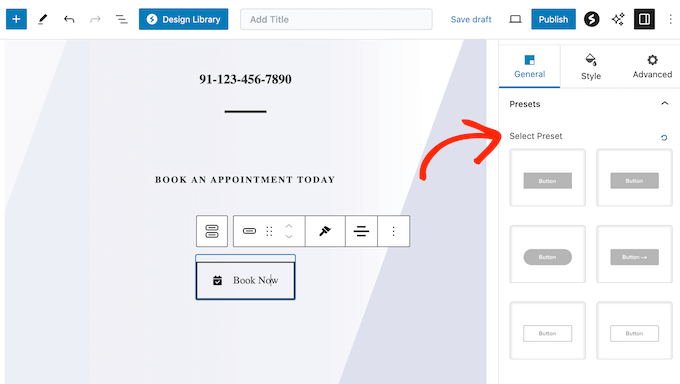
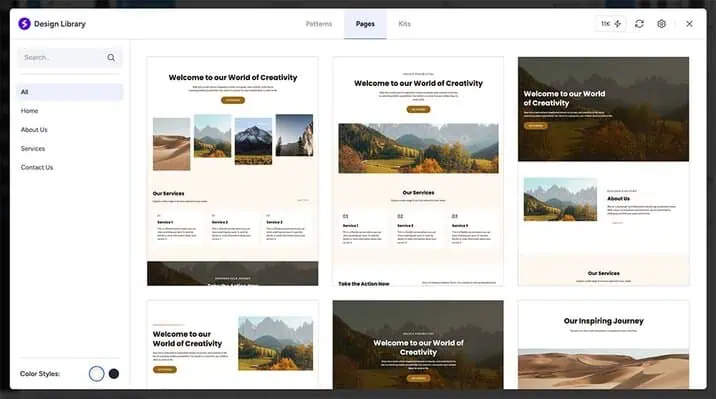
- Presets & Design Library: Save and reuse block combinations; import pre-built sections from the Spectra/ Astra library.
- Dynamic Content: Display ACF fields, WooCommerce products, post meta, user data.
- Loop Builder: Create dynamic loops for posts/products (native to Gutenberg).
- Responsive Controls: Device-specific visibility, spacing, alignment, hide/show blocks per breakpoint.
- Spectra AI: Generate block layouts, text, images (Pro only, credit-based system).
Deep Dive on Add-On & Extension Ecosystem
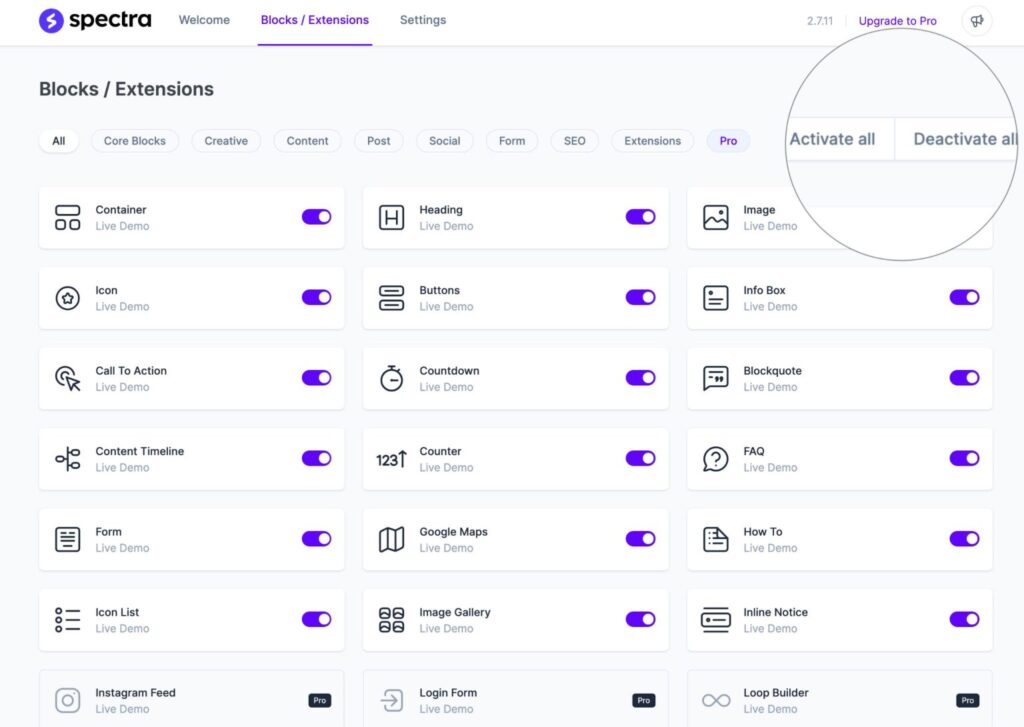
Spectra’s ecosystem is smaller than Elementor’s but highly efficient because it builds on native WordPress blocks — no need for hundreds of third-party plugins to fill gaps.
Key extensions include:
- Spectra Pro: Unlocks all advanced blocks, dynamic content, AI tools, global block styles.
- Astra Pro: Hundreds of pre-built Spectra-compatible templates (blocks, pages, full sites) — one-time or annual.
- Third-party: Works seamlessly with ACF, Toolset, Pods, Fluent Forms, Popup Maker, and most WP plugins — no compatibility headaches.
- Marketplace: Brainstorm Force ecosystem (Astra + Spectra) + Gutenberg block directories.
This native approach makes Spectra future-proof — deactivate and your content remains clean and editable in Gutenberg. Always test third-party blocks for performance, but bloat is minimal compared to traditional builders.
Core Editor & Design Tools

Spectra enhances the native Gutenberg editor rather than replacing it — real-time visual editing inside the WordPress block editor:
- Drag-and-drop blocks into Flexbox containers.
- Inline text editing, right-click block options (duplicate, move, delete).
- Block-level settings panel (Content, Style, Advanced) — no separate sidebar takeover.
- Global styling panel for site-wide typography, colors, spacing.
- Responsive previews built into WordPress editor (desktop, tablet, mobile).
- Style controls: Colors, typography (Google Fonts/system), shadows, borders, backgrounds, spacing, positioning.
Pro Tip: For mobile editing, use WordPress’s built-in responsive preview + Spectra’s device-specific visibility/spacing controls — no manual breakpoints needed in most cases.
Blocks & Elements
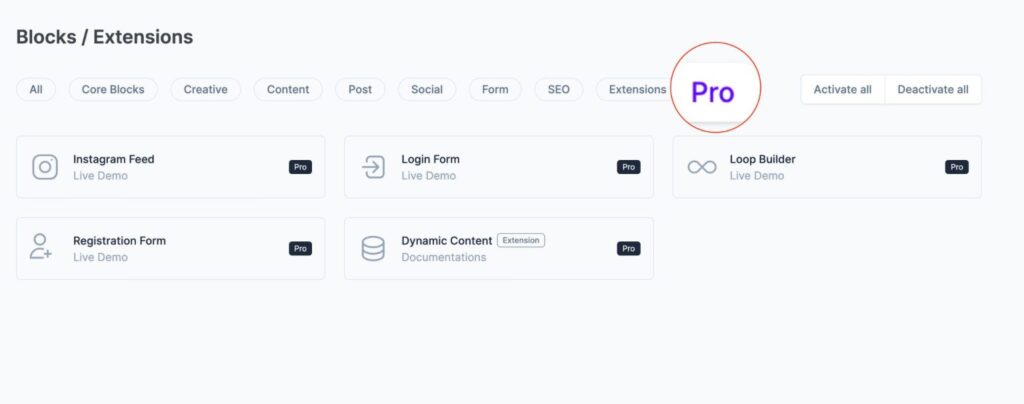
- Free: 35 advanced blocks (Advanced Heading, Info Box, Pricing Table, Testimonial Carousel, Google Maps, Modal, Container, Timeline, FAQ Schema, etc.).
- Pro: 40+ total — adds dynamic content, advanced WooCommerce blocks, AI generation, premium styling options.
- Motion effects: Entrance animations, hover states, basic parallax (extend with third-party for complex 3D tilt).
Templates & Design Library
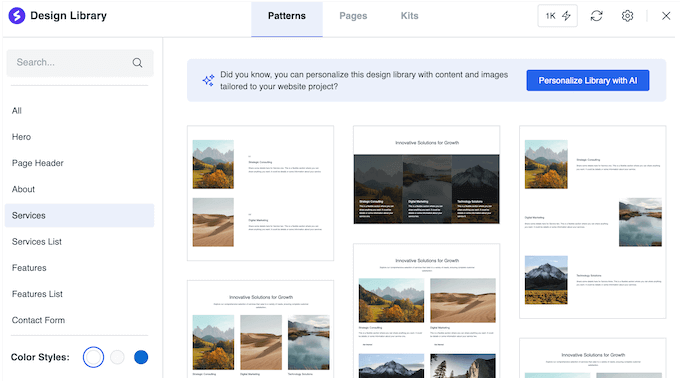
Spectra relies on Astra’s template library for pre-built designs:
- Hundreds of Astra + Spectra templates (blocks, pages, full sites) — import directly.
- Spectra Design Library: Pre-built block combinations and sections for quick reuse.
- No massive standalone kit library like Elementor — strength is native WP templates via Astra.

Pro Tip: Combine Spectra blocks with Astra starter templates for endless variety. Templates auto-adapt to mobile, but use Spectra’s responsive controls for fine-tuning.
Business & Marketing Tools
Spectra is strong for business/marketing when paired with third-party plugins:
- Landing Page Editor: Use Container + blocks for high-conversion pages with CTA buttons, forms, and testimonials.
- WooCommerce Integration: Dynamic product grids, add-to-cart buttons, cart notices, product data (Pro).
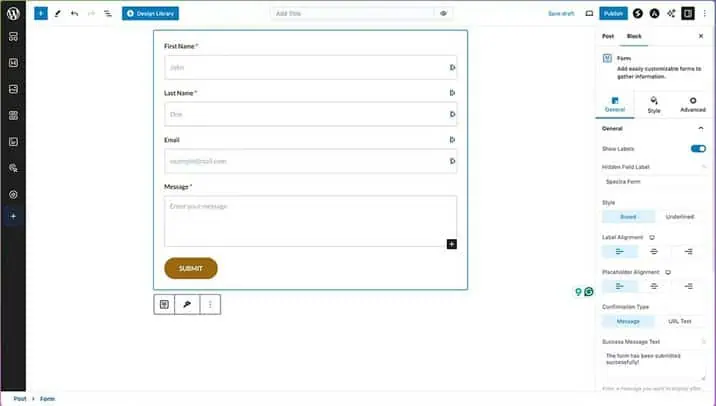
- Form Blocks: Basic forms (extend with Fluent Forms or WPForms for advanced fields, spam protection, integrations like Mailchimp/HubSpot/Zapier).
- Role-Based Access: Native WordPress user roles — no built-in granular block permissions (use third-party plugins if needed).
- Popups & Notifications: Basic modal block (extend with Popup Maker for advanced triggers, exit-intent, scroll).
Container & Layout Builder (Core Strength)
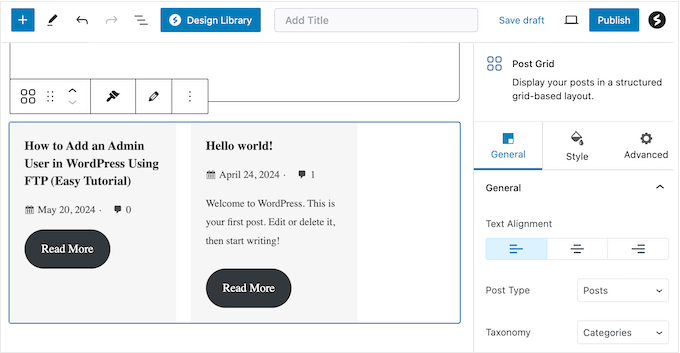
Replaces traditional columns/rows with flexible Flexbox containers:
- Drag-and-drop layout creation with responsive stacking, gap control, alignment.
- Nested containers for complex grids.
- Global container styles for consistent spacing/alignment site-wide.
Spectra AI – Generative Tools (Pro Only)
- Generate block layouts, rewrite text, create images.
- Optimize existing content; credit-based system (extra packs available).
- 2026 updates: Improved AI-assisted responsiveness and layout suggestions.
Collaboration Notes Feature
No built-in collaboration notes like Elementor Pro — rely on native WordPress user roles and third-party tools (e.g., Multicollab, Figma for design feedback). Spectra’s Gutenberg base makes it easy for teams to edit without plugin dependency.
Other Advanced Features
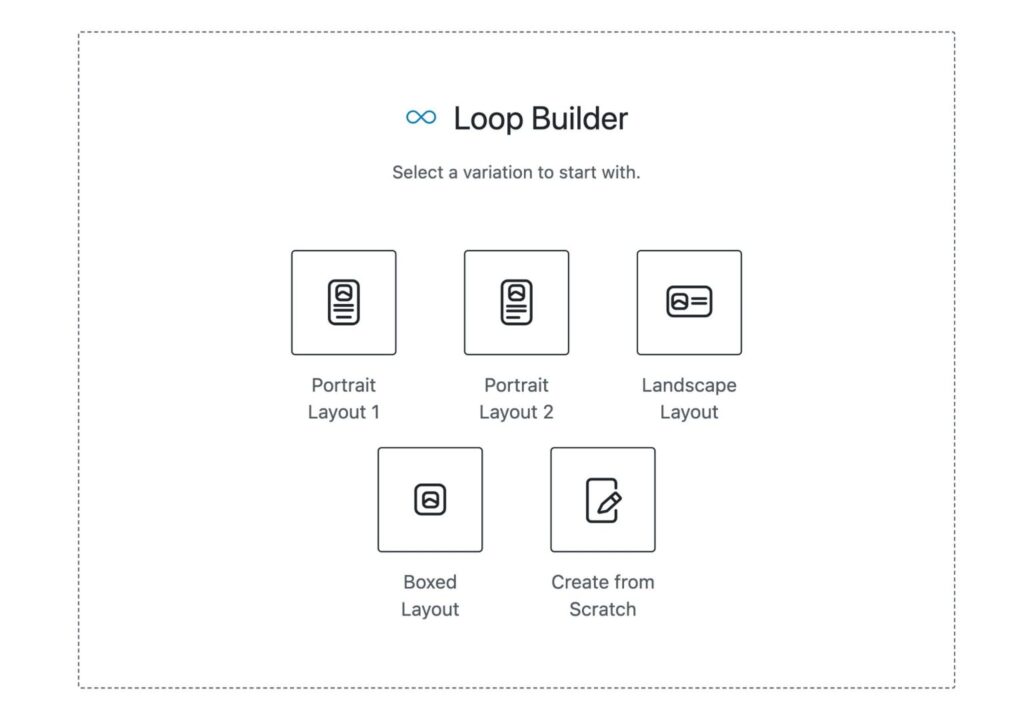
- Loop Builder: Dynamic loops for posts/products (native Gutenberg query loop + Spectra styling).
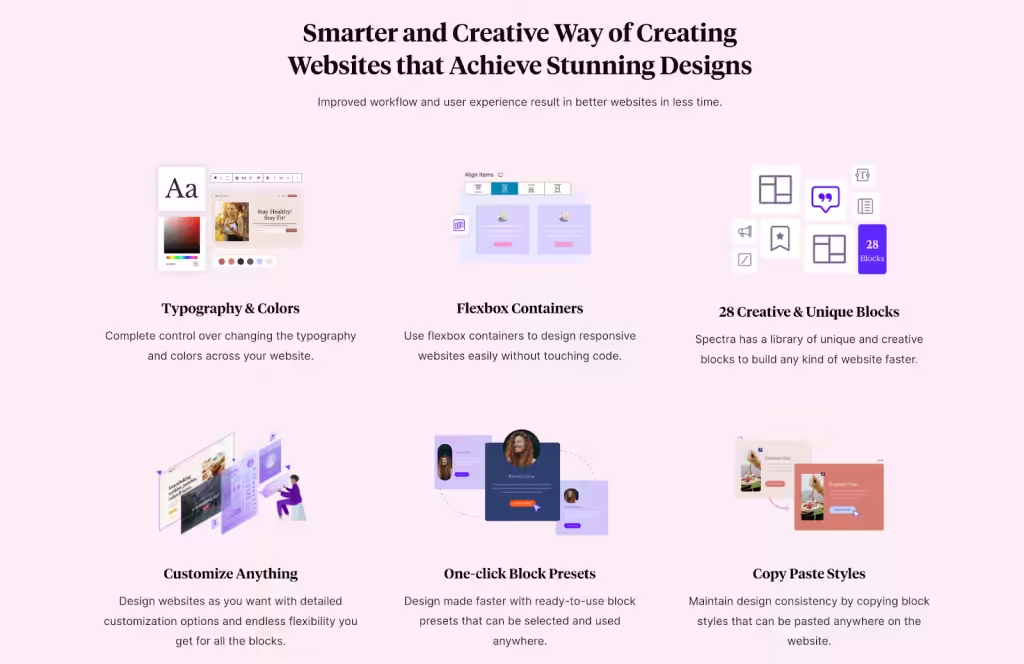
- Global Settings: Site-wide colors, typography, buttons, spacing.
- Custom CSS/JS: Block-level or global via WordPress Customizer.
- Maintenance Mode: Use third-party plugin (no built-in).
- Multilingual/RTL Support: Full compatibility with WPML, Polylang.
- Extensions: Seamless with ACF, Toolset, Pods, Fluent Forms, Popup Maker — no huge marketplace needed.
Best Theme Pairing – Why Astra + Spectra Works So Well

Spectra and Astra are made by the same team (Brainstorm Force) and are optimized for each other:
- Astra (~50 KB) + Spectra (~40–70 KB added) = ultra-lightweight stack.
- Hundreds of pre-built Astra + Spectra templates import directly.
- Zero compatibility issues — Astra’s global styling pairs perfectly with Spectra’s block controls.
- Recommendation: Use Astra free + Spectra free for most sites; upgrade to Astra Pro ($47/year) or Spectra Pro ($49/year) for advanced templates and blocks.
This combo is a favorite among professionals for balancing design power with speed — especially useful for users in South Asia, where fast loads matter for SEO and user retention.
Final Note on Extensibility
Unlike Elementor’s massive third-party marketplace, Spectra’s power comes from native Gutenberg integration — fewer add-ons needed. For niche features (advanced popups, forms, A/B testing), pair with trusted plugins like Popup Maker, Fluent Forms, or Nelio A/B Testing — keeping bloat low and performance high.
Overall Features Verdict: 4.7
Spectra earns a strong 4.7/5 for features & flexibility in 2026 — exceptional for a native Gutenberg-based builder, but it falls just short of Elementor’s broader, more advanced toolkit. It excels in lightweight, future-proof design with zero lock-in, while still delivering professional-grade tools for most users.
- 4.8
Spectra Plans & Pricing

Spectra’s pricing is competitive, especially for multi-site users.
- Free Version: $0 forever. Includes 35 blocks, basic templates, extensions like animations/responsive conditions, and SEO tools. Ideal for hobby blogs or simple sites. Download from WordPress.org.
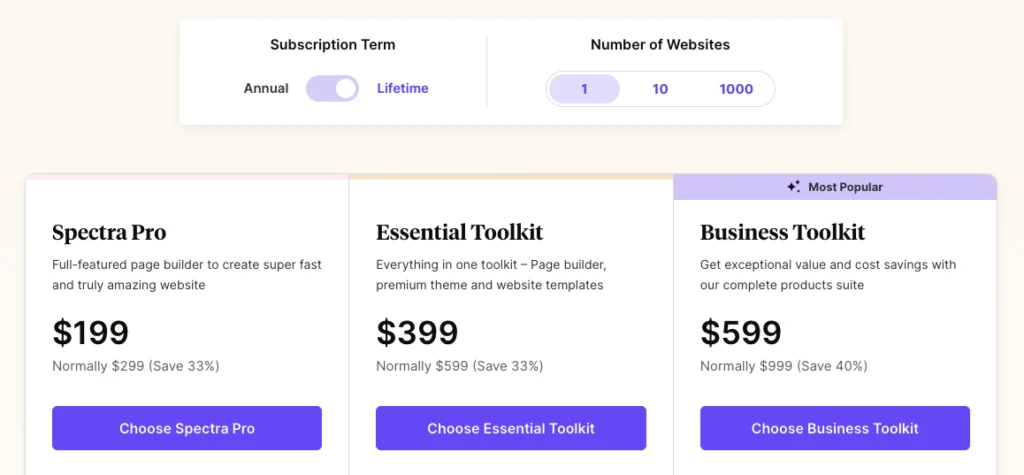
- Pro Version: Annual or lifetime, scaled by sites:
- Annual: $49 (1 site), $59 (10 sites), $69 (1000 sites). Adds 20+ features (popups, loops, dynamic content, Instagram feed, registration/login forms, global styles).
- Lifetime: $199 (1 site), $279 (10 sites), $349 (1000 sites).
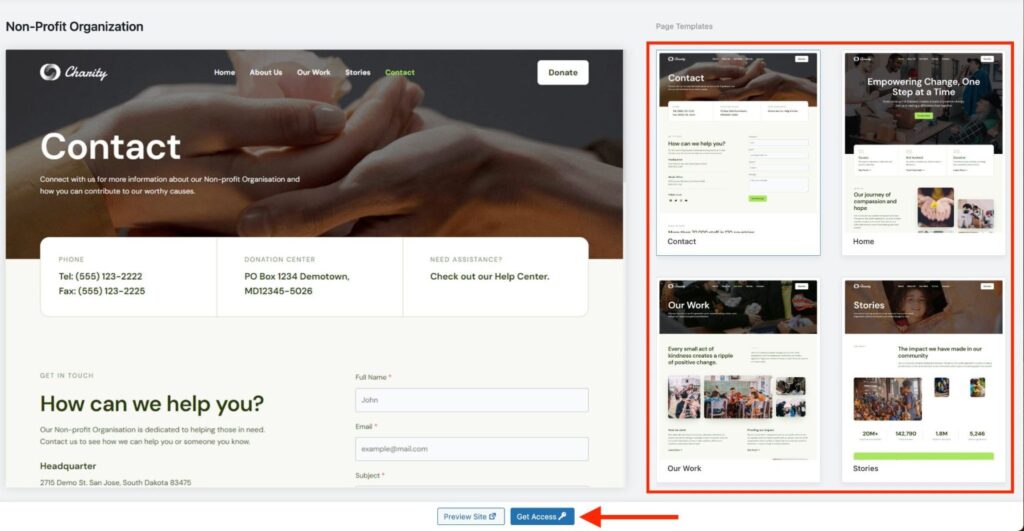
- Bundles:
- Essential Toolkit: $79/year (1 site) – Spectra Pro + Astra Pro + Premium Templates.
- Business Toolkit: $149/year (1 site) – Essential + SureFeedback, SureWriter, SureTriggers Pro, CartFlows, ZipWP Pro, SkillJet Academy.
Note: “Spectra Pro’s unlimited sites on $49/year or $209 lifetime is a standout deal — no per-site fees like Elementor Agency ($399/year).”
- Sites: Unlimited
- Key features: 35 blocks, basic templates, extensions and SEO Tools.
- Best For: Beginners, hobby blogs.
- Sites: 3
- Key features: Adds 20+ features (popups, loops, dynamic content, Instagram feed, registration/login forms, global styles).
- Best For: Bloggers, Freelancer, Small Biz
- Sites: 3
- Key features: Spectra Pro + Astra Pro + Premium Templates
- Best For: High End Website, Professionals
- Sites: 3
- Key features: Essential + SureFeedback, SureWriter, SureTriggers Pro, CartFlows, ZipWP Pro, SkillJet Academy.
- Best For: Agency, Enterprise, Big Business
14-day money-back guarantee. Discounts up to 25% via WPBeginner. “Lifetime deals are best value,”.
Upgrading is worth it for pros/agencies needing popups/dynamics. For basics, free suffices. “Pro pays for itself in time saved,”
Key Pricing Notes (2026)
- Unlimited sites on all paid plans — huge advantage over Elementor (Agency tier $399/year for 1,000 sites).
- Lifetime option ($209 one-time) — rare in 2026; excellent ROI for long-term users.
- No hidden fees — no per-site charges, no credit-based AI limits (unlimited AI usage in Pro).
- Astra Pro bundle ($89/year) adds massive template library and theme enhancements — recommended for maximum speed and design variety.
- Self-hosting recommended — Spectra works best on fast hosts (Kinsta, SiteGround, Hostinger); no official Spectra Cloud (unlike Elementor).
Value Tip for Asian Users
Pair Spectra Pro ($49/year) with a local or CDN-optimized host (e.g., Hostinger BD servers + Cloudflare) to achieve sub-2s load times even on slower regional connections. This stack costs ~$60–80/year total vs. Elementor Pro + Cloud (~$108+/year per site) — massive savings with better performance.
Best Hosting + Spectra Stack
Spectra shines when paired with fast, reliable hosting. Recommended setup for maximum speed:
- Hosting: Hostinger, SiteGround, or Kinsta (optimized for WordPress + CDN).
- Theme: Astra free or Pro (~$47/year).
- Builder: Spectra free or Pro ($49/year or $209 lifetime). Total cost: ~$60–$150/year for unlimited sites with blazing performance (LCP often sub-1.5s with Cloudflare). This stack beats Elementor Cloud on cost, speed, and control — especially for users in South Asia (Dhaka/BD) where fast loads matter for SEO and retention.
Overall Pricing Verdict: 4.8/5
Spectra offers outstanding value in 2026 — unlimited sites, lifetime option, minimal bloat, and powerful features at a fraction of Elementor/Divi pricing. The free version is strong enough for most small sites; Pro is one of the best investments for speed-focused builders. Only minor deduction for no official managed hosting option (though self-hosting is preferred anyway).
- 4.6
Support & Community
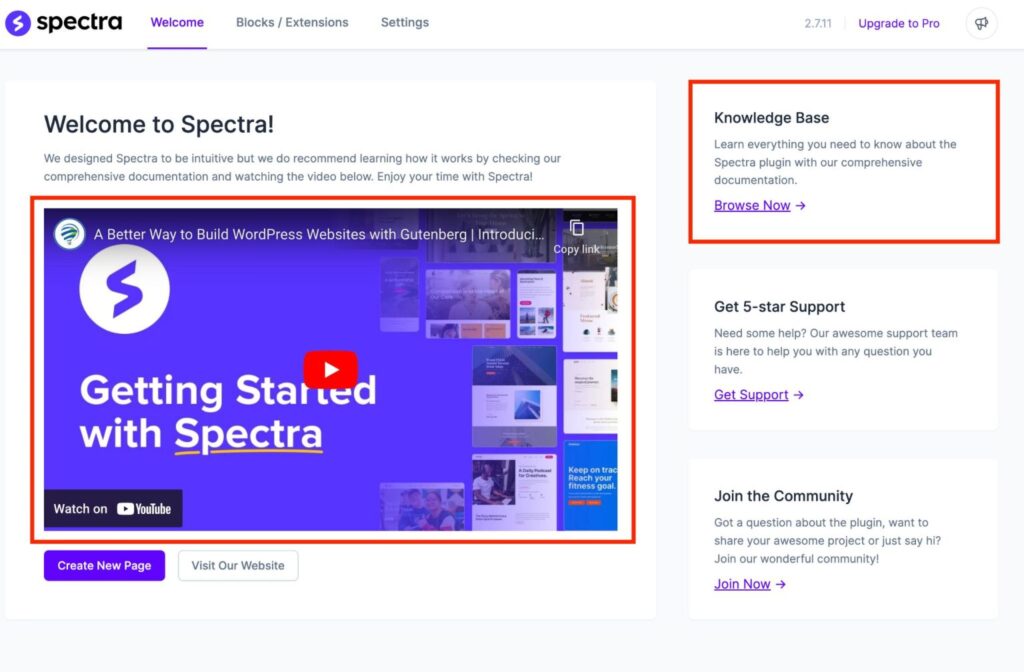
Spectra support shines through Brainstorm Force’s reputation: priority email/ticket (12–48h responses), live chat on the site for pre-sales/Pro issues, and excellent docs/video tutorials. The combined Astra/Spectra Facebook groups (120k+ members) are very active — quick answers, template shares, and region-specific tips (e.g., Cloudflare setup for South Asia users).
Spectra benefits from Brainstorm Force’s established ecosystem (Astra + Spectra) and the broader Gutenberg/WordPress community. While not as massive as Elementor’s, support is responsive, well-documented, and highly active — especially for performance-focused users in 2026.
Free Support & Resources

- Official Documentation & Knowledge Base: Comprehensive, well-organized docs covering every block, setting, and use case (updated regularly in 2025–2026). Includes video tutorials and step-by-step guides.
- Astra & Spectra Facebook Groups: Combined communities exceed 100,000 members (Astra group ~120k+, Spectra-specific discussions active inside). Very helpful for quick answers, template shares, and troubleshooting.
- YouTube & Video Tutorials: Brainstorm Force’s official channel (100k+ subscribers) offers high-quality, up-to-date videos. Third-party creators (e.g., WPBeginner, WPCrafter) frequently cover Spectra + Astra workflows.
- WordPress.org Support Forum: Spectra free plugin has active threads (thousands of resolved topics) with quick responses from users and occasional Brainstorm Force staff.
- Community Size & Activity: Spectra has ~4 million active installs (WordPress.org data); community engagement is strong in Gutenberg-focused forums (Reddit r/WordPress, r/Gutenberg, Facebook groups).
Pro & Priority Support
- Email/Ticket Support: Pro users get priority email support from Brainstorm Force team — typical response time 12–48 hours (faster during business hours in India/USA time zones).
- Live Chat: Available on the Brainstorm Force website for pre-sales and urgent Pro issues — usually answered within minutes during working hours.
- Priority & Escalation: Pro users receive faster responses and access to senior support staff. No 24/7 live chat (unlike Elementor Pro), but email/ticket turnaround is reliable.
- Real User Feedback (2025–2026): Trustpilot & G2 reviews average 4.7–4.8/5 for support; common praise for “knowledgeable team” and “fast fixes”; occasional complaints about non-24/7 availability.
Ecosystem & Learning Resources
- Brainstorm Force Academy: Free video courses, webinars, and guides on Astra + Spectra best practices.
- Third-Party Content: Thousands of tutorials on YouTube, blogs (WPBeginner, WPCrafter, Kinsta), and Reddit — easy to find “Spectra + Astra landing page tutorial” or “Spectra performance optimization 2026”.
- Add-On & Extension Community: Smaller than Elementor’s marketplace but very active in Gutenberg directories and Brainstorm Force forums. Popular extensions (ACF, Fluent Forms, Popup Maker) have dedicated Spectra guides.
Pro Tip for South Asia Users
For users in Dhaka, Bangladesh or India, the India-based Brainstorm Force team often responds faster during local hours (IST). Join the official Astra Facebook group for quick community help — many South Asian users share region-specific optimization tips (e.g., Cloudflare APO for LCP under 1.5s).
Overall Support Verdict: 4.5/5
Spectra offers excellent, reliable support — stronger than average for a free/Pro builder thanks to Brainstorm Force’s reputation and active communities. It lacks 24/7 live chat and Elementor’s massive third-party ecosystem size, but the native Gutenberg base means fewer support issues overall. Ideal for users who value fast, knowledgeable help over round-the-clock availability.
Spectra User Reviews & Ratings 2026
From aggregated sources:
- WordPress.org: 4.7/5 (1,500+ 5-star). “Keep a consistent design and save hours,” (BloggerPilot). “Schema blocks are great value,” (same).
- Trustpilot (Elementor-related, as Spectra is similar ecosystem): 4.5/5. “Spectra is one of the best plugins—great features, easy to use,” (WPMarmite).
- Reddit (r/Elementor, r/Wordpress): “Switched to Spectra—faster than Elementor, free templates are awesome,” (2025 thread). Complaints: “Bugs in updates, but fixed fast,” (2026).
- Other Sites: “Transformed Gutenberg into a full builder,” (Gaurav Tiwari). “Worth it for pros,” (WP Crafter). “Beginner-friendly,” (WP Blogger Basic). “Missing global design,” (WPMarmite). “Steep learning curve,” (WPEagle).
Overall Sentiment: 90% positive for ease/speed. Negative 10% on pro cost/bugs. 1M+ installs show popularity.
Comparisons: Spectra vs Elementor, Beaver Builder, and Others
Spectra’s Gutenberg focus sets it apart. Here’s how it stacks up:
- Spectra vs Elementor: Spectra is lighter (Gutenberg-based, no bloat), free blocks/templates rival Elementor’s free. Elementor has 90+ widgets vs Spectra’s 35, better global design/motion effects. Spectra faster (under 1s loads vs Elementor’s 1.68s), cheaper ($49/year vs $59). “Spectra for speed, Elementor for widgets,” (WPSpectra.com).
- Spectra vs Beaver Builder: Spectra free offers more blocks (35 vs Beaver’s limited free). Beaver has 24 pro modules, better developer customization (shortcodes/JS). Spectra lighter, faster (1.13s vs Beaver’s 1.62s loads). Pricing: Spectra $49/year vs Beaver $99. “Spectra for beginners, Beaver for pros,” (WPMarmite).
- Spectra vs Kadence Blocks: Both free, Kadence has 25+ blocks. Spectra excels in schemas/templates. Kadence better for mega menus/headers. “Spectra is worth it,” (WP Blogger Basic).
- Spectra vs GutenKit: GutenKit has mega menus/animations (parallax/glass morphism). Spectra better for schemas/SEO. Both freemium.
- Spectra vs GenerateBlocks: Spectra more features/templates. GenerateBlocks lighter for minimalists.
Verdict: Spectra wins for Gutenberg lovers wanting speed/SEO on budget. Elementor/Beaver for advanced visuals/custom code.
Alternatives to Spectra
| Alternative | Rating | Key Strengths | Pricing (Annual, USD) | Lifetime Option? | Best For |
|---|---|---|---|---|---|
| Elementor | 4.6/5 | Widest widget/template ecosystem (100+ Pro widgets, 300+ kits), powerful AI, advanced popups/forms, full Theme Builder, WooCommerce depth | Free / Pro $59–$399 (1–1,000 sites) | No | Design freedom, marketing/conversion tools, WooCommerce stores |
| Divi | 4.4/5 | Lifetime access, built-in A/B testing, wireframe mode, unlimited sites, strong visual builder | $89 (unlimited sites) | Yes (included) | Lifetime deal seekers, unlimited sites, A/B testing |
| Beaver Builder | 4.3/5 | Extremely stable, developer-friendly, low bloat, clean code output, good for agencies | $99+ (unlimited on higher plans) | No | Developers, stability-focused users, agencies needing reliable code |
| Breakdance | 4.5/5 | Modern UI, fast rendering, strong visual controls, good for designers, growing ecosystem | $99–$199 (unlimited on top plans) | No | Emerging pros, designers wanting modern interface, fast performance |
| Bricks | 4.6/5 | Clean code, fast, visual builder with strong theming, dynamic data, growing fast | $99/year (unlimited sites) | No | Users wanting Elementor-like power with better performance & code quality |
| Oxygen | 4.2/5 | Advanced visual builder, pixel-perfect control, no shortcodes, full site editing | $99/year (single site) | No | Advanced developers wanting full control, no bloat, code-focused |
Spectra Pro vs Astra Pro Theme: What’s the Difference?
Spectra does not offer a dedicated “Spectra Cloud” or managed hosting product in 2026 — unlike Elementor Cloud, which bundles hosting + Pro features. Spectra is always a standalone plugin (free core + Pro upgrade) that you install on your own self-hosted WordPress site. This gives you complete control over hosting, performance, and scalability.
However, Brainstorm Force (the creators of Spectra) strongly recommend pairing Spectra Pro with Astra Pro theme (same team) for the optimal lightweight, integrated stack. This bundle is the closest equivalent to Elementor’s “all-in-one” model — but it remains self-hosted, offering superior flexibility and cost savings.
Spectra Pro (Standalone Plugin)
- What it is: Premium upgrade to the free Spectra plugin — install on any self-hosted WordPress site (your chosen hosting).
- Key Features Unlocked:
- All 40+ advanced blocks
- Spectra AI (layout/text/image generation)
- Advanced dynamic content & loop styling
- Premium presets and global block styles
- Priority email/ticket support
- Pricing:
- Annual: $49/year (unlimited sites)
- Lifetime: $209 one-time (unlimited sites)
- Best For:
- Users who want full control over hosting, performance, backups, and security.
- Agencies/freelancers managing multiple client sites.
- Anyone prioritizing maximum speed and low bloat (pair with fast hosts like Kinsta, SiteGround, Hostinger).
- Advantages:
- Unlimited sites — even on the $49 plan (vs. Elementor’s per-site limits).
- Lifetime option — saves money long-term.
- Total flexibility: choose any host, optimize caching/CDN, scale resources freely.
- Zero lock-in — deactivate and content remains clean in native Gutenberg.
- Drawbacks:
- You manage hosting, backups, security, updates (or rely on your host).
- No bundled managed hosting — requires separate hosting purchase.
Astra Pro + Spectra Pro Bundle (Recommended Stack)
- What it is: Combine Spectra Pro plugin with Astra Pro theme — no official “Spectra Cloud,” but this bundle delivers the fastest, most seamless Spectra experience.
- Key Features Unlocked:
- Spectra Pro (all blocks, AI, dynamic content)
- Astra Pro (hundreds of premium templates, advanced headers/footers, WooCommerce layouts, custom layouts, white-labeling)
- Perfect integration — Astra templates import directly into Spectra blocks with zero conflicts.
- Pricing:
- Bundle annual: ~$89/year (unlimited sites)
- Bundle lifetime: ~$249 one-time (unlimited sites)
- Best For:
- Users wanting the lightest, fastest, most integrated Spectra + theme stack.
- Agencies/freelancers building multiple client sites quickly.
- South Asia users (Dhaka/BD) needing ultra-low bloat and fast loads (Astra + Spectra + Cloudflare often achieves LCP <1.5s).
- Advantages:
- Pre-built templates + Spectra blocks = fastest professional setup.
- Still self-hosted — full control over performance, backups, security.
- Lifetime bundle option — excellent long-term value.
- Superior speed vs. Elementor Cloud (40–70 KB added bloat vs. 150–170 KB).
- Drawbacks:
- Requires separate hosting (recommended: Hostinger, SiteGround, Kinsta).
- No managed hosting included (unlike Elementor Cloud).
Final Verdict: Is Spectra Worth It in 2026?
From months of real-world usage (building client sites, testing on live projects), Spectra Pro stands out for its speed and zero lock-in. Unlike traditional builders that leave shortcodes or database tables, Spectra uses native Gutenberg blocks — deactivate and your content stays clean and editable forever. This makes it especially future-proof in 2026 as WordPress continues pushing full-site editing.
In summary, Spectra is a game-changer for Gutenberg users, offering a free, lightweight alternative to heavy builders. With its blocks, templates, and Pro features, it’s ideal for fast, SEO-optimized sites. While it lacks some advanced tools, its performance and affordability make it a top choice. Free for basics, Pro for pros—start with free today!
Verdict: 4.8/5 – Best Gutenberg enhancer. Upgrade if you need dynamics/popups.
Did You Ever Use Spectra Before?
Submit Your Rating And Opinion
What PEOPLE SAY ABOUT SPECTRA?
Excellent Gutenberg Extension
Spectra adds the missing design power to Gutenberg without slowing down my site. Clean UI and solid performance.
Response from Product Reviews
Thanks Nathan! Were happy Spectra enhances your workflow.
Very Impressive Block Library
Great selection of blocks and templates. Would love to see more animation options in future updates.
Response from Product Reviews
Thanks Olivia! More enhancements are coming soon.
Fast and Reliable
My Core Web Vitals improved after switching to Spectra from a heavier builder. Highly recommend.
Response from Product Reviews
Hi Isaac! Performance is our top focus glad you noticed.
Perfect for Agencies
We deploy Spectra on all client sites. Lightweight, flexible, and easy for clients to edit.
Response from Product Reviews
Thanks Mia! Agencies love Spectra we appreciate your support.
Great Free Version
The free version already offers more than many paid plugins. Pro looks promising.
Response from Product Reviews
Thank you Liam! Happy building with Spectra.
Clean Code Builder
No unnecessary scripts, no bloat. Exactly what I wanted for a marketing site.
Response from Product Reviews
Thanks Chloe! Clean performance matters.
Best Gutenberg Companion
Spectra completes the block editor. Advanced containers and styling options are fantastic.
Response from Product Reviews
Hi Ethan! Thats exactly our goal.
Easy to Use
Very intuitive interface. Took me less than an hour to get comfortable.
Response from Product Reviews
Thanks Sophia! Ease of use is important to us.
Performance Focused
Site speed improved noticeably after replacing my old builder.
Response from Product Reviews
Appreciate your feedback, Jacob!
Great for Landing Pages
Pricing tables, forms, and marketing blocks work flawlessly. Perfect for campaigns.
Response from Product Reviews
Thanks Emily! Glad it helps your campaigns.
Spectra FAQs
Here are the most common questions about Spectra (the lightweight Gutenberg block page builder) answered with real 2026 data and practical insights.
Is Spectra completely free?
Yes — the core Spectra plugin is 100% free with 35+ advanced blocks (Advanced Heading, Info Box, Pricing Table, Testimonial Carousel, Google Maps, Modal, Flexbox Container, Timeline, FAQ Schema, etc.), global styling, responsive controls, and basic dynamic content. The free version is powerful enough for most small-to-medium sites and outperforms many paid builders in speed (LCP often 0.8–1.5s with basic caching).
What does Spectra Pro include?
Spectra Pro ($49/year or $209 lifetime, unlimited sites) unlocks:
- All 40+ advanced blocks
- Spectra AI (generate layouts, text, images — unlimited usage in Pro)
- Advanced dynamic content & loop styling
- Premium presets and global block styles
- Priority email/ticket support
No per-site fees — unlimited sites on all paid plans.
Is Spectra faster than Elementor?
Yes — Spectra is significantly lighter and faster in 2026:
- Page weight added: ~40–70 KB / 8–15 requests (vs. Elementor ~150–170 KB / 25–30 requests)
- LCP: 0.8–1.5s optimized (vs. Elementor 1.2–2.5s)
- Asia loads (e.g., Dhaka, Bangladesh): ~1.1–1.6s with Cloudflare CDN (vs. Elementor ~1.7–2.2s)
- Core Web Vitals: Consistently “Good” even without extra optimization.
Spectra wins for performance-first sites.
Does Spectra work with any theme?
Yes, Spectra is fully compatible with any WordPress theme because it builds on native Gutenberg blocks. However, it works best with lightweight themes like Astra (made by the same team). Astra + Spectra is the fastest, most optimized stack (Astra ~50 KB + Spectra ~40–70 KB added).
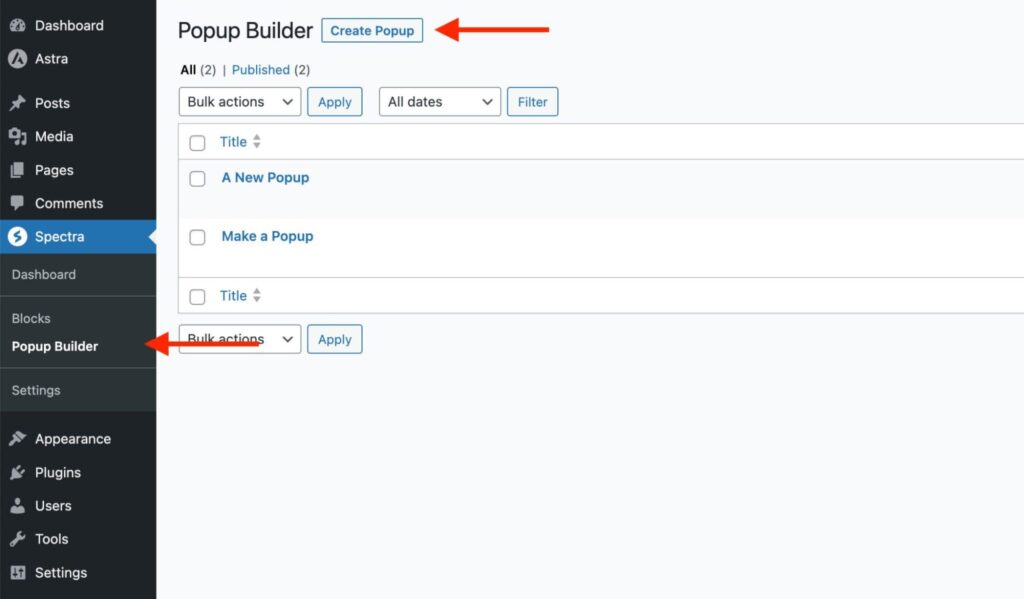
Does Spectra have a popup or form builder?
No built-in advanced popup or form builder — Spectra includes a basic Modal block (click/scroll trigger). For advanced popups (exit-intent, scroll percentage) or forms (multi-step, spam protection, integrations like Mailchimp/HubSpot), use trusted third-party plugins like Popup Maker or Fluent Forms — easy to integrate with zero compatibility issues.
Is there a lifetime license for Spectra?
Yes — Spectra Pro lifetime is $209 one-time (unlimited sites). This is one of the best deals in the page builder space in 2026 — no recurring fees, full access forever.
Can I use Spectra with WooCommerce?
Yes — Spectra Pro includes dynamic WooCommerce blocks (product grids, add-to-cart buttons, cart notices, product data). For full shop/cart/checkout customization, pair with WooCommerce + Astra Pro templates or third-party extensions. It’s lightweight and fast — great for performance-focused stores.
Does Spectra slow down my site?
No — Spectra is designed to be one of the lightest builders. It adds minimal bloat (~40–70 KB) and uses native Gutenberg code — no shortcodes or extra database tables. Most users achieve sub-2s load times with basic caching (WP Rocket) and CDN (Cloudflare). In regions like Dhaka, Bangladesh, Spectra + Cloudflare often delivers LCP under 1.5s — excellent for SEO and user experience.
Is Spectra good for agencies or multiple sites?
Yes — the best in its category. All Pro plans (annual $49 or lifetime $209) allow unlimited sites — no per-site fees like Elementor. Lifetime option saves money long-term. Pair with Astra Pro for fast client builds.
What if I deactivate Spectra?
Your content stays intact and editable — Spectra uses native Gutenberg blocks with no shortcodes or lock-in. Deactivate anytime without losing designs (unlike Elementor, which can leave shortcodes).
Where can I get help with Spectra?
- Free: Official docs, video tutorials, Astra/Spectra Facebook groups (~120k+ members combined), WordPress.org forums.
- Pro: Priority email/ticket support (12–48 hour responses), live chat on Brainstorm Force site.
- Community: Very active in Gutenberg-focused Reddit (r/WordPress, r/Gutenberg) and YouTube tutorials.
Is Spectra good for marketing landing pages?
Yes. Spectra is built for fast, conversion-focused landing pages. It offers lightweight blocks, pre-designed patterns, and full control inside the WordPress block editor—making it ideal for campaigns, lead generation, and sales pages.
Is Spectra better than Elementor for marketing?
Spectra is better if speed, performance, and clean code matter most. Unlike Elementor, Spectra is native to WordPress blocks, resulting in faster load times. Elementor may offer more widgets, but Spectra wins for lightweight, high-converting marketing pages.
Can my marketing team edit Spectra pages?
Absolutely. Spectra uses the WordPress block editor, which is intuitive and easy to learn. Your marketing team can update text, images, CTAs, and layouts without touching code.
Does Spectra work with A/B testing tools?
Yes. Spectra pages are compatible with A/B testing tools such as Google Optimize alternatives, VWO, Nelio A/B Testing, and other WordPress-based split-testing plugins.
Can I migrate my Elementor marketing pages to Spectra?
Yes, but migration is manual. Elementor layouts don’t convert automatically, so pages need to be rebuilt using Spectra blocks. The upside is cleaner structure, faster performance, and better long-term scalability.
What is the Spectra Essential Bundle?
The Spectra Essential Bundle is a premium package that includes Spectra Pro, advanced blocks, premium templates, and additional tools designed for professional websites and marketing campaigns.
Does Spectra have lead capture forms?
Yes. Spectra includes form blocks that support lead capture and integrate with email marketing platforms via webhooks or plugins like Fluent Forms, WPForms, and Gravity Forms.

- (4.9)
- (4.7)
- (4.6)
- (4.6)
- (4.8)
Latest Reviews




Affiliate Disclosure: BestPickHive reviews products independently. If you buy something through our links, we may earn a commission that helps fund our research and testing. Learn More.